



The Income Tax Department launched the new website of Income Tax on June 7th, 2021. The website has had various technical problems since its launch. One of these is the problem related to ITR. Let’s know it in detail here.
Various Errors Related to ITR
People were excited about the new Income Tax website, but after the launch, they are facing various problems with it. The long list of problems also includes problems related to ITR filing, due to which people are getting frustrated. It is obvious that ITR filing is one of the main functions of the Income Tax website, along with other functions. But right now, the website is not able to perform its main function properly.
Submit Query for Error Free Return Filing Software
Common ITR Issues Faced by Taxpayers in FY 2024-25
- Error 1: The income tax portal has been issuing an error for the past few days, making it impossible to download the AIS and TIS Data. According to the given challenges in the ITR filing, it would be mindful to think about extending the additional deadline by 2 to 3 weeks. The lack of these important records significantly complicates the tax filing process. Here is the error below –
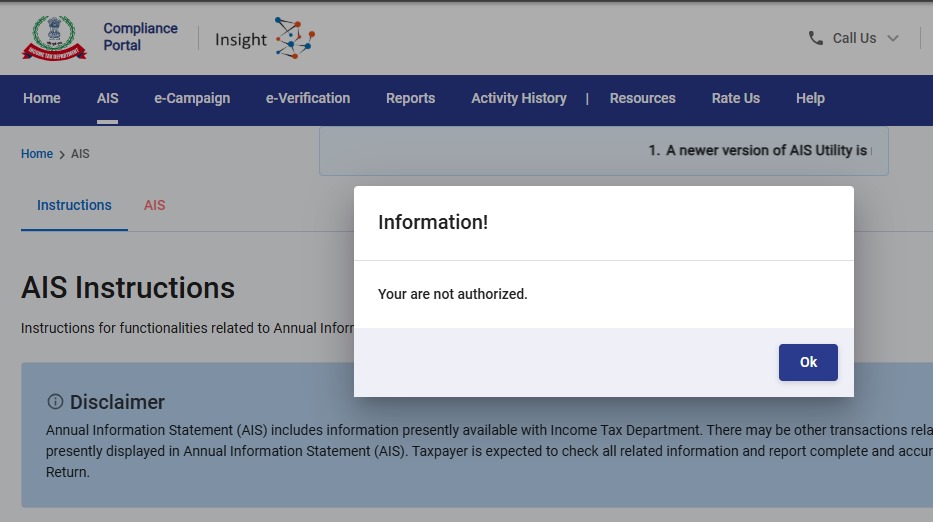
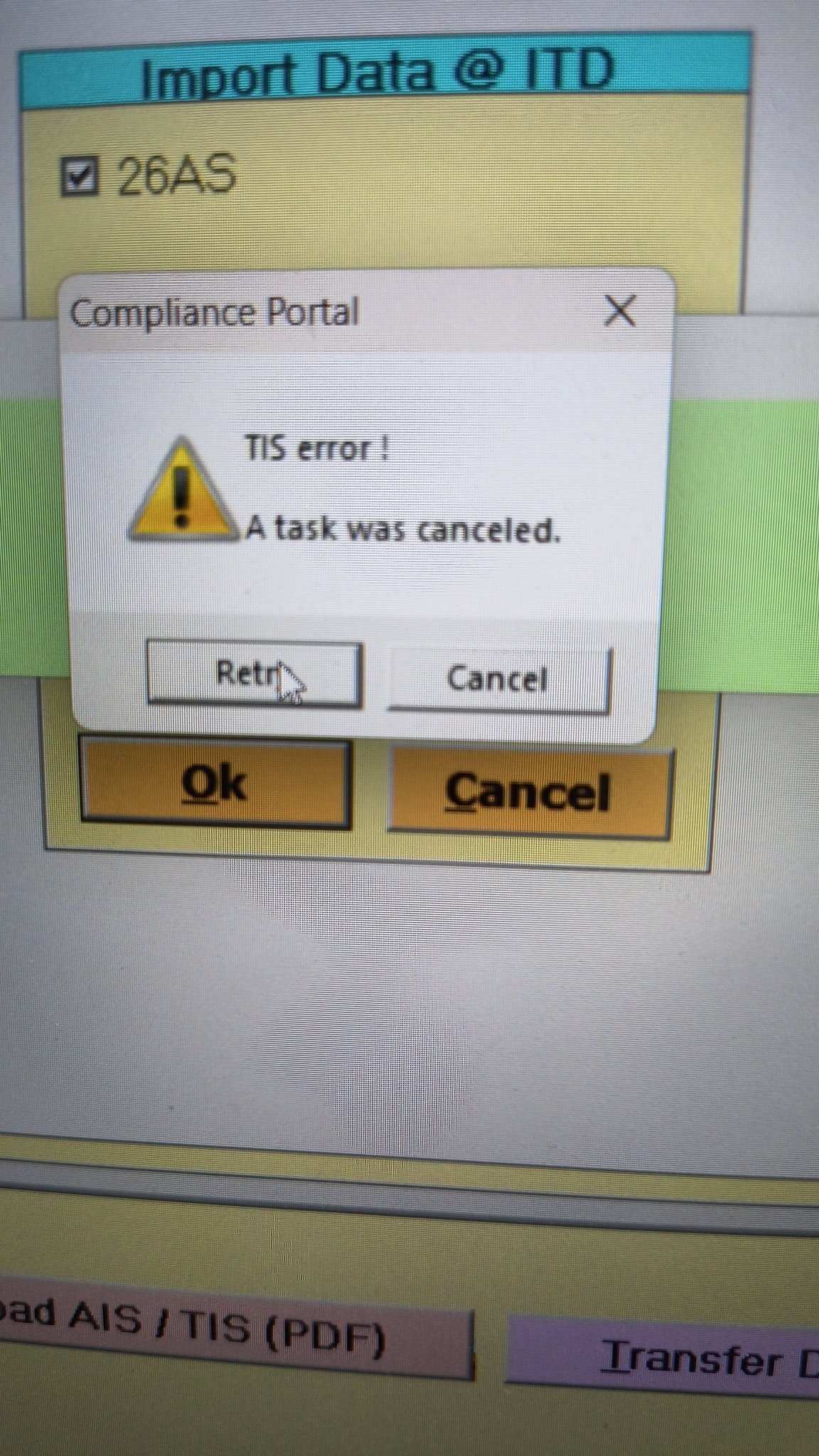
- Error 2: While submitting the return in ITR-2, the Assessee is facing the following validation error. This error is not coming while filing ITR-3:
- In Schedule CG, the value of b1eii should be: (a) the difference of B1eiA and B1eiB, if eiA > eiB, else 0, if the date of acquisition is before 23 July 2024 and the transfer is on or after 23rd July 2024; (b) 0 in any other case.
- Error 3: While submitting the return in ITR-2, the Assessee is facing the following validation error. This error is not coming while filing ITR-3: In schedule CG, the dropdown at sl. no. B10a, &; Whether the date of limitation /withdrawal was before 23rd July 2024 & is not selected.
- Error 4: While submitting the return in ITR-2, the Assessee is facing the following validation error:
- In Schedule Part-BTI, Sl. No. 15 Aggregate Income of Schedule B-TI is not equal to Sl. No. 12 – 13 + 14
Genius Software Makes Income Tax Filing Easy and Secure
Since Assessment Year 2001-02, Genius tax software has been the number one tax return filing software among Indian tax professionals. Clients can file unlimited returns with this software, including income tax, TDS, AIR/SFT, and other tax forms. Gen BAL (Balance Sheet), Gen IT (Income Tax), Gen CMA, Gen FM, TDS (Tax Deducted at Source) and AIR/SFT make up the six modules of the Genius program. Among the best taxation software in India, Genius provides multiple features such as Backup, Restore, and Password Settings.





While filing ITR 1, the following error shows up
” The date should be before 01/04/2024 for AY- 2024-2025″
[#/ITR/ITR4/ScheduleBP/FinanclPartclrOfBusiness/OtherAssets: expected type: Number, found: String];#;Please contact the developer of your utility with the error key
I was also getting same error, you need to go to dashboard and do the resume filing.
Verification when done from draft is working.
Saame here. How to resolve it
I am also facing the same problem
How did you resolve the date error?
“The date should be before 01/04/2024 for AY-2024-2025”
[#/ITR/ITR1/Refund: required key [BankAccountDtls] not found];#;Please contact the developer of your utility with the error key
I also have the same problem. Could you find the solution? Kindly share the information.
Bro same issue here, how did you resolved this?
I was also getting same error, you need to go to dashboard and do the resume filing.
Verification when done from draft is working.
While filing ITR 5 offline the following error message is coming
[3/ITR/ITR5/PartA_Gen1FilingStatus/ItrFilingDueDate:/202Jul-31 is not a valid unu,m dfate]
Please contact the developer of the Utility
While filing ITR 5 offline the following error message is coming
[3/ITR/ITR5/PartA_Gen1FilingStatus/ItrFilingDueDate:/202Jul-31 is not a valid unu,m dfate]
Please contact the developer of the Utility
[#/ITR/ITR2/TaxReturnPreparer: required key [IdentificationNoOfTRP] not found, #/ITR/ITR2/TaxReturnPreparer: required key [NameOfTRP] not found];#;Please contact the developer of your utility with the error key
THIS ERROR CAN BE RESOLVE AFTER GOING TO DASHBOARD AND SELECT RESUME FILLING OPTION AND THEN VERIFY THE SAME
This is still not working, even after navigating from dashboard
#/ITR/ITR3/TaxReturnPreparer: required key [IdentificationNoOfTRP] not found, #/ITR/ITR3/TaxReturnPreparer: required key [NameOfTRP] not found];#;Please contact the developer of your utility with the error ke
when already TRP option is selected NO
Filled and validated via system and encountered the same issue. However, it worked for me by switching the devices from laptop to mob. Should work for others as well
This case could be applicable for all ITR not found cases.
In Schedule Salary, at Sl. No. 3 “exempt allowance” no drop down can be selected more than once error.
I am getting the same error
I am getting the same error, How did you guys fix the issue.
same error, what to do?
I get the same error. Nothing is selected more than once. How to move forward?
have you fixed this error?
Delete the 0 value field by using delete tab in exempt column & problem resolved
Not working even after that
In exempt allowances, delete those ones which are blank
YES IT IS WORKING
Yes same error arising…what should i do
even i facing the same error
How you rectify that error
In exempt allowances, delete those ones which are not applicable, even if the value is 0
Thanks for the input. This solved the problem
My ITR1 validation successfully done, no error found.
But when I am proceeding for ITR verification, getting below error :
#ITR/ITR1/Refund : Key required [BankAccountDtls] not found];, Please contact the developer of your utility with error key .
Can anyone please advice – what can be done to resolve this issue.
How was this error fixed?
Delete the 0 value field by using delete tab in exempt column & problem resolved
From which step , we have to this step?
Not working still
Go to the home page dashboard and select resume filing and submit for verification it will work
Please fill bank account detail.
Did you find a way to resolve this issue ? I am getting the same error
[#/ITR/ITR3/TradingAccount/OtherIncDtls/0: required key [NatureOfIncome] not found];#;Please contact the developer of your utility with the error key
how to rectify the error
I am facing this error while uploading ITR 2 from offline Utility for AY 2024-25- “Http failure response for https://eportal.incometax.gov.in/iec/itrweb/auth/ v0.1/returns/submit/wzrd/xml: 0 Unknown Error”
same error is coming when I tried to verify and submit through desktop utility. And error-“Something went wrong, please try again” is coming when tried submit direct online. Please help
have you resolve it ?..
How did you solve the issue ?
I am facing the same problem when filing ITR 2 under old regime. ITR 2 under new regime going through without any issue.
Iam also unable to resume filing of ITR-2 under old regime as all details are saved.
same error when filing ITR2 under new tax regime, how to resolve it?
Getting same error. This is so irritating. No solution and help from IT.
Issue resolved. One needs to do some changes in the DNS setting under Wifi Settings. Pls follow the steps shown the link below – https://youtu.be/nZG5klHVkNw?si=n2Qux2sno9chGCDw
44ADA case. getting this error while uploading return
Same error. How did you solve it?
[#/ITR/ITR4/IncomeDeductions/UsrDeductUndChapVIA: required key [Section80DD] not found, #/ITR/ITR4/IncomeDeductions/UsrDeductUndChapVIA: required key [Section80U] not found, #/ITR/ITR4/IncomeDeductions/DeductUndChapVIA: required key [Section80DD] not found, #/ITR/ITR4/IncomeDeductions/DeductUndChapVIA: required key [Section80U] not found];#;Please contact the developer of your utility with the error key
Did you find a way to resolve this issue ? I am getting the same error
SAME
SAME
how to solve this error
[#/ITR/ITR1/ITR1_IncomeDeductions/UsrDeductUndChapVIA: required key [Section80DD] not found, #/ITR/ITR1/ITR1_IncomeDeductions/UsrDeductUndChapVIA: required key [Section80U] not found, #/ITR/ITR1/ITR1_IncomeDeductions/DeductUndChapVIA: required key [Section80DD] not found, #/ITR/ITR1/ITR1_IncomeDeductions/DeductUndChapVIA: required key [Section80U] not found];#;Please contact the developer of your utility with the error key
Hey, did you figure out how to solve it?
I was also getting same error, you need to go to dashboard and do the resume filing.
Verification when done from draft is working.
Thanks for sharing this solution. It worked.
Thank you it worked
Yes, It working bro thank you
I got the same error when filing from Linux, via Firefox.
Switched to Chrome on Windows and it just worked.
is this solved please help……..
[#/ITR/ITR1/ITR1_IncomeDeductions/UsrDeductUndChapVIA: required key [Section80DD] not found, #/ITR/ITR1/ITR1_IncomeDeductions/UsrDeductUndChapVIA: required key [Section80U] not found, #/ITR/ITR1/ITR1_IncomeDeductions/DeductUndChapVIA: required key [Section80DD] not found, #/ITR/ITR1/ITR1_IncomeDeductions/DeductUndChapVIA: required key [Section80U] not found];#;Please contact the developer of your utility with the error key
Did you find any solution to this?, I am also getting same error.
I am getting the same error, please tell me how to resolve it.
Getting the following error, PAB details entered etc is correct [#/ITR/ITR2/ScheduleTDS3/TDS3onOthThanSalDtls/0: required key [PANOfBuyerTenant] not found];#;Please contact the developer of your utility with the error key
Please enter PAN no of tenant in house property head.
In which section this PAN of tenant needs to be entered ?
I being super senior citizen tried to pay tax on line through authorised bank kotak Mahindra
Bank six attempts failed.it was not
Going through ITD Bank has sent
OTP to my mobile and tried to pay
It didn’t work A
#/ITR/ITR2/TaxReturnPreparer: required key [IdentificationNoOfTRP] not found, #/ITR/ITR2/TaxReturnPreparer: required key [NameOfTRP] not found];#;Please contact the developer of your utility with the error key. How to resolve it
Please let me know if you found any solution
Did you got solution on this?
[#/ITR/ITR2/ScheduleTR1/ScheduleTR/0: required key [TaxIdentificationNo] not found];#;Please contact the developer of your utility with the error key
did you get solution of this error?
In Schedule Salary, at Sl. No. 3 “exempt allowance” no drop down can be selected more than once error
Please delete all the pre-filled exemptions which you are not claiming (value = 0). This should work.
where to delete these fields?
Where to find this ? How did you fix it
This worked Tq.
Sir,
While i am Proceeding to validation, i m facing this error ”
1. Date of Form 10IA and Ack number of Form 10IA provided in schedule 80DD/Schedule 80U should match with efiling DB filed for claiming section 80DD/Section 80U”
please help to resolve the error.
Works
Did you find how to resolve
In Schedule Salary, at Sl. No. 3 “exempt allowance” no drop down can be selected more than once
Yes, It was resolved after removing the unused fields next to HRA exemption section. It was showing as zero values, those are deleted. It worked out then.
Logout, and resume filing. Select No option in all other exemptions other than applicable deduction. Then it will work.
Logout and change browser to Chrome. It will work
Just delete those empty drop down’s and also fill the empty fields with a min value of 1. It should get us out of it.
Unable to proceed IT filing Form 1. The option is disabled.
error: request could not be completed in absence of response from uidia, please retry after sometime.
While verifying my ITR through adhaar
ERROR OCCURED : PLEASE ENTER RETURN FILLING DATE.
ISSUE FACING WHILE FILLING ITR. KINDLY RECTIFY.
I am getting the following error;
#/ITR/ITR2/PartB_TTI/Refund/BankAccountDtls/AddtnlBankDetails/0/AccountType: NO is not a valid enum value];#;Please contact the developer of your utility with the error key
Please help to resolve
we have faced this problem 2 times while making tds payment today . Our 2 challan still pending for payment today was the last day of payment .please guide what to do.
Error
“you have exceeded the limit to invoke the service on this network. please try after 8 hours.”
Sir
did u find the solution of this error ?
If solved please let me know
Facing same problem. Please provide suggestions asap
SAME PROBLEM
I am getting the below error
[#/ITR/ITR2/ScheduleS/AllwncExemptUs10/AllwncExemptUs10Dtls/1:
required key [SalNatureDesc] not found]
Please contact the developer of your utility with the error key
Did it get resolve? I’m getting the same error
You have exceeded the limit to invoke the service on this network. Please try after 8 hours.
PAN CARD PROBLEMS
Sir
did u find the solution of this error ?
If solved please let me know
we getting an below error
EF21004 -THIS ERROR SHOWN IN OFFLINE UTILITY
Caught Error Description as nul IN EXCEL FORMAT
I’m also getting same error from offline utility while trying to validate the updated return. Can you please help on how you fixed this issue?
Hello Sir,
Same error reflected from my side error code EF21004. give me the solution of the code
This error reflected due to special character.
could you pls elloborate further on special character as I couldnt get it.
Error not resolved
I am also getting same error ‘EF21004’ while validating return on the Income tax website ,but nothing is mentioned in description about error type neither hyperlink working. Tried installing utility 3-4 times as told by income tax customer service person, but still same error. Anybody knows solution for this error correction.
Hiten – Were you able to find any solution?
Is the issue resolved ? If yes pls let me know the solution.
Hi Velu,
Is the error resolved.
I am facing the same issue.
Could you please suggest as to how to proceed
Is this error resolved? How can it be done?
ef 21004 problem
Hi
I am also getting “Caught error description as null” when trying to upload
Kindly help with a solution
“Contact to income tax portal.”
we getting an below error
Error : Please correct the below mentioned error(s) in the uploaded json and try again.
Caught Error Description as null
In case of ITR 7 online filing, validation is successful. After that trying to submit it but getting this error ” Server Exception. Request: POST http://foitrgovalidations2324maxservice.iec.svc.cluster.local:3335/itrintval/api/1.0.0 HTTP/1.1 “…can anyone guide in this regard??
same error is showing – Server Exception. Request: POST http://foitrgovalidations2324maxservice.iec.svc.cluster.local:3335/itrintval/api/1.0.0 HTTP/1.1 …. anyone guide in this regard??
FE 21004 error aa raha hai. Pl advise kya karu
“Contact to income tax department.”
while fillling offline utility of 3CB3CD , 3CB form save button not working or inactive
i am getting below error while registering ID in IT returns portal.
ERROR:Name enterned is not as per PAN.
Hey ,
When I am trying to get the OTP for e verification it throws an error that your PAN is not linked with adhaar but in profile when i am linking the adhaar it is already linked with my PAN
I am getting error 1 (Both description and suggestion are blank)?!! How fix it.?
How to fix :
Since option No is selected for ‘Are you opting for new tax regime u/s 115BAC?, Amount that can be claimed for category “Self with disability” u/s 80U should be equal to is 75,000
Please help !
Just revisit that section VIA, and delete the 0 amount entry against 80U section
put some amount in that sec—->save it and then delete it
Just logout and login again. Most of the errors will go away.
Logging off and login from a different browser resolved 80U error.
Thanks.
While moving to new regime, we have to fill Form10IE.After all the data fields which are either prefilled or filled by me, it asks me to generate otp for aadhar verification. Once done with the verification, it says “submission failed- invalid input” without giving any reason. Please help.
I found it extremely difficult to file Itr 2, on behalf of my son in law. Unlike the previous portal which was user friendly, the present one is a most useless, unhelpful portal. This present one should be scrapped and replace it with the old one with some modifications if required. Heavy penalty should be levied on the latest software provider.
Error while verification : Since option No is selected for ‘Are you opting for new tax regime u/s 115BAC?, Amount that can be claimed for category “Self with disability” u/s 80U should be equal to is 75,000
Fix: Download json and click on validate the error goes away. why these kind of errors are not fixed by Infy
I resolved this issue by going to the Schedule of Chapter VI-A. In the C-D deductions, uncheck the 80U deduction.
Please change your web browser, login and processed to validate and you would be done. Or if you do not have another browser, logout, clear cache, relogin and try ….
The error continues even now. No help from IT Call centre too
Finally I have finally found a solution for all such problems, don’t keep Text Boxes Blank put value as “0” in all such Text Boxes in the schedules (like 80U, 80DD)
Thank god , this response saved ..
Thank you.. I had exact same issue.
Your suggestion helped and saved my day. Thank you.
Thanks Bheemsen. I lost 2 hours and cursing Govt. Thanks you saved me.
Hi,
I downloaded the json, but where to click on validate error ??
Worked for me. Thanks Akshay
same error , even after trying for second day , today its not logging only may because of huge load on server…
Thanks Bheemsen.. Worked for me instantly
You may have selected “Yes” for any other deductions in the Schedule quiz. (this is where sections 80 U, DD, etc are mentioned). Select “No” in case you are not claiming any of those and the problem will resolve.
TaxReturnPreparer: required key [IdentificationNoOfTRP] not found, #/ITR/ITR2/TaxReturnPreparer: required key [NameOfTRP] not found];#;Please contact the developer of your utility with the error key
Thanks yaar, your suggestion ‘Download json and click on validate the error goes away’, really helped me and I could verify it immediately.
error , Since option No is selected for ‘Are you opting for new tax regime u/s 115BAC?, In Schedule VI-A, assessee has claimed deduction u/s 80DD for dependent person with disability should be equal to Rs.75,000
Same here. Any solution or issue with web portal?
Go to Schedule VI-A. Under 80 DD claim 75000, Save and confirm. Go back to Schedule VI-A and delete 80DD. It worked for me. In fact I had 2 errors 75000 in 80 DD and 75000 under 80U. Did both separately and could proceed to verify and submit returns. Hope it will work for you too.
It Worked for me also
thank you Mr.Govind. Your suggestion worked for me. Initially i was thinking why i have to enter first then delete the same. I dont know the technicality behind it. But it worked for me also. Once again thanks
Thanks, this workaround worked for me.
Thanks Govind. I too had the same error. Your suggestion worked for me.
Yes… this worked for me too. Thanks
Thanks for this help. It worked.
Thank you, Govind. It worked. Entered the section 80DD with the value. Confirmed it. Went back and deleted and confirmed it again. And it allowed me to file the return.
This solution worked for me too.
I was also struggling with these two issues and the given trick worked for me.
Thanks for the suggestion.
This worked. Awesome! Thanks.
Thank you Govind, I also faced the 80U and 80DD errors in after validation successful and before verification in ITR 2.
Manually adding them in VI-A and deleting them again helped to proceed verification without errors. Thank you!
Yes, It worked for me as well. Perfect solution to fix 80DD and 80U section issue. It’s bug which never tested by Infy.
This worked for me. Thanks, I owe you one!
Thanks this works…One can simply select the deduction which is causing error and delete it (if not claimed)
Thanks for your suggestions. This error was bugging me badly. Your trick worked.
Thanks a lot, the WA worked for me too
Yes, it worked. Thank you Govind!
Worked. Thanks alot!
Same issue.. you were able to fix from your end,? pls guide
I was facing error. The column of error was blank. I could not figure out the reason for error. I downloaded the json file and opened in offline filing menu. The error was displayed clearly. Worked on the error and filed the return online. Posting for information and for those who come across similar error.
I am getting the following validation error for online as well as the offline Excel utility ( after uploading )json file. All the sheets of the excel are validated and no errors.
This is in the House property schedule. Even the total share is coming to 100%.
I feel the issue is with the load because of sudden filing retry few times it will go thorugh
When I click on Calculate Tax in Part-b TI TTI, getting error repeatedly that enter amount of tax deducted at source and tax collected at source in income details, where I have entered all. Can some one help. Regards.
I fixed all the errors in ITR 2 (error was in the quarterly breakup of the dividends), the validation is successful but still I am not getting the button to submit.
What could be the issue?
I am getting this error while filing ITR 3 online.
[#/ITR/ITR3/TradingAccount/OtherIncDtls/0: required key [NatureOfIncome] not found];#;Please contact the developer of your utility with the error key
Hi, I’m also facing the same error in ITR 3. If you got the solution then please help me out with the same.
#/ITR/ITR3/TradingAccount/OtherIncDtls/0: required key [NatureOfIncome] not found];#;Please contact the developer of your utility with the error key
pl help how to resolve problem
“This error is due to the other validation errors listed by others in the conversation. once that is fixed, this error goes away.
To fix the validation errors for 2 items:
1. Sec 80U related error –> go and delete the schedule for 80U in Section VIA. clear cache, temp files, reboot machine and relogin
2. Sec 80DD related error –> go into section VIA, add 80DD schedule with 0 value. Save and confirm. validate and verify –> this worked for me.”
It is showing error “Fixed amount of INR 75000 can be claimed for category ” Dependent with disability” u/s 80DD subject to GTI.” at the time of verification .
There is no validation error.
I was also facing the same issue. Just select deduction u/s 80dd in schedule VI A and leave it zero and confirm. the error will be removed.
Tried selecting “select deduction u/s 80dd in schedule VI A and leave it zero”. But still getting this error. “Since option No is selected for ‘Are you opting for new tax regime u/s 115BAC?, In Schedule VI-A, assessee has claimed deduction u/s 80DD for dependent person with disability should be equal to Rs.75,000”.
FIRST PLEASE ADD AN AMOUNT EXACTLY SIMILAR TO THE AMOUNT OF ERROR BEING SHOWN AGAINST 80DD. SAY THE ERROR CONTAINS RS. 75000 THEN PUT 75000 OR 125000 (IF THE ERROR SHOWS SO) AND SAVE AND VERIFY THE RETURN. IT WILL REMOVE THE ERROR. NOW GO BACK AND DELETE THE 80DD TAB THAT YOU ADDED EARLIER AND SAVE AND CONFIRM SCH VIA AGAIN. ON VERIFICATION THE ERROR WILL BE REMOVED.
This Worked. Thanks.
I can’t see 80 DD under the schedules at all and getting the same error as said above
Thanks DEBLINA NANDI ROY. This is very much helpful and solved the issue.
thanks… it worked… hadd technical jugaad he
Worked like charm
Thanks a lot. It worked
Yes it is working
Then it says taxlaibility more and to be paid as TDS is less
After the error is received. Click on ‘Download JSON’.
Post that the validation error will go away.
Then you can submit return.
Thanks
Thanks a ton for this Jugaad !!!
This worked for me (I tried a lot of add/delete etc. 80-whatever- none of them worked – Finally I tried this download-JSON option and after that, it worked!)
May i know if this is resolved. I am getting the same error even if i haven’t selected anything under 80DD. In fact 80DD itself isn’t shown under schedules even to select
Is this resolved ?
itr2 error
It is showing error “Fixed amount of INR 75000 can be claimed for category ” Dependent with disability” u/s 80DD subject to GTI.” at the time of verification .
There is no validation error.
i have also facing this type of error i have file 3 to 4 time but till same error shown in return
If option No is selected for ‘Are you opting for new tax regime u/s 115BAC?’ and In Schedule VIA, if Resident assessee has claimed deduction u/s 80U for self with disability then amount should be equal to Rs.75,000
Go To Schedule VI-A and Part C, CA and D, if u see 80U delete it and confirm
Then logout and login again then the validation. This worked for me
One more edit, go to the salaries section and check if any entries need to be deleted similar to above. In fact try for all the other schedules. My error was in the salaries section and it was showing the below message along with the above error:
#/ITR/ITR2/ScheduleS/Salaries/0/Salarys: required key [IncomeNotifiedOther89A] not found];#;Please contact the developer of your utility with the error key
i am also face the same issue while file ITR 2. How to fix it. help me. i can verified by Aadhar OTP.
i am also facing the same error. under filing old regime. how to resolve this.
The solution is that you:
1. go to Schedules.
2. Open Schedule VI-A
3. Expand Part C, CA, and D. Here you’ll find an entry “Deduction under section 80USelf with disability” with value 0.
4. Select this entry and click the red Delete button.
5. Click Confirm at the bottom of the page.
6. When you validate you will still get Category B/D defect error but it will allow you to upload and submit the return.
“To fix the validation errors for 2 items:
1. Sec 80U related error –> go and delete the schedule for 80U in Section VIA. clear cache, temp files, reboot machine and relogin
2. Sec 80DD related error –> go into section VIA, add 80DD schedule with 0 value. Save and confirm. validate and verify –> this worked for me.”