• twitter-icon
Unlimited Tax Return Filing


Most Common Technical Errors on New ITR e-Filing 2.0 Portal

Technical Errors on New Income Tax Web Portal

The Income Tax Department launched the new website of Income Tax on June 7th, 2021. The website has had various technical problems since its launch. One of these is the problem related to ITR. Let’s know it in detail here.

Various Errors Related to ITR

People were excited about the new Income Tax website, but after the launch, they are facing various problems with it. The long list of problems also includes problems related to ITR filing, due to which people are getting frustrated. It is obvious that ITR filing is one of the main functions of the Income Tax website, along with other functions. But right now, the website is not able to perform its main function properly.

Submit Query for Error Free Return Filing Software

    Guaranteed Offer on Every Software*

    Common ITR Issues Faced by Taxpayers in FY 2024-25

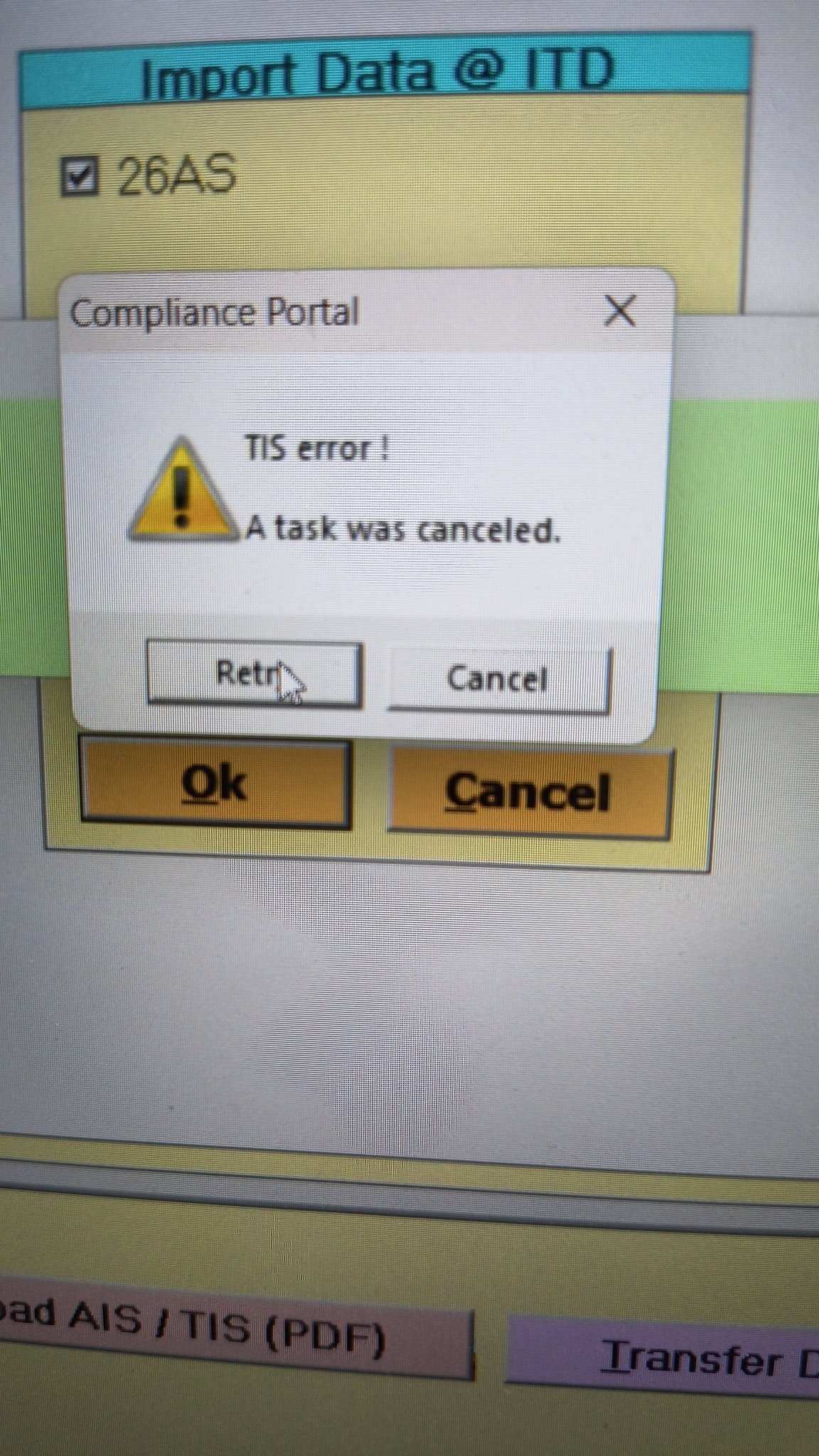
    • Error 1: The income tax portal has been issuing an error for the past few days, making it impossible to download the AIS and TIS Data. According to the given challenges in the ITR filing, it would be mindful to think about extending the additional deadline by 2 to 3 weeks. The lack of these important records significantly complicates the tax filing process. Here is the error below –
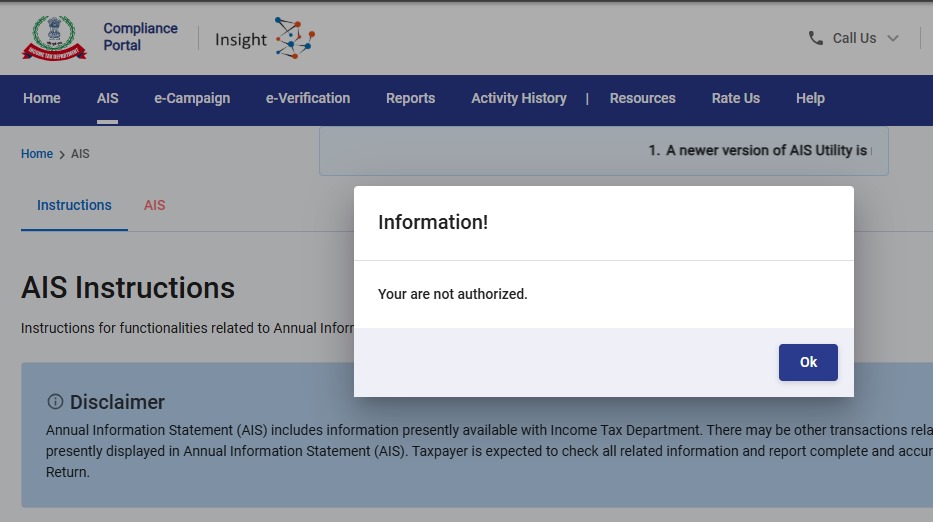
    AIS Error
    • Error 2: While submitting the return in ITR-2, the Assessee is facing the following validation error. This error is not coming while filing ITR-3:
      • In Schedule CG, the value of b1eii should be: (a) the difference of B1eiA and B1eiB, if eiA > eiB, else 0, if the date of acquisition is before 23 July 2024 and the transfer is on or after 23rd July 2024; (b) 0 in any other case.
    • Error 3: While submitting the return in ITR-2, the Assessee is facing the following validation error. This error is not coming while filing ITR-3: In schedule CG, the dropdown at sl. no. B10a, &; Whether the date of limitation /withdrawal was before 23rd July 2024 & is not selected.
    • Error 4: While submitting the return in ITR-2, the Assessee is facing the following validation error:
      • In Schedule Part-BTI, Sl. No. 15 Aggregate Income of Schedule B-TI is not equal to Sl. No. 12 – 13 + 14

    Genius Software Makes Income Tax Filing Easy and Secure

    Since Assessment Year 2001-02, Genius tax software has been the number one tax return filing software among Indian tax professionals. Clients can file unlimited returns with this software, including income tax, TDS, AIR/SFT, and other tax forms. Gen BAL (Balance Sheet), Gen IT (Income Tax), Gen CMA, Gen FM, TDS (Tax Deducted at Source) and AIR/SFT make up the six modules of the Genius program. Among the best taxation software in India, Genius provides multiple features such as Backup, Restore, and Password Settings.


    Disclaimer:- "All the information given is from credible and authentic resources and has been published after moderation. Any change in detail or information other than fact must be considered a human error. The blog we write is to provide updated information. You can raise any query on matters related to blog content. Also, note that we don’t provide any type of consultancy so we are sorry for being unable to reply to consultancy queries. Also, we do mention that our replies are solely on a practical basis and we advise you to cross verify with professional authorities for a fact check."

    Published by CA Vineeta
    Hi,I am Vineeta Sharma. I am a chartered accountant. I have done my (B.Com) from Rajasthan University. I have keen interest in taxation field.
    View more posts
    SAGINFOTECH PRODUCTS

    Join the Conversation

    899 thoughts on "Most Common Technical Errors on New ITR e-Filing 2.0 Portal"

    1. I have been trying to e-file ITR-2 for AY2021-22 for past several days and am stuck on 1 item relating to my LT Carried Forward Losses from AY2020-21 not getting populated in Schedule CFL and the editing page doesn’t allow me to input the same manually (AY selection button stays gray and as such, no changes or additions can be made). I have been sending queries and grievances about this issue but no response on this issue even though some of the other issue regarding TDS were resolved at least partly.

      This CF Loss doesn’t even affect my taxes for the year because it is not going to be used in AY2021-22 and just needs to be carried over. But they won’t even let me know if I should go ahead and file without it and that this issue can be resolved later. Very poor service by the e-filing Helpdesk.

      If anyone has ideas on how to resolve this issue, it would be greatly appreciated.

      1. I am facing the same problem. But I will need to remit extra tax if CFL for AY 2020-2021 not taken in to account. Thank you for your post which helped me to find out this is a common problem.

      2. I think I faced this problem last year. The solution, as far as I can remember, is, you first tick the box by the year to which the carry forward loss pertains and click edit. Input carry forward loss manually into each respective year.

    2. With this new portal I am unable to file the return (ITR-2) due to name mismatch with PAN. Never had such problems earlier. The portal is not reflecting the corrected name as per PAN or Aadhaar. Its been almost two months, I have raised grievance, spoke to customer care, emailed efilingwebmanager mutliple times but the issue is still not fixed. With just another 2 days left, I am not sure what to do.. Any advises?

      1. Hey JeanRaj,
        I just found a solution, you could try this.
        Prepare the json file from income tax website itself, donot use any thirdparty websites like cleartax or something else to create json file. For some reason they don’t work. Actually I compared two json files from cleartax and incometax websites, both the names are same, but the differences are in some other fields.

        Please give it a try. Use https://www.incometax.gov.in/iec/foportal this to create and upload json.

    3. I am getting “Date of deposit cannot be prior to 01-04-2020.” error even though I’ve made self tax payment on 24th Dec 2021.

      1. It worked for me using Chrome. I had deleted the earlier entry (created in Safari Browser) and created another entry (now using Chrome Browser) and it worked like charm.
        Happy Filing.

      2. you can go back to the place and try to add another entry of those details, for me the initial details that I had added did not have any date showing that’s why I added another row of details and then delete the earlier one so it worked fine for me.

        Hope this helps!

      3. Hi, does your issue resolved ?
        I am facing the same error. I Made the payment on 24th dec 2021, but getting error like “Date of deposit cannot be prior to 01-04-2020.”

        1. I faced this problem when using Safari browser on MacBook. On using Chrome browser the issue got resolved. The self assessment tax paid entry also added using Chrome after deleting the entry made using Safari which was showing the error ““Date of deposit cannot be prior to 01-04-2020.” The problem seems to be Safari browser specific.

    4. Need help to clear below error while online ITR 2
      1. Please select the drop down of head of income for which corresponding income offered
      2. Please select the radio button for the field TDS credit relating to Self/Other Person.

      1. Go to Schedule TDS Paid . Select Tax deduct at source. There will be two options . Self and others. Click on Self .
        In the same menu , scroll down . There will be an option to select ” head of income for which Tax deducted at source ” Select option from drop down menu ie Income from other source / House property etc.”

        1. Thanks, but it has to be done for every TDS entry. So I have 54 dividend entries and hence 54 TDS entries – do I have to manually do it for every one of those 54? If there is any bulk update method, then pls guide.

          Thanks

      2. how to fix this error- ‘Please select radio button for the field TDS credit relating to Self/Other Person in Schedule TDS 2’

    5. Form 3CA/CD has been filed by Chartered Accountant but while accepting the form by the assessee and proceeding to sign the form with the help of DSC the error is showing as “Something went wrong Please try after sometime” and due to which I am not able to accept the 3CD form and sign with DSC. Also I have checked in my profile under key person category that DSC has been registered of the person who is responsible for signing the form with DSC. Kindly help with the problem.

      1. While filing ITR 1, radio buttons for answering one of three questions are not working. I can’t move further till I click this radio button. Some times , confirmation of each segment not working even after modifications. Pl let me know the solution.

    6. Hi
      While validating ITR, I am getting an error saying-
      Please enter amount against nature of Exempt allowances.
      Can some one help me how to resolve this issue. All the deductions are already been filled under total deduction section.
      Thanks

    7. I used to get “Request not completed due to technical issue. Please try again.” erorr while verifying thru Aadhar OTP. This was coming up in edge browser. And Internet Explorer (IE) wasnt loading the login page at all. But both login and the verification went thru in chrome. So whoever have this pariticular issue, can try in different browsers. Trying in Chrome worked for me you can as well try in other browsers too.

      1. Error : Request not completed due to technical issue. Please try again.
        gETTING THIS ERROR WHILE RECOVERING PASSWORD VIA AADHAR

    8. Getting 2 errors while filling IT 2 –

      Please select the radio button for the field TDS credit relating to Self/Other Person.
      The total of all the quarter of respective CG must be equal to the final figures of schedule BFLA.

      How to solve?

      1. I’m also facing the same issue “The total of all the quarter of respective CG must be equal to the final figures of schedule BFLA.”

        Can someone help me how to solve this?

        1. Click on Sl. No. F ” of Schedule CG (Information about Accrual / Receipt of Capital Gain )
          Add details and enter the quarter wise details of Capital Gain . Enter 0 if there in NIL CG in any quarter .

          1. I am still unable to do all is highlighted in red after entering as well how to see to this.Moreover it does not accept negatives

      2. select the error and in the redirected page, select “Self” radio button. Next if you try to save it will ask head of salary, there if its FD, update “Other Sources”

    9. I am facing a problem with regard to Capital Gains on Sale of Property. The Online version does not reflect the details captured in this section once you logout and login, though the calculations are appropriate. The Offline version is calculating the entire sale value as Capital Gain.
      Also there is a problem in filling the details related to sale of equity mutual fund units in both the online and offline versions where the online version exits on inputting the ISIN and the offline version has a different problem. I am not sure who is going to solve these and when I am going to file my returns.

    10. Many times after filling ITR-3 tried to revalidate, but msg comes
      2 Errors found to be rectified
      ‘Pl select the button for the filled TDS credit relating to self/other person in schedule’
      Same is repeated at s.no.
      Tried but could not rectify. Pl suggest.
      Thanks.

      1. You have to Click on each error, new window will open.. select “Self” click save… since u r getting 2 errors therefore u need to do it 2 times to file your return..

    11. Dear All, Error when uploading Json File, generated from the ITR-5 Excel utility available in Income tax Portal Invalid hash value identified, modification to ITR details outside utility is not allowed……

      Please help how to resolve the issue

    12. After successful validation of ITR 2 the verification shows Error:
      Gratuity amount re enter under Sec10(10).
      Even after re entry the error persists.

      1. Hi Saji,

        Same issue here. Have raised grievance. Received a standard reply saying trying filling fresh online form or new offline utility. Tried everything. Error persists. Have you found a solution?

        Only thing I can think of is to not report the Gratuity. Anyway, there is not tax implication if less than 20 lakh.

        Regards,
        Arun

        1. Same error related to Sec 10(10). No resolution yet despite repeated grievance’s with efiling manager as well as income tax grievances portal.

          If there is a resolution, pls post.

          thanks

          1. I received an email that my grievance was resolved to which I sent a strongly worded email stating that the grievance has NOT been resolved and that they should not close the ticket. After that I received a call from CPC Bangalore stating that they will organize a webex call with the relevant team who will guide me. 5 days since then and I am still waiting. Keep raising grievances and keep mailing them. Lets get this issue up in the list of bugs to fix. That’s the only way!

            1. Exemption u/s 10(10) for gratuity shall not exceed income offered under the head salary under sub head gratuity receipt and cannot exceed Rs20 lakhs

              Exactly facing the same error.
              Even after splitting up the ‘Nature of Salary’ to have Gratuity reflect the value, it is not allowing the same value in exempt allowance and throwing the above error.

      2. I was able to add the gratuity exemption under “Any other” and description as under section 10(10) gratuity
        One thing the utility had to be completely closed and reopened for this to work. Otherwise even after this change it was giving the same error.
        Reason was the earlier error was not opening up the link directly when clicked and so any modification still gave the same error.
        This is definitely a bug that needs to be fixed and have raised grievance also.

        1. Thanks, that worked! Looks like as part of the resolution, they added Gratuity and some other categories of income (Leave Encashment) in the Salary break-up dropdown. Providing the break-up using “Add Another” ensured the rectification of validation error.

        2. I also faced the same problem but as you mentioned. Yesterday mailed to IT department efiling mail ID but not receive any response and today also called to the helpline and raised the ticket for the same and they told me that I will get the response within 24 to 48 hours.
          Thank You for the solution which you had posted & it worked. Removed the gratuity field and added the same in “Any Other” option under section 10(10) exemption with the same description I had provided in “any other” field.
          Thank you again for the solution.

          1. Thanks this worked for me also. Essentially the deductions under section 10 like gratuity, leave encashment etc. should be provided under the salary breakup by adding “Add Another” section. But its a bug nonetheless.

    13. Namaskar! For me the issue is the ITR2 form shows ZERO salary, ZERO income from other sources. If I try to put in the salary as per Form 16, the ITR2 utility does not allow me to edit the salary. I raised Grievance on 4 August and again I reported on 11 Nov. I also sent email to efilingwebmanager@incometax.gov.in. No resolution so far. Anybody facing this kind of issue?

        1. It was never resolved, so I filled it manually. It took me a long time to fill in manually every field of the ITR2 form.
          Missed seeing this message, replying really late. Hope it was better for you, i.e., got a solution.

    14. I am getting below error while adding the Advance Tax and Self Assessment Tax payment for the assessment year 2021-22.
      Error: Date of deposit cannot be prior to 01-04-2020.
      I had deposited the challan on 16/10/2021 and selected the same date but I am still getting the same error.

      1. After facing same issue for past 08 days today I updated my chrome browser in my phone , cleared cookies and filled it through my phone itself and finally submitted successfully without error. Earlier I was trying through my iPad and It was continuously giving errors.

        1. Hi Ankit, I tried your method of clearing caches in Google Chrome but I am still getting date error while filling Self assessment tax details . Because of this error, I am not able to verify my return. Do you have any other solution?

    15. ITR FOR AY 20-21 INTIMATION HAS BEEN RECEIVED AND ALSO REFUND RECEIVED BUT ITR SHOW UNDER PROCESSING AND ITR STATUS BY ACK NO SHOW E VERIFIED

      1. Still facing e-filling through black. It’s saying the error “your filling encountered an error at IT”.since one month facing the same issue. Kindly do the needful. Due to this error I am unable to receive my return ammount.

    Your email address will not be published. Required fields are marked *

    Latest Posts

    Best Offer in 2025

    Powering India's Taxation Experts with Innovation

    Upto 20% Off
    Tax, ROC/MCA, XBRL, Payroll, Online GST

    Limited Offer, Hurry

    New Tax Offer 2025

    Upto 20% Discount on Tax Software

      Select Product*

      Genius Software