The Income Tax Department launched the new website of Income Tax on June 7th, 2021. The website has had various technical problems since its launch. One of these is the problem related to ITR. Let’s know it in detail here.
Various Errors Related to ITR
People were excited about the new Income Tax website, but after the launch, they are facing various problems with it. The long list of problems also includes problems related to ITR filing, due to which people are getting frustrated. It is obvious that ITR filing is one of the main functions of the Income Tax website, along with other functions. But right now, the website is not able to perform its main function properly.
Submit Query for Error Free Return Filing Software
Common ITR Issues Faced by Taxpayers in FY 2024-25
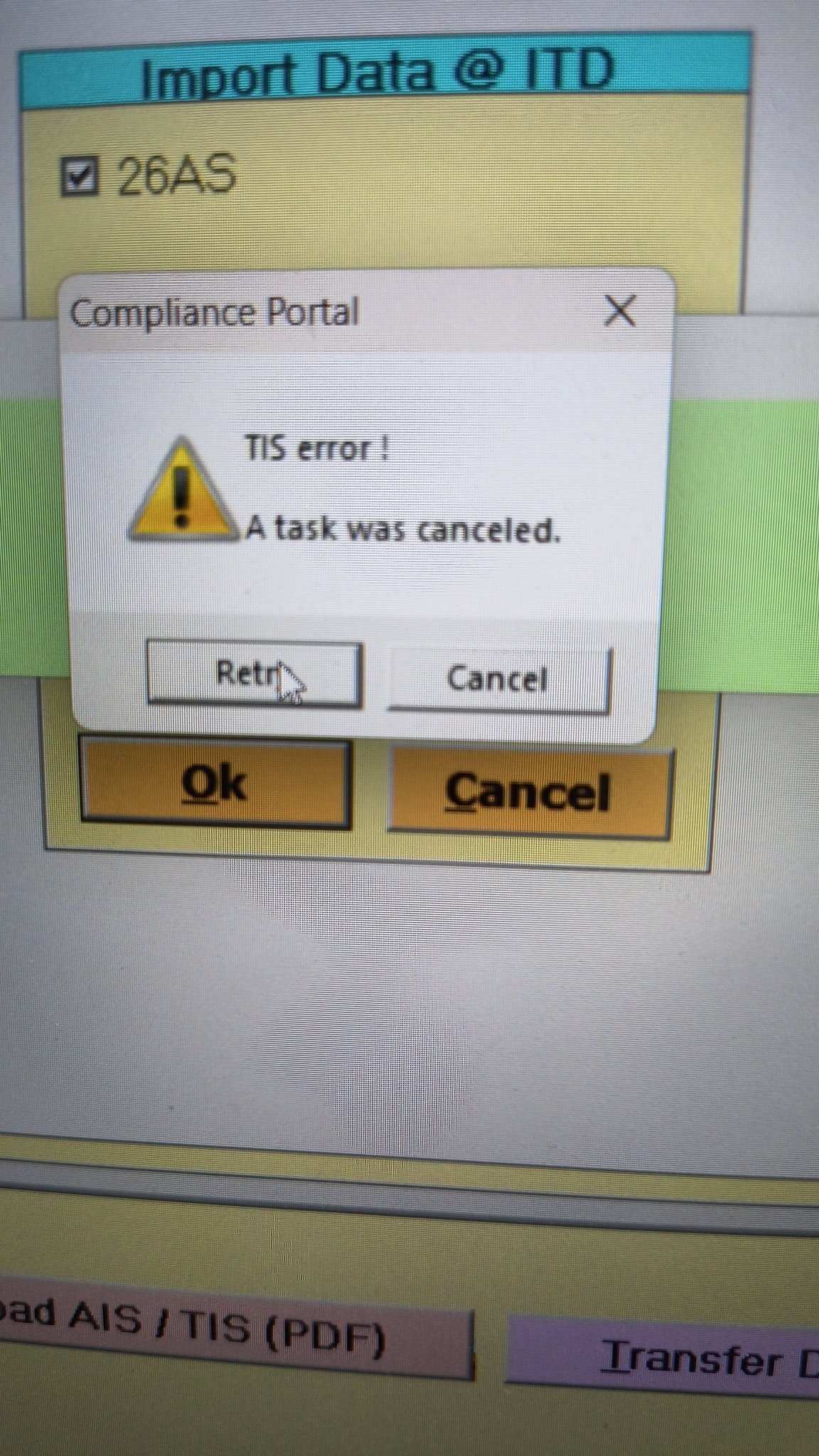
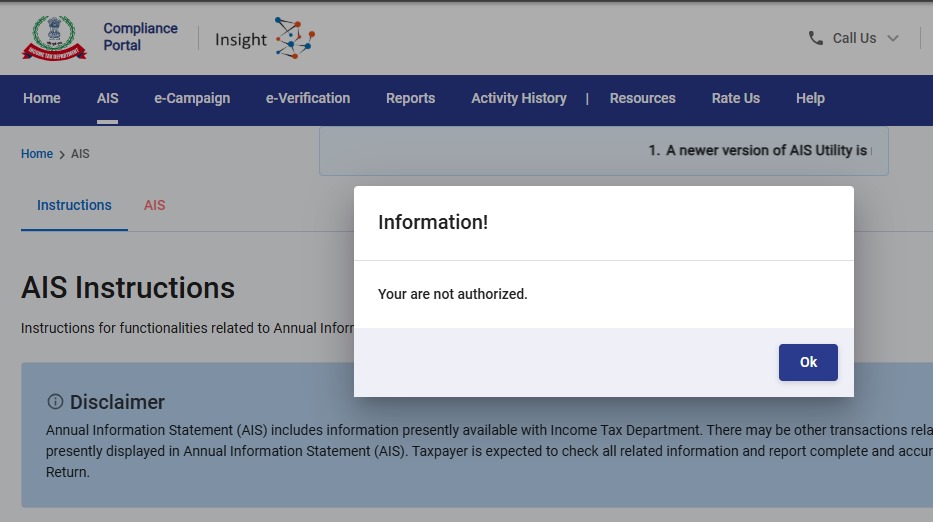
- Error 1: The income tax portal has been issuing an error for the past few days, making it impossible to download the AIS and TIS Data. According to the given challenges in the ITR filing, it would be mindful to think about extending the additional deadline by 2 to 3 weeks. The lack of these important records significantly complicates the tax filing process. Here is the error below –
- Error 2: While submitting the return in ITR-2, the Assessee is facing the following validation error. This error is not coming while filing ITR-3:
- In Schedule CG, the value of b1eii should be: (a) the difference of B1eiA and B1eiB, if eiA > eiB, else 0, if the date of acquisition is before 23 July 2024 and the transfer is on or after 23rd July 2024; (b) 0 in any other case.
- Error 3: While submitting the return in ITR-2, the Assessee is facing the following validation error. This error is not coming while filing ITR-3: In schedule CG, the dropdown at sl. no. B10a, &; Whether the date of limitation /withdrawal was before 23rd July 2024 & is not selected.
- Error 4: While submitting the return in ITR-2, the Assessee is facing the following validation error:
- In Schedule Part-BTI, Sl. No. 15 Aggregate Income of Schedule B-TI is not equal to Sl. No. 12 – 13 + 14
Genius Software Makes Income Tax Filing Easy and Secure
Since Assessment Year 2001-02, Genius tax software has been the number one tax return filing software among Indian tax professionals. Clients can file unlimited returns with this software, including income tax, TDS, AIR/SFT, and other tax forms. Gen BAL (Balance Sheet), Gen IT (Income Tax), Gen CMA, Gen FM, TDS (Tax Deducted at Source) and AIR/SFT make up the six modules of the Genius program. Among the best taxation software in India, Genius provides multiple features such as Backup, Restore, and Password Settings.



Unable to confirm personal details and hence unable to feed any data for the return.
I am also not able to confirm personal information & proceed with gross total income. Next options are not enabled.
vile validate next page is not coming and validation not processed wile submitting online filling
I am not able to confirm personal information & proceed with gross total income. Next option is not enabled.
Could you, by any chance, get this problem of confirming personal info solved ?
I downloaded the offline Desktop version “ITDe-Filing-2022 Setup 1.1.8” utility in July 2022. I get the message “Schema error occurred while submitting your form, please try later” when uploading the form after successful validation. What should I do now? I have painfully entered my returns, do I have to reenter them in another utility if this version does not work?
For all those who were asking regarding the message of error like “schedule IT/tax payment -01-challan se no. Expected;number, found : string ## please contact developer of the utility for the error.
Here I got the solutions, I asked on twitter and tagged income tax department Twitter handle. They reply & told to download latest version.
Actually there are 2 updates on 06th of July. i.e. version 1.1.08 & in the evening new version came i.e version 1.1.10.
So kindly download latest version & try. I am sure problem will be resolved.
Refer these tweet if needed ;-
https://twitter.com/IncomeTaxIndia/status/1545363266884423682?t=vwhcronQWiHplM2GkGWWdQ&s=19
THANKS. PROBLEM SOLVED
Thanks Parth, I was facing the same issue and remedy suggested by you worked perfectly. By downloading latest version of Offline tool, I could successfully file my Return.
IN MY CASE THERE ARE NOT SHOWING THE OPTION OF ITR 5 WHILE FILLING.
Schema error occur while submitting your return. Please give advice for rectification of this error
I got the same schema error and was able to resolve it. Hope this helps some other people.
In my case, I started with the version 1.1.8 tool, entered all the details, passed validation, and at the step of uploading the returns, got the schema error. I learnt that there is a new 1.1.10 version. I downloaded it and tried to submit it, but it also showed the same error. Here is how I was able to resolve it:
1. From the desktop tool, download the JSON file of the filled return.
2. On your windows machine, clear the temporary data. Goto c:\users\\AppData\Roaming. Enable viewing hidden files in your file explorer if you cannot see AppData.
3. Delete all the folders starting with ITe-filing….
4. Start the version 1.1.10 desktop tool. Your saved draft will be gone.
5. Start a new filing and import the JSON file from step 1.
6. Fix and validate errors and file the returns, it should go through.
It seems even after upgrading the tool, it still uses the old cache on the computer. A bug which they should fix.
Yes same problem facing
Am getting the same Schema error while uploading but am using version 1.1.10. Communication with the Income Tax Department on their grievance portal has yielded a very poor response as yet. Just wanted to know if you have been to overcome this issue ?
While filing ITR 1, radio buttons for answering one of three questions are not working. I can’t move further till I select this radio button.
I am also facing the same problem, unable to select the radio button after selecting ITR 1 form
I am also facing same issue, radio button not enable for giving “please answer the following question”
Big peanlty should be levied to infosys, there are so many problems
Try in EDGE browser
Not working in Edge as well
Sir,
[#/ITR/ITR1/TaxPayments/TaxPayment/0/SrlNoOfChaln: expected type: Number, found: String];#;Please contact the developer of your utility with the error key
facing the issue since 5 pm july 6. what to do
I was also getting the same error when was using offline utility. I filed online today and it is done without any other. So try online or download latest utility 1.1.10
Error message while verifying noticed 06.07.2022@10PM#/ITR/ITR1/TaxPayments/TaxPayment/0/SrlNoOfChaln: expected type: Number, found: String];#;Please contact the developer of your utility with the error key
While filing ITR 1, radio buttons for answering one of three questions are not working. I can’t move further till I click this radio button. Some times , confirmation of each segment not working even after modifications.
USE OTHER BROWSER
Similar error: Can someone please help.
“[#/ITR/ITR1/CreationInfo/IntermediaryCity: expected maxLength: 25, actual: 26];#;Please contact the developer of your utility with the error key”
same error for me also , is it resolved ??? I raised from last week still IT department not resolved still now .
I am also getting the same error, sent a grievance mail to IT, but no solution yet.
I was going through all the comments and thought I should give it a try, so I downloaded desktop utility version for ITR filing, and it worked for me. I was able to file ITR.
July 6, 2022 at 8:59 pm [#/ITR/ITR2/ScheduleIT/TaxPayment/0/SrlNoOfChaln: expected type: Number, found: String, #/ITR/ITR2/ScheduleIT/TaxPayment/1/SrlNoOfChaln: expected type: Number, found: String];#;Please contact the developer of your utility with the error key
July 6, 2022 at 3:59 pm
[#/ITR/ITR2/ScheduleIT/TaxPayment/0/SrlNoOfChaln: expected type: Number, found: String, #/ITR/ITR2/ScheduleIT/TaxPayment/1/SrlNoOfChaln: expected type: Number, found: String];#;Please contact the developer of your utility with the error key
Please fix this bug:
[#/ITR/ITR2/ScheduleIT/TaxPayment/0/SrlNoOfChaln: expected type: Number, found: String, #/ITR/ITR2/ScheduleIT/TaxPayment/1/SrlNoOfChaln: expected type: Number, found: String];#;Please contact the developer of your utility with the error key
The return has been validated successfully without any error.
same here.
please inform if you find any solution or your problem is resolved.
thank you
yes please post a comment here if it starts working or if there is a solution to this problem –
when validation is successful but verifying ITR-2 gives the error: [#/ITR/ITR2/ScheduleIT/TaxPayment/0/SrlNoOfChaln: expected type: Number, found: String, #/ITR/ITR2/ScheduleIT/TaxPayment/1/SrlNoOfChaln: expected type: Number, found: String];#;Please contact the developer of your utility with the error key
I am facing same error
there is NO problem in verifying this morning – i did a quick confirmation of each part of the ITR and did a validation again – and then submitted for verification – it went through , without any problem – no error like yesterday –
Hi
Your issue is resolved?
I am facing similar error .income tax department has to rectify it,I think it is slow speed of website making us to get bored of filing a return.[#/ITR/ITR2/ScheduleIT/TaxPayment/0/SrlNoOfChaln: expected type: Number, found: String];#;Please contact the developer of your utility with the error key
Have the same issue since morning today
[#/ITR/ITR2/ScheduleIT/TaxPayment/0/SrlNoOfChaln: expected type: Number, found: String, #/ITR/ITR2/ScheduleIT/TaxPayment/1/SrlNoOfChaln: expected type: Number, found: String];#;Please contact the developer of your utility with the error key
Sir,
While submitting the itr-1 getting the following error message. Please do help.
[#/ITR/ITR1/TaxPayments/TaxPayment/0/SrlNoOfChaln: expected type: Number, found: String];#;Please contact the developer of your utility with the error key
what to do
I am getting string error while validating itr 2 online and schema error by off line mode since last 5 days
Raised grivence with cpc…..got reply update Microsoft net 3.5 do not use special characters…..but still problem persists.
If anybody can guide…..please help
Same issue since last 5 days
Please help in case you get solution
Please try now, I was facing this issue yesterday but was able to submit it today thanks
The return has been validated successfully without any error. But ultimately the following comment appeared. I fail to understand what this means. How to send the return now.
[#/ITR/ITR2/ScheduleIT/TaxPayment/0/SrlNoOfChaln: expected type: Number, found: String, #/ITR/ITR2/ScheduleIT/TaxPayment/1/SrlNoOfChaln: expected type: Number, found: String];#;Please contact the developer of your utility with the error key
The return has been validated successfully without any error.
Exactly the same error is coming for me also. Very irritating.
i too am facing the same problem today 6th Jul 2022 – validation of ITR2 is successful – how does one file the income tax return ? gives this error while verifying – [#/IT/ITR2/ScheduleIT/TaxPayment/0/SrlNoOfChain: expected type: Number, found: String];#;Please contact the developer of your utility with the error key
I am facing the same problem. Please,let me know any solution for this error.
I am also facing this problem, let me know if the problem resolved
[#/ITR/ITR2/ScheduleIT/TaxPayment/0/SrlNoOfChaln: expected type: Number, found: String, #/ITR/ITR2/ScheduleIT/TaxPayment/1/SrlNoOfChaln: expected type: Number, found: String];#;Please contact the developer of your utility with the error key
Facing the same error since 10 AM, tried every 30 min. problem persists
Same problem.. Does infosys at all test this portal? simple JS error on type casting. pls look into code in self assement tax section. error is there.
I am also facing the same error… can anybody update a fix here.
[#/ITR/ITR2/ScheduleIT/TaxPayment/0/SrlNoOfChaln: expected type: Number, found: String, #/ITR/ITR2/ScheduleIT/TaxPayment/1/SrlNoOfChaln: expected type: Number, found: String];#;Please contact the developer of your utility with the error key
The return has been validated successfully without any error.
Sir,
While submitting the itr-1 getting the following error message. Please do help.
[#/ITR/ITR1/TaxPayments/TaxPayment/0/SrlNoOfChaln: expected type: Number, found: String];#;Please contact the developer of your utility with the error key
Yes I am too facing this problem and feed up with return filing. First honestly pay tax and than to justify the same file return with continue technical problem in software from last 2 FY.
Facing the same error “[#/ITR/ITR1/TaxPayments/TaxPayment/0/SrlNoOfChaln: expected type: Number, found: String];#;Please contact the developer of your utility with the error key”
How to resolve this?
Hi… Joshi, I am also facing same problem from 2:00 pm [#/ITR/ITR1/TaxPayments/TaxPayment/0/SrlNoOfChaln: expected type: Number, found: String];#;Please contact the developer of your utility with the error
I am facing the same problem – SrlNoOfChaln: expected type: Number, found: String];#;Please contact the developer of your utility with the error key
Sir,
While submitting the itr-1 getting the following error message. Please do help.
[#/ITR/ITR1/TaxPayments/TaxPayment/0/SrlNoOfChaln: expected type: Number, found: String];#;Please contact the developer of your utility with the error key
sir,
i am facing the problem while filing itr1. option is not enable. please help me
I tried to file return using ITR-1 but I am not able to select the reason ubder heading “Are you filing the income tax return for any of the following reasons?”
The choice is not being highlighted on clicking it
while filing ITR 4 TDS deducted does not match with 26 AS. How to rectify auto filled deduction amount?
Just over right the amount you feel is right after cross checking
You can use Microsoft edge and clear the cache etc you will be able to file the ITR 1 online in the income tax portal. I tried and it is working now
Unable to verify online verification since last 10days trying everyday. Tried with different laptop and different browsers also.
Error: Something went wrong please try later.
Please resolve the issue ASAP on urgent basis.
Yeah, Me too facing this. (Error: Something went wrong please try later.)
Have raised tickets also, (6178800 and 6201053). Still not resolved.
I am facing the same issue “something went wrong please try later” while trying to verify ITR 2. Any idea if this issue has a solution?
I am also facing issues in filing ITR for a couple of weeks. Not able to confirm personal details and everything else is greyed out.Tried changing browser but had no success. Kindly help…
Hello,
Clear Browser catch file then it will work
Thanks
All done. Still unable to e-verify ITR V.
Hello Nilesh Bansal…..I have tried everything. No result. This problem was in the last year also. Last year I had to sent physical ITR V by speed post. This defect in the portal still not rectified. Ridiculous.
Facing problem while filing itr .personal information step ist not confirmed.what is the problem .plz help
I myself being not able to file my ITR 1 since last three days. I am also unable to confirm my personal details and proceed to next step. whats the reason.
Same here. Even if I confirm the details the site is saying to confirm the personal information again and again
Was this issue of your resolved? I am still facing the issue since last week .
Hi I too facing the same issue. Once i entered, i am unable to conform with green tick. If you got the solution please let me know.
I am also facing the same issue for the last few days.
While filling ITRs in the field name State under contact details showd “Outside India/Foreign” automatically and not alow to change the sate name.
Dear friend,
I also come across the same issue “Outside state/Foreign”, but i resolved the problem in the following way.
In Google chrome, On the right top, there is three dots in vertical manner. Click on the same and select more tools option and then clear browsing cache for all time. After than login again and file. Everything will be alright.
Dear Friends,
Please follow this steps, and you will get the success.
Hi
I tried above option still not working
Hi Raghuram…
Even after clearing the cache, still can’t resolve the issue. please try these step:
Initially, the field will be “Outside state/Foreign”. You just change the country field name in Address Details to some other country and afterward get back to India. “Outside state/Foreign” issue will be solved.
Vile conformation in e filling not updating
In the IT portal i am trying to file the income tax return for AY22-23.
It goes up to the view pls validate the prefilled return where the personal information is only allowed to be edited and seen .Rest of the fields are greyed out..e.g Gross Total income , total deductions.I have even confirmed the Personal information section .I am trying to file the return since 23jun22.
i am also facing a similar problem since yesterday. unable to confirm the earnings column.
i am also facing the same issue
same issue Unable to confirm the earning columns. becuase of which can’t move to next step
Even I am facing the same issue for the last few days. No idea how to go ahead.
I am facing the same issue. Not able to confirm personal details and go to the next tab.
Even i had the same issue. Provided all information in the Second sTep ( Gross Annual Income) but it didnt show as Green. The values submitted were matching the Form-16 as well. I was using the Google Chrome Browser.
Today i tried using Microsoft Edge and it worked Properly. Please try with another browser in your case as well.
Just a trial and error. Not investigated.
Nandri!
Ashok
Sir, I am also facing the same issue. While filing ITR 1, first I reviewed the ‘Personal Information’ tab details and got it Confirmed (green coloured). Then In the next step, I entered values in the ‘Gross total Income’ Tab and clicked confirm button ………….But That
particular tab is not getting confirmed (done several times). I am using Google chrome.
Now let me try any other browser.
I am facing the same issue and not able to move to next step
Change of Browser does not help.Same issue continues
IN MY CASE MICROSOFT EDGE ALSO NOT WORKED.
Personal information cannot be validated and state name cannot be put. Several attempts are made but failed. Totally upset.
You can file in Incognito mode, this error will be eliminated.
I am also facing the same.
Yes.The same issues in my case also.
Dear friend,
Please read my earlier comment and do accordingly. You can solve it.
I tried using Edge and tried with Incognito also. But still Im not able to move to Gross Total Income section
I tried submitting my ITR 2 return after validation and got a message “schema error occurred while submitting your return, please try later.” ……………..what should I do ? I’ve been trying but same message comes. Please advise. Thanks
I am also getting the same error…..
“Schema error occured while submitting your form, Please try later”
Stuck with this in completion of the filing before due date, Please assist and respond.
INFOSYS PLS RESOLVED – Sr Citizen has more than 80% disability but the portal is limiting the exemption to 75k (applicable for 40% to 80% disability) instead of allowing 125k permitted u/s 80U.
while doing NEW REQUEST FOR RECTIFICATION OF AY 2018-19 GOT THE ERROR ITD EXEC-2003.
ALREADY MAILED TO EFILIINGWEBMANAGER@INCOMETAX.GOV.IN
BUT PROBLEM NOT RECTIFY
I have received the same “ITD EXEC 2003” while filing ITR 3 for Ay 2022-23. There are a lot of glitches in the offline portal as well as online portal. I am truly fed up complaining to the grievance dept.
I am having the same problem since May 18; I have spent more than 3 hours on Webex meetings with IT / CPC people to no avail. They keep saying that they will fix the issue and revert within a week but that never happens. Every week is the same issue!!. When i contact them, i am told to use the latest version and try again….So, I have used 1.1.3, 1.1.4, 1.1.5 and also the latest 1.1.6….again to no avail!. How do we solve this issue?. I am at my wits end!!!
in ITR filling not visible in profile data in personal information
This trouble is related to ITR-1 for AY 2022-23.
If I try to do ITR verification by selecting ‘self’ in the capacity, then the name disappears and showing something went wrong, Pl try later.
I’m facing this problem Since April 15th, 2022 to today. (Almost daily trying and also tried in Apple, chrome and Edge browsers, still getting the same message)
Pl advise me how to solve this problem
massage after velidation successfully SOMETHING WENT WRONG PLEASE TRY LATER what to do next please guide me thanks
Same issue happened to me as well
same problem happened with me
I am facing similar issue, is it resolved for you now?
adding bank verification problem not verifying and not adding . second after filling the itr error while verifying and submitting however in green shows all information is ok.
pls give solution in ay 2022-23
Something happens in my case also. While verifying through net banking of sbi a message comes when I click ‘confirm’ finally, read with “Your specified request cannot be processed”.? “.what to do?
Hi,
PAN verification is ok, it gives an error last name mismatch during the ITR filing.
Hi you able to resolve this error ? No option to edit Name.
Hi you able to resolve this error of last name ? No option to edit Name.
hi , Last name is mandatory error while validation of ITR is this resolved?
getting Error Code: EF00099 after opting for adhar otp and it shows aadhaar and pan not linked although i have linked
Error occured while submitting your form, Please try later how to solve this problem can you please solve this problem
Error request not completed due to technical issue for forget password
please reply
In the portal, I am unable to raise a Refund Re-issue request for my validated bank account.
In Services> Raise Refund Re-issue Request, I have selected the Acknowledgement number and clicked Continue. But unable to see any pre-validated bank accounts on the page. There
is no way to select an already added and validated bank account.I checked all possible ways and sent an email with attached documents to efilingwebmanager@incometax.gov.in. But they are asking for Error snapshots. Any suggestion on this
Cannot down load IT RETURNS
if you faced a problem while filling of form 10IE in the Case of HUF like an Input submission error then click on the profile section and select the key personal details and fill the Karta of huf details. After that you can file Form 10IE.
Please google the error – Category of defect A :You will not be allowed to upload the return. Kindly correct below errors in order to proceed further.
You will find an Instruction booklet of 52 pages. This appears a very complicated error involving new tax regime u/s 115BAC option.s newly introduced for AY 20-21. We have to make some clear options. Otherwise this error will not allow us to file.
Instructions to Form ITR-1 (AY 2021-22) – Income Tax …https://www.incometaxindia.gov.in › ITR2021 › I…PDF
Category A defect are the defects, wherein return will not be allowed to be uploaded and error message will be displayed to the taxpayer. List of Category A …
52 pages
S.No. Error Description Suggestion
1. You can not file return under section as the time limit to file the return under this section is over
To solve this problem… you have Tick/ select option After due date instead of On and Before due date option, then file your returns I did same technique and its works !
In this case if there is any carry forward loss of the current year, it will not be allowed to be carried forward…….
I am not able to file rectification of ITR2020-2021 due to Error-ITD-EXEC-2003
I send mail to Ewebmanagerepotprtal but problem not solved.
The new e-filing portal 2.0 gives a lot of trouble for generating evc online. I failed to generate evc for ay 22-23 online since 10.6.22 post successful submission of itr. Always a message comes ” Your special request cannot be processed” while processed through net banking of sbi. I am fed up. Pl help.
Not able to select that option.Not sure how to proceed
option to select after due date is disabled…then what shoud i do?
I am not able to select option after due date. i have mistakenly clicked on before due date but after that got error and i am trying to change it but it is not changing. please guide me what should i do?
1] Log out from the portal and try to login again.
2] Try to select Select Assessment year* 2021-22 (Current A.Y.)
Select Mode of Filing* :Online (Recommended)
3]Start filling new.
4] Enter the same as previous and then before conforming select the filing option after due date.
5] reset same process .
6] The new form will be saved as draft once everything is validated you can e-verify .
Hope this will help you guys.
I am not able to get that option as it shows that option is fixed with on or before due date and cursor is not moving. now what to do.
Thank you Pramod. It works.
I am getting error code validation ef20113 while filling ITR 6. How to get it resolved. Please help.
register your DSC once again
Category of defect A :You will not be allowed to upload the return. Kindly correct below errors in order to proceed further.
S.No. Error Description Suggestion
1. You can not file return under section as the time limit to file the return under this section is over
Hi Lokesh, is the issue resolved? If yes, Can you please update the solution here as I am also getting the same error.
To solve this problem… you have Tick/ select option After due date instead of On and Before due date option, then file your returns I did same technique and its works !
Is this solve sir, because i have also recived same error what should i do
i did not filed my ITR for the Assessment Year 2021-22, but at the time of filling error showing your return already been filed, not allow to resubmit
When I am going to submit for my ITR , there is showing a error that : Validation completed -1 Errors Found
Please click on respective error description to resolve the error and to proceed further
Category of defect A :You will not be allowed to upload the return. Kindly correct below errors in order to proceed further.
Error Description Suggestion
1. You can not file return under section as the time limit to file the return under this section is over
What should I do ? please suggest me.
I am also facing the same issue. I have raised a complaint and they have asked to send an email to efilingwebmanager@incometax.gov.in with error screenshot and pancard copy in a zip file. And this is the response I got from them.
Resolution: “With respect to the concern raised by you, kindly retry now with the latest Offline json utility from the e-Filing portal http://www.incometax.gov.in You’re requested to start “”Fresh filing”” of the ITR form instead of resume filing of the saved Draft.If issue persists, kindly attach and share the following details at efilingwebmanager@incometax.gov.in • PAN & Contact Details • Download JSON file • Error screen shot Note: Kindly attach the documents in ZIP (.zip) format only, otherwise your request will not be processed.”
I even tried the offline JSON Utility but ended up with same error as in online portal. I have sent an email about this also. But there after no response from them.
I think the new portal is with full of bugs that they need to fix them all asap.
BTB if you are able to solve this issue, please do let me know at : athularjunan@gmail.com
Thanks,
Athul
I am also getting same error. Please leave a solution if u get one.
Today I also get the same error, got any resolution?
Facing the same error….do tell the solution incase you find one
have you got any solution
in case you find any solution please let us know.
In personal information change Filing Section to 139(4) Belated- Return filed after due date. if you had to pay due fine
I have come across t same error message.
In fact t filing section in profile page is not responding.
One can only proceed only when sec 139(4) circle gets activated
But HOW…. any idea
Thanks
buro
Download the latest offline filing utility and select 139(4) first time itself while filling in the form . Was not able to select 139(4) in the online filing
Hi All, you can also do a new online filing and select 139(4) first time itself while filling in the new online form.It works as well.
I too got the same error while filing ITR-1 for my wife. But after selection filling after due date it is getting submitted to IT without any fine. The IT department is not al all responding
This is the first time I will be filing ITR.
But as a non-resident, I am unable to register my PAN on the new website.
My mobile number is from out of India. And as a non-resident, I should be able to register myself with the OTP received in my e-mail only.
But the website does not let me register without OTP received on mobile, which a person with mobile number out of India does not receive.
Have been contacting help desk since almost a week. First I was told to email webservicemanager,which I did. Then after 2 days, help desk rep took my information and said she will submit the request to solve the problem. It has been 3 days already, but I still cannot register my PAN on the new website
I am getting “ITD-EXEC2003 Life Cycle error” while raising a refund reissue request. Can anyone help how to resolve it?
I am facing problem in filling HRA on portal and utility both. Its not allowing to enter HRA amount, I am getting this error “Exemption of HRA u/s 10(13A) shall not be more than minimum of HRA received or 50% of (Basic + DA)” when even try to fill even Re.1 in section. Due to which I am getting tax liability and advance tax due penalty and not able to complete ITR filing.
I discussed whit CA and Income Tax Customer Care they are saying other people also facing similar issue. The thing is what will happen if we are not able to fill it on time 🙁
Any other person getting this error ?
Hi Rohit,
Have this HRA error has been resolved for you?
HI Rohit,
am also facing the same error. Have u able to solve this?
Hey Amit,
Apology for late reply, I am seeing your message just now.
No it was not resolved immediately, I got mail from CPC ITR team today for its resolution. But still I am not sure if its resolved or not.
I paid to CA to file via his software, then I checked json and found that software break my basic salary into two heads one as basic and other as HRA head (with value higher than actual HRA) and then it allowed to add HRA value as well. Also that higher value required thing was also an issue because after 2-3 hours of filing I tried, it allowed to enter same value in HRA salary head and allowing same value in HRA allowance.
I hope you were able to file on time.
Even i am facing the same issue. Not able to declare HRA amount, getting the same error as yours.
Were you able to solve it.
You need to provide the breakup of the salary in 17(1) then it will accept the HRA amount
Adding the salary breakup worked. Thanks