


The Income Tax Department launched the new website of Income Tax on June 7th, 2021. The website has had various technical problems since its launch. One of these is the problem related to ITR. Let’s know it in detail here.
Various Errors Related to ITR
People were excited about the new Income Tax website, but after the launch, they are facing various problems with it. The long list of problems also includes problems related to ITR filing, due to which people are getting frustrated. It is obvious that ITR filing is one of the main functions of the Income Tax website, along with other functions. But right now, the website is not able to perform its main function properly.
Submit Query for Error Free Return Filing Software
Common ITR Issues Faced by Taxpayers in FY 2024-25
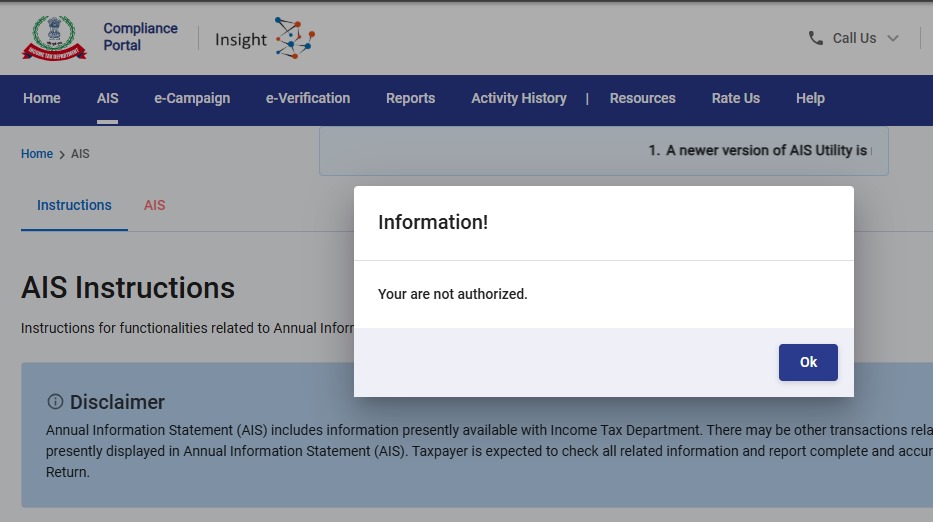
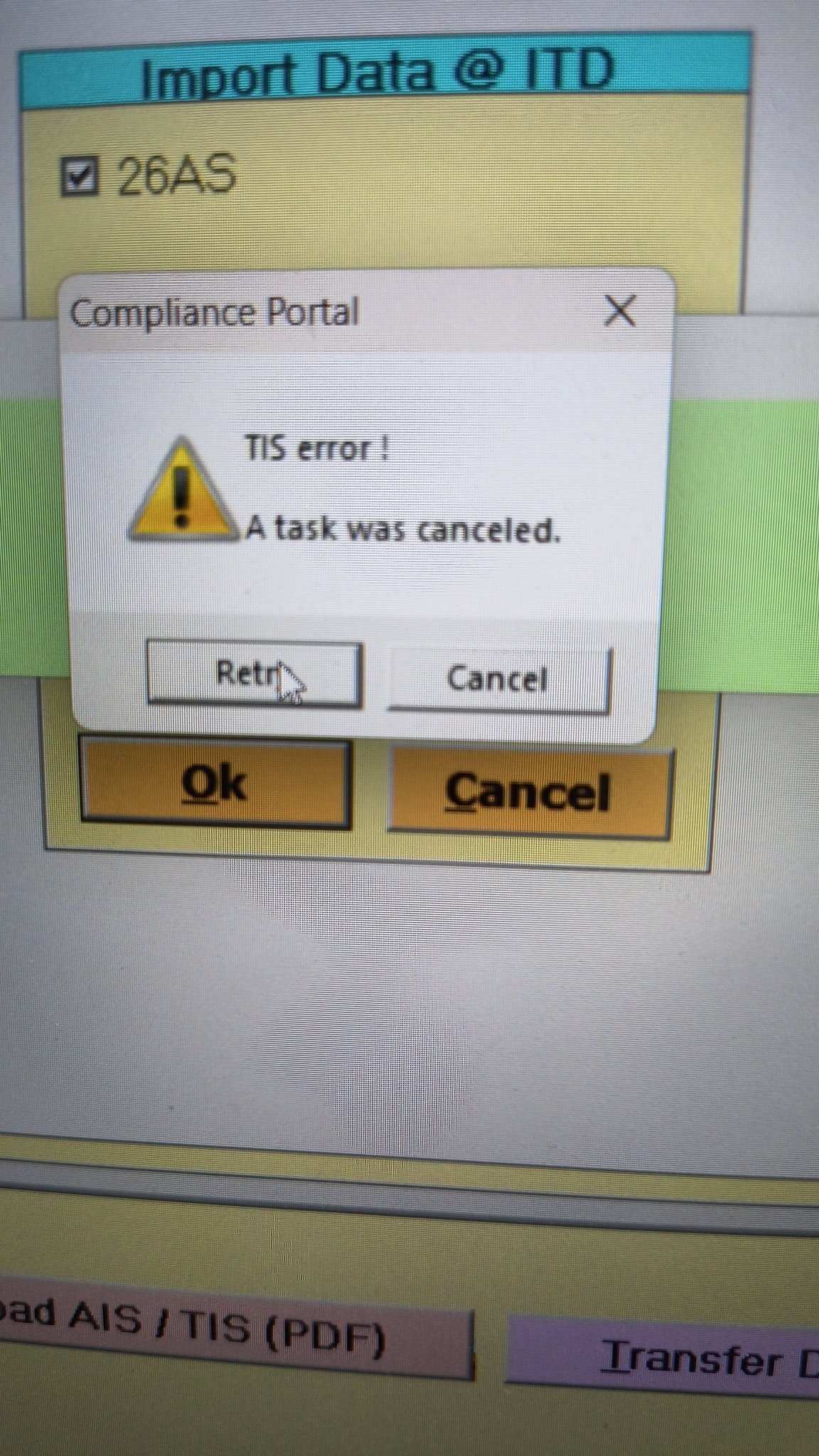
- Error 1: The income tax portal has been issuing an error for the past few days, making it impossible to download the AIS and TIS Data. According to the given challenges in the ITR filing, it would be mindful to think about extending the additional deadline by 2 to 3 weeks. The lack of these important records significantly complicates the tax filing process. Here is the error below –
- Error 2: While submitting the return in ITR-2, the Assessee is facing the following validation error. This error is not coming while filing ITR-3:
- In Schedule CG, the value of b1eii should be: (a) the difference of B1eiA and B1eiB, if eiA > eiB, else 0, if the date of acquisition is before 23 July 2024 and the transfer is on or after 23rd July 2024; (b) 0 in any other case.
- Error 3: While submitting the return in ITR-2, the Assessee is facing the following validation error. This error is not coming while filing ITR-3: In schedule CG, the dropdown at sl. no. B10a, &; Whether the date of limitation /withdrawal was before 23rd July 2024 & is not selected.
- Error 4: While submitting the return in ITR-2, the Assessee is facing the following validation error:
- In Schedule Part-BTI, Sl. No. 15 Aggregate Income of Schedule B-TI is not equal to Sl. No. 12 – 13 + 14
Genius Software Makes Income Tax Filing Easy and Secure
Since Assessment Year 2001-02, Genius tax software has been the number one tax return filing software among Indian tax professionals. Clients can file unlimited returns with this software, including income tax, TDS, AIR/SFT, and other tax forms. Gen BAL (Balance Sheet), Gen IT (Income Tax), Gen CMA, Gen FM, TDS (Tax Deducted at Source) and AIR/SFT make up the six modules of the Genius program. Among the best taxation software in India, Genius provides multiple features such as Backup, Restore, and Password Settings.





From 23rd Aug 2021, STCG is being taxed at normal rate of tax for the individual instead of 15%. Is there any change in tax laws or a new bug created in the efiling portal during rectifications?
I am also facing the same issue. STCG under 111A is filled correctly but the total gain is taxed at normal rate instead of 15%
Hope this is bug and not yet resolved. Any feedback will be helpful.
Thanks
STCG is included in total income at a normal rate as well as showing a separate lines for tax at 15% also.
I know I am replying late. I also faced the same problem today and after trying to find solution for it, finally found that it is because I had not selected the Schedule SI (this is the one that calculates tax at special rates) as part of the schedules. The moment I selected it, the amount of short term capital gain showed in the tax calculation page as amount included in the total income which will be taxed at special rate.
There is no change in STCG tax applicability.
cant update profile, in spite of inputting correct mobile and email otps.
Receiving This Error in ITR2
Sum of income u/s 111A or section 115AD(1)(ii)- Proviso (STCG on shares/equity oriented MF on which STT paid) & Pass-Through Income in the nature of Short Term Capital Gain chargeable @ 15% in schedule SI should be equal to corresponding income as per schedule BFLA
Sir, I am also getting the same error in my father’s form. if you get solution to this, please let me also know.
Regards,
Raj Pandey
Hi,
Can you please share the solution for this error if you have found one? Thanks
I validated my itr for AY 2021-22 but while verifying it shows one error saying under head CG subhead E the Ex is not the same as
i – ix. But I found that under subhead E there is no row ‘x’ but instead ix is repeated twice. For row x also it is written as ix. So an error. Any solution
There is a error ” Please enter valid bank name while validating ITR 1 , Please give me the guidance.
Im also facing same issue – ” Please enter valid bank name” while validating ITR 1.
I was thinking of deleting two banks out of 4 banks as two of them has been validated and other two status is Validation in progress. So if I delete the two banks then will it be considered wrongly or I can go ahead with only two banks which have been validated. Otherwise I’m stuck and unable to submit ITR return. Kindly advise
I am also getting the same error as Mr Kale. I have two banks which are cooperative banks for which valid IFSC and account no.s are inputted. Requested for help. Regards
Sir, Firstly Co-Operative banks cannot be validated, so kindly add any other nationatised bank or private bank for validation. And you need to remove the bank account which cannot be validated. And you need to revalidate the bank accounts after changing the mobile number or email as provided in bank by changing in profile details.
Sir, Please remove the account which is either not validated or cannot be validated. Then retry.
Pre filled Form. My profile for Bank account shows a false account. It shows a Bank account with Bhilwara branch of a Bank, which I neither ever had nor mentioned in any Return filed till now. The last four digits displayed for this false account are same as the last four digits of my account with aKolkata branch of same Bank. The false account is shown as validated. It is not getting removed. Kindly advise
.
I completed ITR2 for assessment year 2021-22 and validation was successful. When I
tried to file the return for verification I get error message “SCHEDULE CG sl No. Ex is not
equal to the difference i – ix . I presume this error occurs because the return preparation
software is not fully compliant with data quality requirement. I downloaded only
return preparation software developed by Income tax dept. Please help in this regard
Has this been resolved? As I am also getting same error.
Getting a validation error. Category of defect A :You will not be allowed to upload the return. Kindly correct below errors in order to proceed further.
Error Description
1. Exemption u/s 10(10) for gratuity shall not exceed income offered under the head salary under sub head gratuity receipt and cannot exceed R20 lakhs
Suggestion – Enter Rs. 20,00,000 in the field “Sec 10(10)-Death-cum-retirement gratuity received.
I have entered the amounts as per Form-16. Gratuity amount is less than salary and less than 20 Lakhs.
Not sure what is wrong. No error until last step and then I get a validation error.
Very poor software.
Hi. I am facing the same issue. How did you resolve this?
Did you get a solution to the section 10(10) error?
No. I raised a grievance. The response was that I should download the new utility and refill the forms or start a new online form. I tried everything that was suggested. Nothing works. Frustrated. Thinking of going to a CA who might have a solution. Looks like a coding error. Instead of disallowing amounts greater than 20 lakhs, it is disallowing amounts lower than 20L. So much for simplification.
Hi, Is this issue resolved? what was the solution? Pls can you share?
Thanks,
karthikeyan
I am trying to file ITR -3 for professional income
return is validated properly but the verification stage is giving errors
I have tried to rectify it for 50 times but still, system is not allowing to file
Same thing with my itr 2 , for capital gains
Sir,
I am facing the problem mentioned in point number7.During ITR returns validation , unable to enter the name when self is chosen.Kindly let me know the solution for this.
Thank you
I am also facing issues in ITR3. somehow, it has decided that i am eligible for AMT (actually I am not as there is no relevant deductions) so giving error not matching AMT and deemed income. Irony is that AMT schedule is disabled for me. Also, it is asking me to fill ESR with zero, but if I fill zero, ESR is not saved showing me again error of ESR not filled. Total junk site as grievances are raised for last 10 days, but nobody bothered to look into. Sad affairs from Infosys and not being tracjed by our FM team. Really sad.
YOU DOWNLOAD NEW UTILITY AND TRY AGAIN, IT WILL WORK
Am trying to e-verify my ITR Form-1 for AY2021-22 using OTP linked to Aadhar card on new portal. It gives me error PAN not linked to Aadhar. When i try to link, it says already linked. As this is already linked, I have double checked that.
So this like a circle, first it says link PAN & Aadhar and then it says already linked. Due to this issue, am not able to e-verify the returns and not able to submit. Please advise what to do.
Sincerely,
Rakesh Gupta
Unable to submit ITR2, after verification, Schema Error is coming.
Same bro
While validating my ITR II return for A.Y.2021-22 error( Please enter the Bank name) appears. I have already given my Bank account particulars while submitting the return for validation and I am getting an error !validation cannot be done! Please help me in this regard.
U CLICK ON ERROR IT WILL TAKE TO BANK ACCOUNT PARTICULAR, THERE IS A BUTTON IF YOU WILL CLICK ON THE BUTTON THEN THE ERROR WILL BE FREE
I tried but my error is still showing
In my online itr2 the prefilled values are showing 0 and no option to edit when I click on confirmstion. Also not getting any schedule to fill shares details.
Sir,
I am trying to file ITR3 using latest release dated 04.08.21. of the Common Utility. All the schedules are filled and return validated with no errors. But after e-verification with aadhar OTP when we press SUBMIT we get the message “SCHEMA ERROR OCCURRED WHILE SUBMITTING YOUR RETURN, PLEASE TRY LATER”
I have been trying for two days now. Any help would be appreciated.
Thanks
Old portal should be restored and new kept in waiting till streamlined and tested. Govt is harassing honest taxpayers.
YOU DOWNLOAD NEW UTILITY AND TRY AGAIN, IT WILL WORK
nothing is working. I have just downloaded the new utility at 8 PM on 18.08.2021 but after verification ITR2, Schema error is still coming. New Income Tax Software is a great joke.
Schedule Capital Gains — Land or Building or Both —
The details filled up for property sell are not visible after saving.
Can not update or modify these details. Is others have tried this option.
Unable to verify return for last two day, Tried Netbanking but it just kept rotating. The tried OTP method but it just kept saying invalid PIN, which was same as I received in SMS.
New ITR portal
Please email all queries pertaining to ITR filing to: efilingwebmanager@incometax.gov.in
i am unable to download itr-2 please help
I have same issue since last 10 days.
I am finding the same problem that “Enter bank name” though I have entered many times and validated. errors repeats. can anyone help
I am trying to file the return since last 2-3 days, Every time after validation I got the message Validation successful without any error. Further proceeding for e – verification after the file is not being submitted and it comes out with an error message.
Even I am facing the same issue.
The gross receipts/income, on which tax has been deducted, are to be entered in the schedules under the respective heads of income, as they are assessable in the year in which the credit for the TDS is being claimed.
Hello, have you got any solution for this? I am also facing the same error(i.e. The gross receipts/income on which tax has been deducted are to be entered in the schedules under the respective heads of income as they are assessable in the year in which the credit for TDS is claimed). can anyone please resolve the issue
I had faced this issue and I raised a grievance in their grievance portal and this got resolved
Kavya, what they suggested you to do – how the problem is resolved?
Kindly elaborate because i am facing same issue
kavya, please tell the resolution they specified in your grievance for the validation error. I am facing same issue even now
Hello Pankaj, you can avoid the error ( i.e. gross receipts/income…) by filing in ITR2.
Thanks, Vasanthi,
TI, as well as GTI, are less than 50 lacs. ITR 1 is applicable.
Error in validation Enter bank name. Last seven days. Customer care not picking up phone
same issue here. after every attempt for validation, same error message in two rows appearing – please enter the bank name but on clicking the same it leads to bank account section where already bank details are provided. Wasted nearly 4-5 hrs time in attempting to file ITR-2 but at the end this problem is faced
I am facing the below issue:
The gross receipts/income, on which tax has been deducted, are to be entered in the schedules under the respective heads of income, as they are assessable in the year in which the credit for the TDS is being claimed.
and
Name mismatch between PAN and the return. Raise an issue on the grievance portal but still no reply.
Can you tell me how did you rectify?
Sir I have already provided solution above. Please see.
Error in validation Enter bank name. Last seven days. Customer care not picking up phone
I am struggling to upload the ITR. The validation is successful, but when it is uploaded, it comes out with following error. I have tried atleaat 10 times now
The gross receipts/income, on which tax has been deducted, are to be entered in the schedules under the respective heads of income, as they are assessable in the year in which the credit for the TDS is being claimed
I am facing exactly same problem for the last 20 days
Is it resolved?
I am also facing same issue
I am also facing same issue.
This error is driving me crazy
would like to know this problem is resolved
Most horrible website. Infosys and Finance department have messed up a smooth running portal by claiming to make the process better
Repeated validation errors in Bank name , inspite of the fact that nothing was wrong on the same and TDS schedule is the worst. Real conjob by Infosys on the tax payers and I am a CA who has been filing returns for several years and helping oit several people in filing returns
Teerible
Yes.. old interface was good… this interface is pathetic and have login issues…
Also take lot of time for verification…
While e-verifying the return, I log on to the income tax portal, click on the return and then click on the e-verify button and nothing happens.
Has anyone seen this? Any help would be appreciated.
Yes, same problem here
Error in validation Enter bank name. Last seven days. Customer care not picking up phone …no call back….
same issue here. after every attempt for validation, same error message in two rows appearing – please enter the bank name but on clicking the same it leads to bank account section where already bank details are provided. Wasted nearly 4-5 hrs time in attempting to file ITR-2 but at the end this problem is faced. Thanks to our competent authorities and FM for making us work so hard to earn bread and butter and spending tax payers hard earned money (Rs.4200 Crores) of tax on such incompetent unprofessional software companies.
After correction of some of the errors mentioned above, I submitted the ITR2 and received the following message:
Validation completed -1 Errors Found
Please rectify the error to proceed further
Category of defect A: You will not be allowed to upload the return. Kindly correct the below errors in order to proceed further.
S.No. Error Description Suggestion
1. Tax Payable on Total Income is not equal to the sum of (Normal Tax plus Special Tax minus Rebate on Agricultural Income).
These computations are done internally and on the same data. I tried with different data but without success. If anybody knows how to get rid off this problem inform me. I have reported it to their Grievance Redress site.
Same error faced by me as well. Frustating ! And running out of time as last date is approaching. It doesn’t allow to manually modify any of those 3 fields. In my case the difference is just 1 Re (rounding off error in internal calculation I guess). Searching for a hack to get it through..
Same problem With me.I too tried in many ways.On validation I got the message “Validated successfully,there no error”. But while uploading, on verification the same message appears which have mentioned.
Hi Tapan,
I found the issue and fix this. taxable income system calculating decimal and creating issue.
eg.. 1497 is come and 15% of this 224.55 . Round this to 1500 , so 225 will come and decimal will not be there.
Hope this helps.
Thanks,
Sujeeth
Same problem appearing for me. The situation is pathetic. All these schedules are automatically generated. The situation is pathetic.
26AS showing the TDS amount but not reflected in the pre-filled TDS page in online mode — pathetic !!
Any solution for that ?
Hi Avik,
Got same . I clicked others there TDS option we have to select in selection.. after that only it will ask all TDS details 16A,B,C or TCS like that.
Thansk,
Sujeeth
Even I face the same issue.
Same issue. TDS deducted on dividend reflecting in 26AS but not in ITR 2. Any solution?
I am not able to file return for AY 21-22 because, everytime when i try to file return, they say that I have already filed return.
I tried to file my income tax return for AY 2021-22 yesterday. After filling the personal details and press ‘confirm’. a message appears saying that you have already filed return and go to revised return. Actually this is my original return and I could not move forward with filing.
Would anyone else experience the same problem?
It is a departmental issue so please contact with the department
After filling the ITR-1 under Prepare & submit method, Iam not getting receipt number even after filling OTP in the dedicated space. I tried several times with several OTPs . As a result the data remained in Drafts only. Instead of harassing the filers with imperfect new portal why not you allow old system for the assessment year 2021-2022. ?
Facing the same issue for one of my clients. I filed it and went through verification but i am unable to see it on the portal now
ITR-2 filing on ITDe-filing is pathetic,software not designed properly, it does not auto uploads all TDS information from 26, throws error for gross dividend value not matching with sum of break up in 5 periods, when summed value matches with gross dividend.. After clearing all these errors , return got validated and verified but errored when Submit button clicked . As it throws Schema error occurred while submitting your form, please try later. I am desperately trying to submit return several times, with bad luck getting same error message.
I have been trying to file income tax for AY2021-22->ITR2
In the very first schedule – Personal Information, Under the Status I have it as ‘Individual’ and the filed is grayed out. And there is an Error : Status is mandatory
This new online portal is a crap, can’t even get past the General Information section. Tried Chrome, IE, Edge but stuck at saving General Information due to above error.
Any help will be appreciated
Hi,. Was your issue sorted. If yes, then how, kindly share.
While moving to the ITNS-280 challan filling for e-paying tax from the efiling portal, the data required need to be filled up again. This work can be minimized by prefilling the required data from the efiling portal.
I filed my ITR-1 today and e-verification also was successful. But currently filed return is not shown in the returns filed page. Hence acknowledgement and ITR-1 Sahaj could not be downloaded. While showing the successful everification page, acknowledgement download option is given at the bottom left. This acknowledgment fonts are very small and not readable and instead “₹” symbol is in the amount column, it shows “V”.
When i am trying to upload return through offline utility, Schema error is coming and when preparing the return online then it showing errorn pls put bank name and when i am clicking on updating bank name , system goes on processing …………….
seriuosly worst website..
Pathetic website, many issues . Every time trying to submit ITR from Offline utility showing schema error.
Facing the same problem. ITR filing portal should be foolproof and thoroughly tested for glitches before launching. I don’t understand how such a faulty site with multiple errors all across has been thrust upon the taxpayers. Wasted the whole night yesterday but could not submit ITR Form 2 despite filling everything. Also, there is no option to modify capital gains. If you have to edit it, you need to discard the entire return and fill a new form all over again! What a third class site!
Sir If you want to modify cg open the cg schedule. On top right press expand all. Select stcg or ltcg as required. Your previous entries will come. Be sure to tick under 111A and modify your values. Dont forget to enter quarterly values.
Open cg schedule press expand all. Click stcg or ltcg edit check tick 111A
While filing the ITR2, I get the following message:
Error description:
In Schedule OS, Sl. No. 10 the quarterly break up of Dividend Income (i+ii+iii+iv+v) is not equal to [1a – DTAA Dividend -System calculated value at 3aii] of Schedule OS
Suggestion:
Please provide the quarterly break up of Dividend Income equal to [1a – DTAA Dividend -System calculated value at 3aii] of Schedule OS
I have checked all the inputs several times. They are correct. So, do not know what I should do.
I do encounter same error. And same has been referred to IT dept. so far no response, i tried contacting through phone/chat. No response from dept. Sent couple of emails, no response.
I too face the same problem while uploading/e-verification. Error is same as you have mentioned above. Despite best efforts not succeeded for the past one month. If you happen to get the solution pl inform me by e mail pl. thanks.
This problem of breakup of divident income is resolved as of 24/07/2021 . I uploaded my return after successfully validating it
I am gettting the same error for ITR-2. I have only one dividend entry in both places.
Form 26 AS is not shown in this new website. Until you see 26AS you cannot fill up return. So unable to proceed.
It is a departmental error so you will have to contact the department
I have been wasting my time with the e-filing portal for the past two days. Trying to file my return for AY 21-22. Unable to complete the task. Unable to upload the file in the form.
Yes, there are many glitches in the new portal
For 26 As go to your netbankiing site you may get there. Or open TRACES SITE register and get 26AS
This year, ITR filing date should be extended beyond September 2021.
It is totally depend on govt
To understand what you are trying to say, the english must be translated back to your native tongue and re-written in English.
I will try one here .. problem #5
“Refund requests are not being made”.
Whatever that means .. I will try to correct it
— Tax refund is not calculated correctly.
There I mean that taxpayers are not able to request for refund on the new portal. Tax calculation usually takes place when taxpayer requests for refund. But the new portal is not allowing users to request for delayed (by govt.) refunds. “Calculation is the other thing”.
Sir,
At the time of validation, it gives an error, “Please enter the bank name”, And the hyperlink doesn’t work. It keeps on loading/processing.
Any suggestion to resolve this issue
I have encountered several problems in preparing and filing ITR2. Details of the bank accounts do not show correctly and I am asked to enter the bank name though the IFSC no shown is correct and indicates the bank name. The PAN profile shows the bank account as validated but the ITR shows not validated. After getting the draft ITR validated, when I tried to upload the file and submit the return, I am told there is a schema error and asked to try later. It is difficult to correct any errors shown as one cannot go back to the relevant schedule, nor does the software show the error. Nor can the draft be saved at that stage. We can neither go back nor forward. The “loading” goes on indefinitely and one has to quit. If one uses a saved draft, he has to still start from the beginning.
It’s a departmental error so you have to contact the department
Still errors in TDS form – inputs vanish post saving, Filling form vi is a nightmare, continuous error at the time of validation with no error whatsoever. Nightmare !!
We are facing a lot of problems, such as 26AS showing the TDS amount, not reflected in the pre-filled TDS page. Pre-filled TDS amount can not be edited this new IT PORTAL. It will be better for this year OLD IT PORTAL should be continued.
while validating my itr for ay 2021 22, error (enter valid bank name) appears persistently, As indicated in the error notification, I click error description to resolve. The error showing the page is loading, loading continuously. After 10 to 15 minutes, the website closed. .Pl. help in this regard
“Please contact to department”
This problem is resolved and I have successfully completed and validated itr2 return as of 24/07/2021 .now there is problem of schema error for e verification
I am getting this error:
[#/ITR/ITR2/TaxReturnPreparer: required key [IdentificationNoOfTRP] not found, #/ITR/ITR2/TaxReturnPreparer: required key [NameOfTRP] not found];#;Please contact the developer of your utility with the error key
I am seeing this erro from last 2 days, and tried re-starting the form as well as using their tool. Nothing seems to be working. What to do?
I’m facing Same error.
I think when there is refund than the TRP no is essential.
On last page of verification it is asking for TRP no, Tax return preparer
number .
I think there is no need to give refund amount in TRP section because its not filed
by TRP. Refund from previous page should be considered.
This worked for me, but please double check this at your end.