



The Income Tax Department launched the new website of Income Tax on June 7th, 2021. The website has had various technical problems since its launch. One of these is the problem related to ITR. Let’s know it in detail here.
Various Errors Related to ITR
People were excited about the new Income Tax website, but after the launch, they are facing various problems with it. The long list of problems also includes problems related to ITR filing, due to which people are getting frustrated. It is obvious that ITR filing is one of the main functions of the Income Tax website, along with other functions. But right now, the website is not able to perform its main function properly.
Submit Query for Error Free Return Filing Software
Common ITR Issues Faced by Taxpayers in FY 2024-25
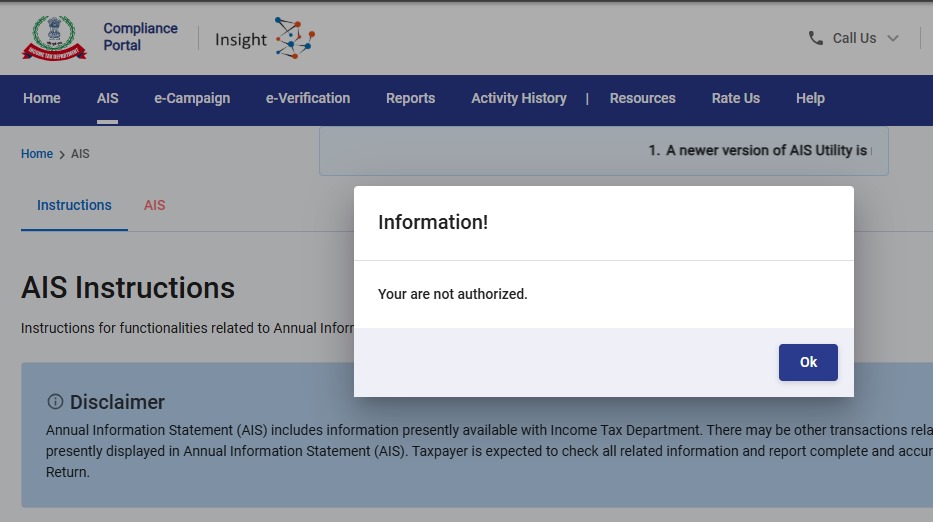
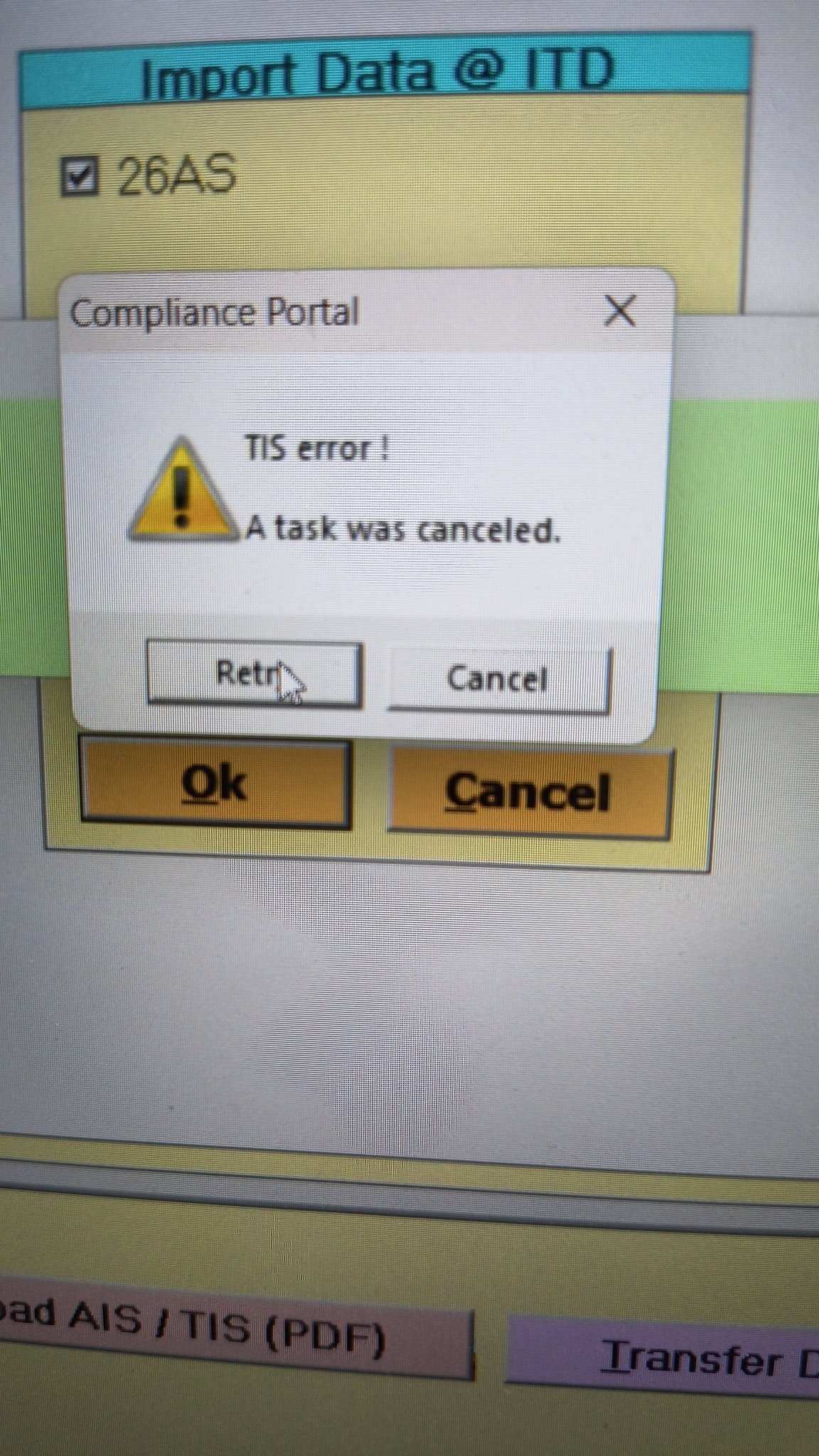
- Error 1: The income tax portal has been issuing an error for the past few days, making it impossible to download the AIS and TIS Data. According to the given challenges in the ITR filing, it would be mindful to think about extending the additional deadline by 2 to 3 weeks. The lack of these important records significantly complicates the tax filing process. Here is the error below –
- Error 2: While submitting the return in ITR-2, the Assessee is facing the following validation error. This error is not coming while filing ITR-3:
- In Schedule CG, the value of b1eii should be: (a) the difference of B1eiA and B1eiB, if eiA > eiB, else 0, if the date of acquisition is before 23 July 2024 and the transfer is on or after 23rd July 2024; (b) 0 in any other case.
- Error 3: While submitting the return in ITR-2, the Assessee is facing the following validation error. This error is not coming while filing ITR-3: In schedule CG, the dropdown at sl. no. B10a, &; Whether the date of limitation /withdrawal was before 23rd July 2024 & is not selected.
- Error 4: While submitting the return in ITR-2, the Assessee is facing the following validation error:
- In Schedule Part-BTI, Sl. No. 15 Aggregate Income of Schedule B-TI is not equal to Sl. No. 12 – 13 + 14
Genius Software Makes Income Tax Filing Easy and Secure
Since Assessment Year 2001-02, Genius tax software has been the number one tax return filing software among Indian tax professionals. Clients can file unlimited returns with this software, including income tax, TDS, AIR/SFT, and other tax forms. Gen BAL (Balance Sheet), Gen IT (Income Tax), Gen CMA, Gen FM, TDS (Tax Deducted at Source) and AIR/SFT make up the six modules of the Genius program. Among the best taxation software in India, Genius provides multiple features such as Backup, Restore, and Password Settings.






I used to get “Request not completed due to technical issue. Please try again.” erorr while verifying thru Aadhar OTP. This was coming up in edge browser. And Internet Explorer (IE) wasnt loading the login page at all. But both login and the verification went thru in chrome. So whoever have this pariticular issue, can try in different browsers. Trying in Chrome worked for me you can as well try in other browsers too.
It is not working for me in Chrome too.
Error : Request not completed due to technical issue. Please try again.
gETTING THIS ERROR WHILE RECOVERING PASSWORD VIA AADHAR
Getting 2 errors while filling IT 2 –
Please select the radio button for the field TDS credit relating to Self/Other Person.
The total of all the quarter of respective CG must be equal to the final figures of schedule BFLA.
How to solve?
I’m also facing the same issue “The total of all the quarter of respective CG must be equal to the final figures of schedule BFLA.”
Can someone help me how to solve this?
Click on Sl. No. F ” of Schedule CG (Information about Accrual / Receipt of Capital Gain )
Add details and enter the quarter wise details of Capital Gain . Enter 0 if there in NIL CG in any quarter .
I am still unable to do all is highlighted in red after entering as well how to see to this.Moreover it does not accept negatives
Select BFLA schedule and enter gains for each quarter so total equals total gains already entered
select the error and in the redirected page, select “Self” radio button. Next if you try to save it will ask head of salary, there if its FD, update “Other Sources”
I am facing a problem with regard to Capital Gains on Sale of Property. The Online version does not reflect the details captured in this section once you logout and login, though the calculations are appropriate. The Offline version is calculating the entire sale value as Capital Gain.
Also there is a problem in filling the details related to sale of equity mutual fund units in both the online and offline versions where the online version exits on inputting the ISIN and the offline version has a different problem. I am not sure who is going to solve these and when I am going to file my returns.
I am also facing this issue and complained to efilingwebmanager@incometax.gov.in wth screenshots and preview download before logout and second login
Many times after filling ITR-3 tried to revalidate, but msg comes
2 Errors found to be rectified
‘Pl select the button for the filled TDS credit relating to self/other person in schedule’
Same is repeated at s.no.
Tried but could not rectify. Pl suggest.
Thanks.
You have to Click on each error, new window will open.. select “Self” click save… since u r getting 2 errors therefore u need to do it 2 times to file your return..
Edit the TDS collected under the schedule “Tax paid ” and tick either self or other person
Dear All, Error when uploading Json File, generated from the ITR-5 Excel utility available in Income tax Portal Invalid hash value identified, modification to ITR details outside utility is not allowed……
Please help how to resolve the issue