• twitter-icon
Unlimited Tax Return Filing


Most Common Technical Errors on New ITR e-Filing 2.0 Portal

Technical Errors on New Income Tax Web Portal

The Income Tax Department launched the new website of Income Tax on June 7th, 2021. The website has had various technical problems since its launch. One of these is the problem related to ITR. Let’s know it in detail here.

Various Errors Related to ITR

People were excited about the new Income Tax website, but after the launch, they are facing various problems with it. The long list of problems also includes problems related to ITR filing, due to which people are getting frustrated. It is obvious that ITR filing is one of the main functions of the Income Tax website, along with other functions. But right now, the website is not able to perform its main function properly.

Submit Query for Error Free Return Filing Software

    Guaranteed Offer on Every Software*

    Common ITR Issues Faced by Taxpayers in FY 2024-25

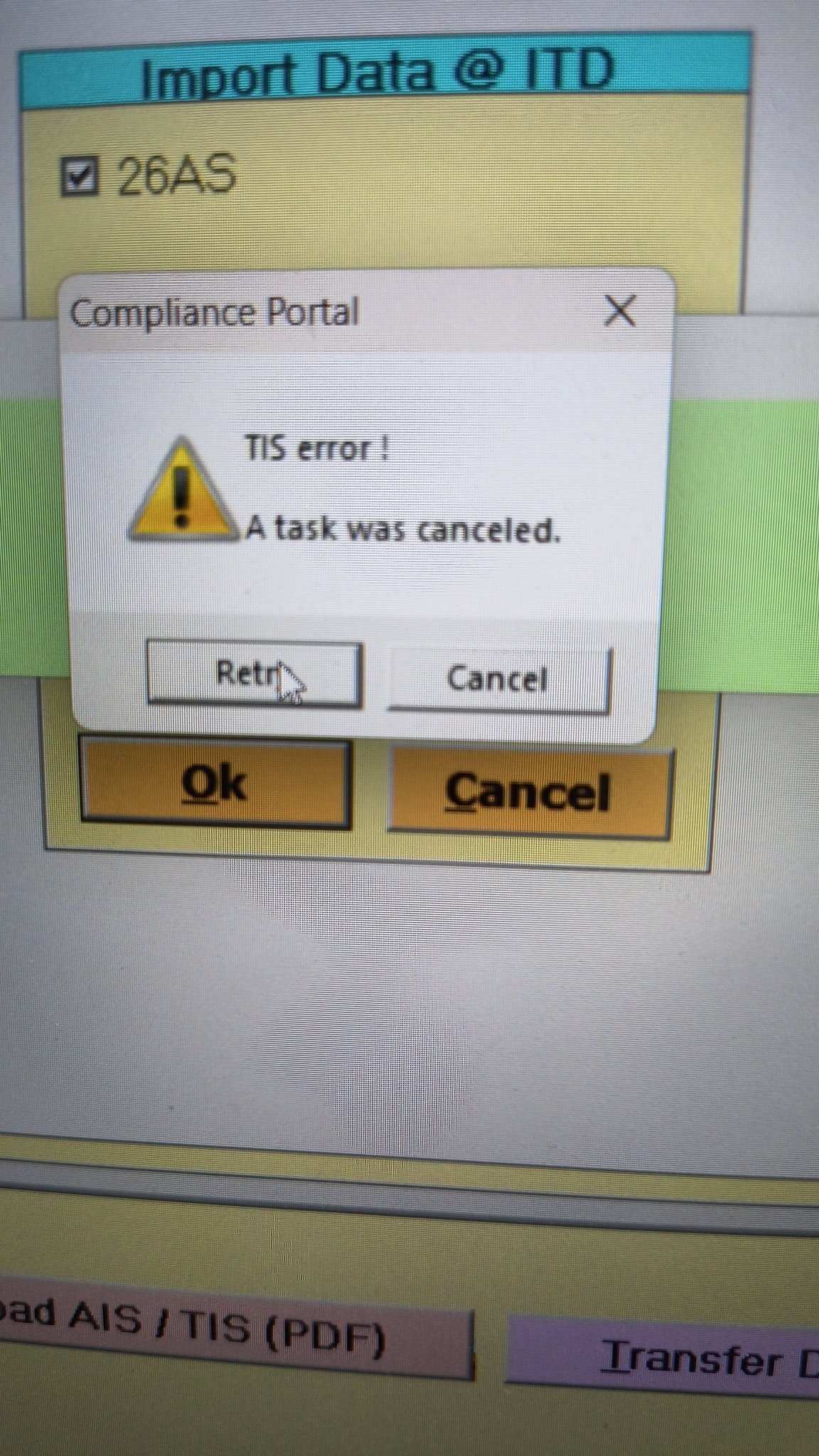
    • Error 1: The income tax portal has been issuing an error for the past few days, making it impossible to download the AIS and TIS Data. According to the given challenges in the ITR filing, it would be mindful to think about extending the additional deadline by 2 to 3 weeks. The lack of these important records significantly complicates the tax filing process. Here is the error below –
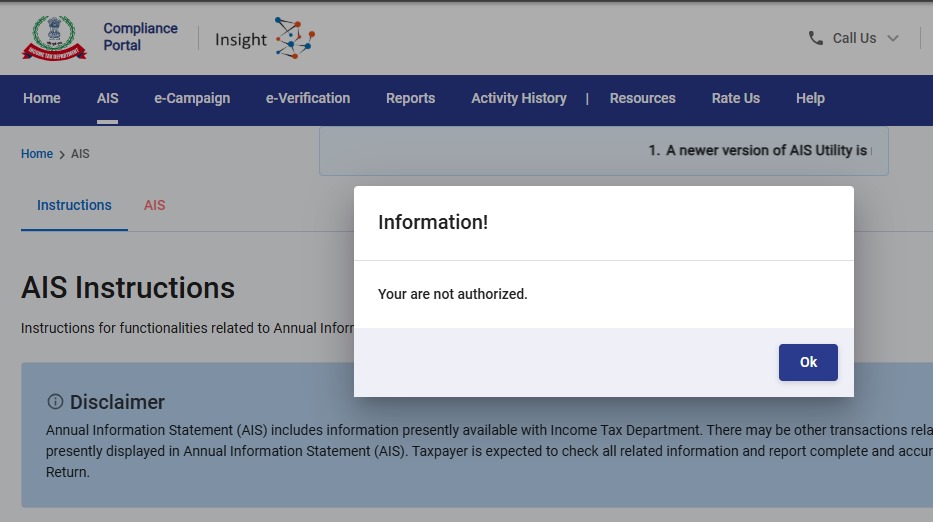
    AIS Error
    • Error 2: While submitting the return in ITR-2, the Assessee is facing the following validation error. This error is not coming while filing ITR-3:
      • In Schedule CG, the value of b1eii should be: (a) the difference of B1eiA and B1eiB, if eiA > eiB, else 0, if the date of acquisition is before 23 July 2024 and the transfer is on or after 23rd July 2024; (b) 0 in any other case.
    • Error 3: While submitting the return in ITR-2, the Assessee is facing the following validation error. This error is not coming while filing ITR-3: In schedule CG, the dropdown at sl. no. B10a, &; Whether the date of limitation /withdrawal was before 23rd July 2024 & is not selected.
    • Error 4: While submitting the return in ITR-2, the Assessee is facing the following validation error:
      • In Schedule Part-BTI, Sl. No. 15 Aggregate Income of Schedule B-TI is not equal to Sl. No. 12 – 13 + 14

    Genius Software Makes Income Tax Filing Easy and Secure

    Since Assessment Year 2001-02, Genius tax software has been the number one tax return filing software among Indian tax professionals. Clients can file unlimited returns with this software, including income tax, TDS, AIR/SFT, and other tax forms. Gen BAL (Balance Sheet), Gen IT (Income Tax), Gen CMA, Gen FM, TDS (Tax Deducted at Source) and AIR/SFT make up the six modules of the Genius program. Among the best taxation software in India, Genius provides multiple features such as Backup, Restore, and Password Settings.


    Disclaimer:- "All the information given is from credible and authentic resources and has been published after moderation. Any change in detail or information other than fact must be considered a human error. The blog we write is to provide updated information. You can raise any query on matters related to blog content. Also, note that we don’t provide any type of consultancy so we are sorry for being unable to reply to consultancy queries. Also, we do mention that our replies are solely on a practical basis and we advise you to cross verify with professional authorities for a fact check."

    Published by CA Vineeta
    Hi,I am Vineeta Sharma. I am a chartered accountant. I have done my (B.Com) from Rajasthan University. I have keen interest in taxation field.
    View more posts
    SAGINFOTECH PRODUCTS

    Join the Conversation

    899 thoughts on "Most Common Technical Errors on New ITR e-Filing 2.0 Portal"

      1. I am also not able to confirm personal information & proceed with gross total income. Next options are not enabled.

    1. I downloaded the offline Desktop version “ITDe-Filing-2022 Setup 1.1.8” utility in July 2022. I get the message “Schema error occurred while submitting your form, please try later” when uploading the form after successful validation. What should I do now? I have painfully entered my returns, do I have to reenter them in another utility if this version does not work?

      1. For all those who were asking regarding the message of error like “schedule IT/tax payment -01-challan se no. Expected;number, found : string ## please contact developer of the utility for the error.

        Here I got the solutions, I asked on twitter and tagged income tax department Twitter handle. They reply & told to download latest version.

        Actually there are 2 updates on 06th of July. i.e. version 1.1.08 & in the evening new version came i.e version 1.1.10.

        So kindly download latest version & try. I am sure problem will be resolved.
        Refer these tweet if needed ;-
        https://twitter.com/IncomeTaxIndia/status/1545363266884423682?t=vwhcronQWiHplM2GkGWWdQ&s=19

        1. Thanks Parth, I was facing the same issue and remedy suggested by you worked perfectly. By downloading latest version of Offline tool, I could successfully file my Return.

      2. I got the same schema error and was able to resolve it. Hope this helps some other people.
        In my case, I started with the version 1.1.8 tool, entered all the details, passed validation, and at the step of uploading the returns, got the schema error. I learnt that there is a new 1.1.10 version. I downloaded it and tried to submit it, but it also showed the same error. Here is how I was able to resolve it:

        1. From the desktop tool, download the JSON file of the filled return.
        2. On your windows machine, clear the temporary data. Goto c:\users\\AppData\Roaming. Enable viewing hidden files in your file explorer if you cannot see AppData.
        3. Delete all the folders starting with ITe-filing….
        4. Start the version 1.1.10 desktop tool. Your saved draft will be gone.
        5. Start a new filing and import the JSON file from step 1.
        6. Fix and validate errors and file the returns, it should go through.

        It seems even after upgrading the tool, it still uses the old cache on the computer. A bug which they should fix.

      3. Am getting the same Schema error while uploading but am using version 1.1.10. Communication with the Income Tax Department on their grievance portal has yielded a very poor response as yet. Just wanted to know if you have been to overcome this issue ?

    2. While filing ITR 1, radio buttons for answering one of three questions are not working. I can’t move further till I select this radio button.

        1. I am also facing same issue, radio button not enable for giving “please answer the following question”
          Big peanlty should be levied to infosys, there are so many problems

    3. Sir,

      [#/ITR/ITR1/TaxPayments/TaxPayment/0/SrlNoOfChaln: expected type: Number, found: String];#;Please contact the developer of your utility with the error key

      facing the issue since 5 pm july 6. what to do

      1. I was also getting the same error when was using offline utility. I filed online today and it is done without any other. So try online or download latest utility 1.1.10

    4. Error message while verifying noticed 06.07.2022@10PM#/ITR/ITR1/TaxPayments/TaxPayment/0/SrlNoOfChaln: expected type: Number, found: String];#;Please contact the developer of your utility with the error key

      1. While filing ITR 1, radio buttons for answering one of three questions are not working. I can’t move further till I click this radio button. Some times , confirmation of each segment not working even after modifications.

      2. Similar error: Can someone please help.

        “[#/ITR/ITR1/CreationInfo/IntermediaryCity: expected maxLength: 25, actual: 26];#;Please contact the developer of your utility with the error key”

        1. same error for me also , is it resolved ??? I raised from last week still IT department not resolved still now .

            1. I was going through all the comments and thought I should give it a try, so I downloaded desktop utility version for ITR filing, and it worked for me. I was able to file ITR.

    5. July 6, 2022 at 8:59 pm [#/ITR/ITR2/ScheduleIT/TaxPayment/0/SrlNoOfChaln: expected type: Number, found: String, #/ITR/ITR2/ScheduleIT/TaxPayment/1/SrlNoOfChaln: expected type: Number, found: String];#;Please contact the developer of your utility with the error key

    6. July 6, 2022 at 3:59 pm
      [#/ITR/ITR2/ScheduleIT/TaxPayment/0/SrlNoOfChaln: expected type: Number, found: String, #/ITR/ITR2/ScheduleIT/TaxPayment/1/SrlNoOfChaln: expected type: Number, found: String];#;Please contact the developer of your utility with the error key

    7. Please fix this bug:

      [#/ITR/ITR2/ScheduleIT/TaxPayment/0/SrlNoOfChaln: expected type: Number, found: String, #/ITR/ITR2/ScheduleIT/TaxPayment/1/SrlNoOfChaln: expected type: Number, found: String];#;Please contact the developer of your utility with the error key
      The return has been validated successfully without any error.

        1. yes please post a comment here if it starts working or if there is a solution to this problem –
          when validation is successful but verifying ITR-2 gives the error: [#/ITR/ITR2/ScheduleIT/TaxPayment/0/SrlNoOfChaln: expected type: Number, found: String, #/ITR/ITR2/ScheduleIT/TaxPayment/1/SrlNoOfChaln: expected type: Number, found: String];#;Please contact the developer of your utility with the error key

        2. there is NO problem in verifying this morning – i did a quick confirmation of each part of the ITR and did a validation again – and then submitted for verification – it went through , without any problem – no error like yesterday –

      1. I am facing similar error .income tax department has to rectify it,I think it is slow speed of website making us to get bored of filing a return.[#/ITR/ITR2/ScheduleIT/TaxPayment/0/SrlNoOfChaln: expected type: Number, found: String];#;Please contact the developer of your utility with the error key

      2. Have the same issue since morning today

        [#/ITR/ITR2/ScheduleIT/TaxPayment/0/SrlNoOfChaln: expected type: Number, found: String, #/ITR/ITR2/ScheduleIT/TaxPayment/1/SrlNoOfChaln: expected type: Number, found: String];#;Please contact the developer of your utility with the error key

      3. Sir,
        While submitting the itr-1 getting the following error message. Please do help.
        [#/ITR/ITR1/TaxPayments/TaxPayment/0/SrlNoOfChaln: expected type: Number, found: String];#;Please contact the developer of your utility with the error key

        what to do

      4. I am getting string error while validating itr 2 online and schema error by off line mode since last 5 days
        Raised grivence with cpc…..got reply update Microsoft net 3.5 do not use special characters…..but still problem persists.
        If anybody can guide…..please help

    8. The return has been validated successfully without any error. But ultimately the following comment appeared. I fail to understand what this means. How to send the return now.

      [#/ITR/ITR2/ScheduleIT/TaxPayment/0/SrlNoOfChaln: expected type: Number, found: String, #/ITR/ITR2/ScheduleIT/TaxPayment/1/SrlNoOfChaln: expected type: Number, found: String];#;Please contact the developer of your utility with the error key
      The return has been validated successfully without any error.

      1. i too am facing the same problem today 6th Jul 2022 – validation of ITR2 is successful – how does one file the income tax return ? gives this error while verifying – [#/IT/ITR2/ScheduleIT/TaxPayment/0/SrlNoOfChain: expected type: Number, found: String];#;Please contact the developer of your utility with the error key

    9. [#/ITR/ITR2/ScheduleIT/TaxPayment/0/SrlNoOfChaln: expected type: Number, found: String, #/ITR/ITR2/ScheduleIT/TaxPayment/1/SrlNoOfChaln: expected type: Number, found: String];#;Please contact the developer of your utility with the error key

      1. Same problem.. Does infosys at all test this portal? simple JS error on type casting. pls look into code in self assement tax section. error is there.

      2. I am also facing the same error… can anybody update a fix here.

        [#/ITR/ITR2/ScheduleIT/TaxPayment/0/SrlNoOfChaln: expected type: Number, found: String, #/ITR/ITR2/ScheduleIT/TaxPayment/1/SrlNoOfChaln: expected type: Number, found: String];#;Please contact the developer of your utility with the error key
        The return has been validated successfully without any error.

    10. Sir,
      While submitting the itr-1 getting the following error message. Please do help.
      [#/ITR/ITR1/TaxPayments/TaxPayment/0/SrlNoOfChaln: expected type: Number, found: String];#;Please contact the developer of your utility with the error key

      1. Yes I am too facing this problem and feed up with return filing. First honestly pay tax and than to justify the same file return with continue technical problem in software from last 2 FY.

      2. Facing the same error “[#/ITR/ITR1/TaxPayments/TaxPayment/0/SrlNoOfChaln: expected type: Number, found: String];#;Please contact the developer of your utility with the error key”
        How to resolve this?

      3. Hi… Joshi, I am also facing same problem from 2:00 pm [#/ITR/ITR1/TaxPayments/TaxPayment/0/SrlNoOfChaln: expected type: Number, found: String];#;Please contact the developer of your utility with the error

      4. I am facing the same problem – SrlNoOfChaln: expected type: Number, found: String];#;Please contact the developer of your utility with the error key

      5. Sir,
        While submitting the itr-1 getting the following error message. Please do help.
        [#/ITR/ITR1/TaxPayments/TaxPayment/0/SrlNoOfChaln: expected type: Number, found: String];#;Please contact the developer of your utility with the error key

    11. I tried to file return using ITR-1 but I am not able to select the reason ubder heading “Are you filing the income tax return for any of the following reasons?”
      The choice is not being highlighted on clicking it

    12. while filing ITR 4 TDS deducted does not match with 26 AS. How to rectify auto filled deduction amount?

    13. You can use Microsoft edge and clear the cache etc you will be able to file the ITR 1 online in the income tax portal. I tried and it is working now

    14. Unable to verify online verification since last 10days trying everyday. Tried with different laptop and different browsers also.

      Error: Something went wrong please try later.

      Please resolve the issue ASAP on urgent basis.

      1. Yeah, Me too facing this. (Error: Something went wrong please try later.)
        Have raised tickets also, (6178800 and 6201053). Still not resolved.

      2. I am facing the same issue “something went wrong please try later” while trying to verify ITR 2. Any idea if this issue has a solution?

    15. I am also facing issues in filing ITR for a couple of weeks. Not able to confirm personal details and everything else is greyed out.Tried changing browser but had no success. Kindly help…

        1. Hello Nilesh Bansal…..I have tried everything. No result. This problem was in the last year also. Last year I had to sent physical ITR V by speed post. This defect in the portal still not rectified. Ridiculous.

      1. Facing problem while filing itr .personal information step ist not confirmed.what is the problem .plz help

        1. I myself being not able to file my ITR 1 since last three days. I am also unable to confirm my personal details and proceed to next step. whats the reason.

          1. Same here. Even if I confirm the details the site is saying to confirm the personal information again and again

      2. Hi I too facing the same issue. Once i entered, i am unable to conform with green tick. If you got the solution please let me know.

    16. While filling ITRs in the field name State under contact details showd “Outside India/Foreign” automatically and not alow to change the sate name.

      1. Dear friend,
        I also come across the same issue “Outside state/Foreign”, but i resolved the problem in the following way.
        In Google chrome, On the right top, there is three dots in vertical manner. Click on the same and select more tools option and then clear browsing cache for all time. After than login again and file. Everything will be alright.

          1. Hi Raghuram…
            Even after clearing the cache, still can’t resolve the issue. please try these step:
            Initially, the field will be “Outside state/Foreign”. You just change the country field name in Address Details to some other country and afterward get back to India. “Outside state/Foreign” issue will be solved.

    Your email address will not be published. Required fields are marked *

    Latest Posts

    Best Offer in 2025

    Powering India's Taxation Experts with Innovation

    Upto 20% Off
    Tax, ROC/MCA, XBRL, Payroll, Online GST

    Limited Offer, Hurry

    New Tax Offer 2025

    Upto 20% Discount on Tax Software

      Select Product*

      Genius Software