



The Income Tax Department launched the new website of Income Tax on June 7th, 2021. The website has had various technical problems since its launch. One of these is the problem related to ITR. Let’s know it in detail here.
Various Errors Related to ITR
People were excited about the new Income Tax website, but after the launch, they are facing various problems with it. The long list of problems also includes problems related to ITR filing, due to which people are getting frustrated. It is obvious that ITR filing is one of the main functions of the Income Tax website, along with other functions. But right now, the website is not able to perform its main function properly.
Submit Query for Error Free Return Filing Software
Common ITR Issues Faced by Taxpayers in FY 2024-25
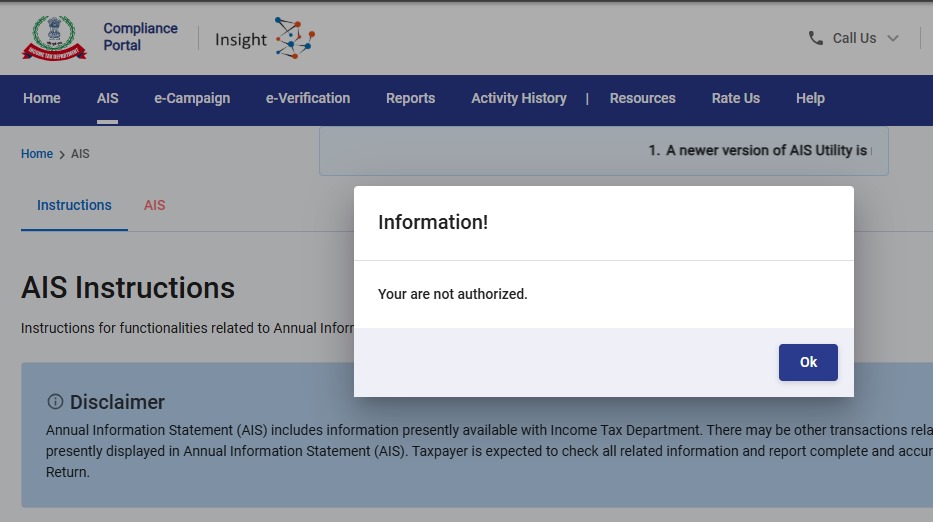
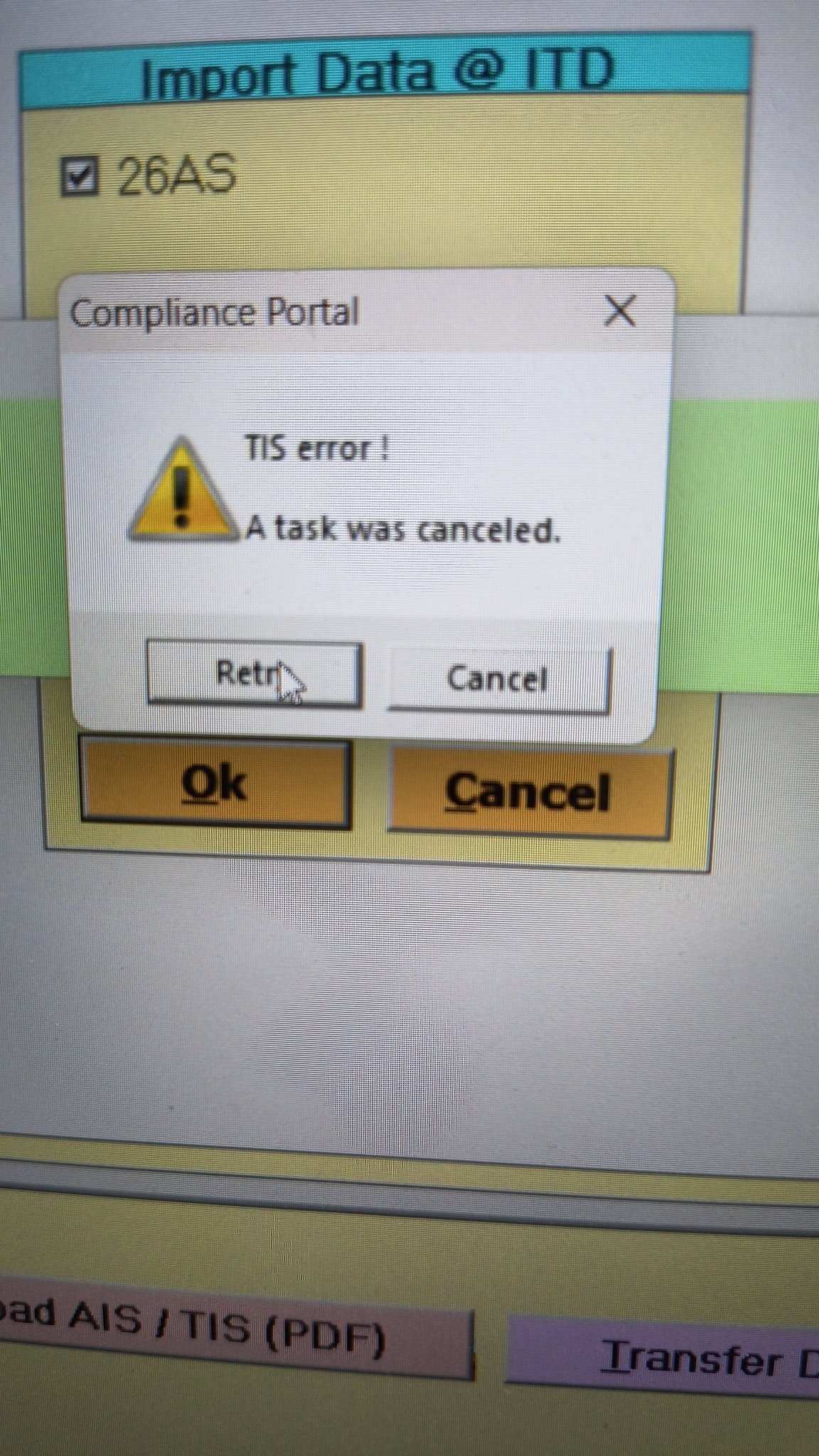
- Error 1: The income tax portal has been issuing an error for the past few days, making it impossible to download the AIS and TIS Data. According to the given challenges in the ITR filing, it would be mindful to think about extending the additional deadline by 2 to 3 weeks. The lack of these important records significantly complicates the tax filing process. Here is the error below –
- Error 2: While submitting the return in ITR-2, the Assessee is facing the following validation error. This error is not coming while filing ITR-3:
- In Schedule CG, the value of b1eii should be: (a) the difference of B1eiA and B1eiB, if eiA > eiB, else 0, if the date of acquisition is before 23 July 2024 and the transfer is on or after 23rd July 2024; (b) 0 in any other case.
- Error 3: While submitting the return in ITR-2, the Assessee is facing the following validation error. This error is not coming while filing ITR-3: In schedule CG, the dropdown at sl. no. B10a, &; Whether the date of limitation /withdrawal was before 23rd July 2024 & is not selected.
- Error 4: While submitting the return in ITR-2, the Assessee is facing the following validation error:
- In Schedule Part-BTI, Sl. No. 15 Aggregate Income of Schedule B-TI is not equal to Sl. No. 12 – 13 + 14
Genius Software Makes Income Tax Filing Easy and Secure
Since Assessment Year 2001-02, Genius tax software has been the number one tax return filing software among Indian tax professionals. Clients can file unlimited returns with this software, including income tax, TDS, AIR/SFT, and other tax forms. Gen BAL (Balance Sheet), Gen IT (Income Tax), Gen CMA, Gen FM, TDS (Tax Deducted at Source) and AIR/SFT make up the six modules of the Genius program. Among the best taxation software in India, Genius provides multiple features such as Backup, Restore, and Password Settings.






I have been trying to e-file ITR-2 for AY2021-22 for past several days and am stuck on 1 item relating to my LT Carried Forward Losses from AY2020-21 not getting populated in Schedule CFL and the editing page doesn’t allow me to input the same manually (AY selection button stays gray and as such, no changes or additions can be made). I have been sending queries and grievances about this issue but no response on this issue even though some of the other issue regarding TDS were resolved at least partly.
This CF Loss doesn’t even affect my taxes for the year because it is not going to be used in AY2021-22 and just needs to be carried over. But they won’t even let me know if I should go ahead and file without it and that this issue can be resolved later. Very poor service by the e-filing Helpdesk.
If anyone has ideas on how to resolve this issue, it would be greatly appreciated.
I am facing the same problem. But I will need to remit extra tax if CFL for AY 2020-2021 not taken in to account. Thank you for your post which helped me to find out this is a common problem.
I think I faced this problem last year. The solution, as far as I can remember, is, you first tick the box by the year to which the carry forward loss pertains and click edit. Input carry forward loss manually into each respective year.
With this new portal I am unable to file the return (ITR-2) due to name mismatch with PAN. Never had such problems earlier. The portal is not reflecting the corrected name as per PAN or Aadhaar. Its been almost two months, I have raised grievance, spoke to customer care, emailed efilingwebmanager mutliple times but the issue is still not fixed. With just another 2 days left, I am not sure what to do.. Any advises?
I have the same issue, not sure what to do
I also face the same issue. I have no idea what to do. I just filed a grievance, but I don’t think they will address it.
Hey JeanRaj,
I just found a solution, you could try this.
Prepare the json file from income tax website itself, donot use any thirdparty websites like cleartax or something else to create json file. For some reason they don’t work. Actually I compared two json files from cleartax and incometax websites, both the names are same, but the differences are in some other fields.
Please give it a try. Use https://www.incometax.gov.in/iec/foportal this to create and upload json.
E-Verification using addhar based opt is not happening. Showing note as “technical error try later”
I am getting “Date of deposit cannot be prior to 01-04-2020.” error even though I’ve made self tax payment on 24th Dec 2021.
Hi, did you get any solution this error?
It worked for me using Chrome. I had deleted the earlier entry (created in Safari Browser) and created another entry (now using Chrome Browser) and it worked like charm.
Happy Filing.
Were you able to solve this date of deposit issue
you can go back to the place and try to add another entry of those details, for me the initial details that I had added did not have any date showing that’s why I added another row of details and then delete the earlier one so it worked fine for me.
Hope this helps!
Hi, does your issue resolved ?
I am facing the same error. I Made the payment on 24th dec 2021, but getting error like “Date of deposit cannot be prior to 01-04-2020.”
I am also getting the same response. Did you find a solution. Please let me know.
I am also getting same problem. any fix?
did you get your issue resolved?
being forced to select 80DD or 80U also under Chapter VI-A , when I only want 80TTB
Facing same issue and updated on this for resolving it
I faced this problem when using Safari browser on MacBook. On using Chrome browser the issue got resolved. The self assessment tax paid entry also added using Chrome after deleting the entry made using Safari which was showing the error ““Date of deposit cannot be prior to 01-04-2020.” The problem seems to be Safari browser specific.