


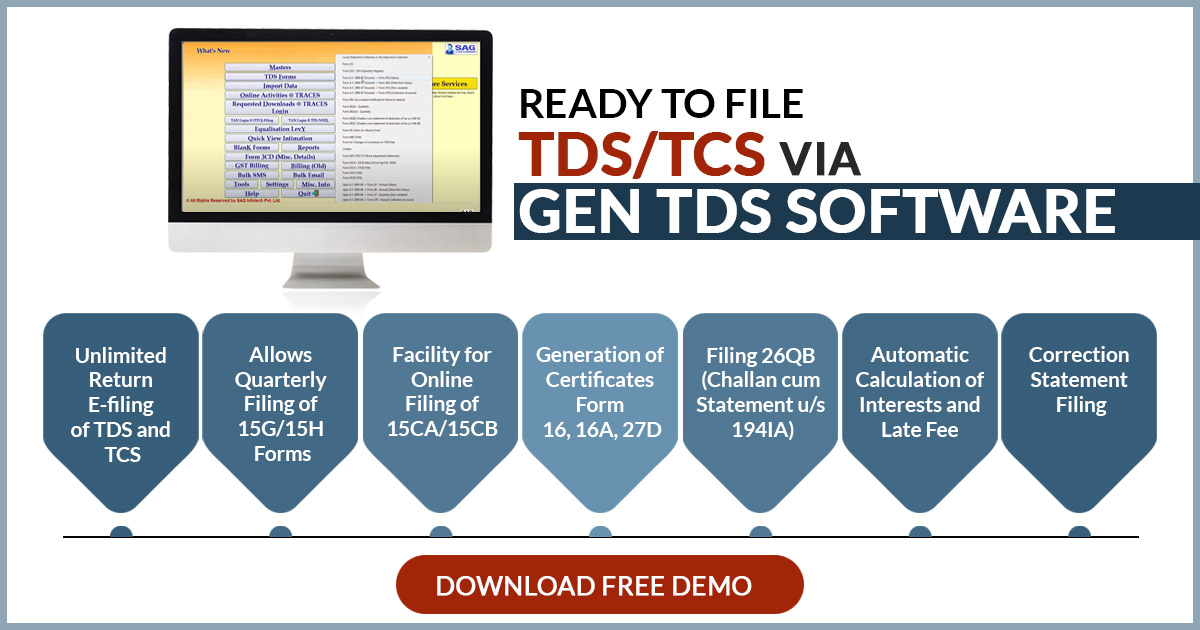
Tax professionals, accountants, and businesses often look for the best TDS return-filing software before making a purchase. To help users make an informed decision, SAG Infotech offers a free download of GenTDS software. The software allows users to explore key features such as TDS/TCS return preparation, certificate generation, challan management, data import, built-in validation, and other compliance tools.
This free trial provides an excellent opportunity to evaluate the software’s features, performance, and ease of use before purchasing the licensed version. This TDS return filing software is designed to file returns as per the requisitions of the Income Tax Department, Government of India.
Need a Demo of TDS Return Filing Software
The Gen TDS Software allows taxpayers to log in directly to the TRACES CPC and NSDL portals. It also helps users to prepare and e-file their TDS returns efficiently. The software is incorporated with recognised standard codes, including All India PIN codes, ISD codes, TAN/PAN AO codes, TIN-FCs, MICR and IFSC codes, bank BSR codes, service tax ranges, and more.
Here, we will guide you on how to download the free trial of TDS Return Filing Software for TY 2026-27. If you are looking for a free trial of TDS software, SAG Infotech offers a free demo of GEN TDS Software. Download it today to experience easy and efficient TDS/TCS return filing. Currently, there is up to a 20% discount running on the Gen TDS software.
Procedure to Free Download Gen TDS Software
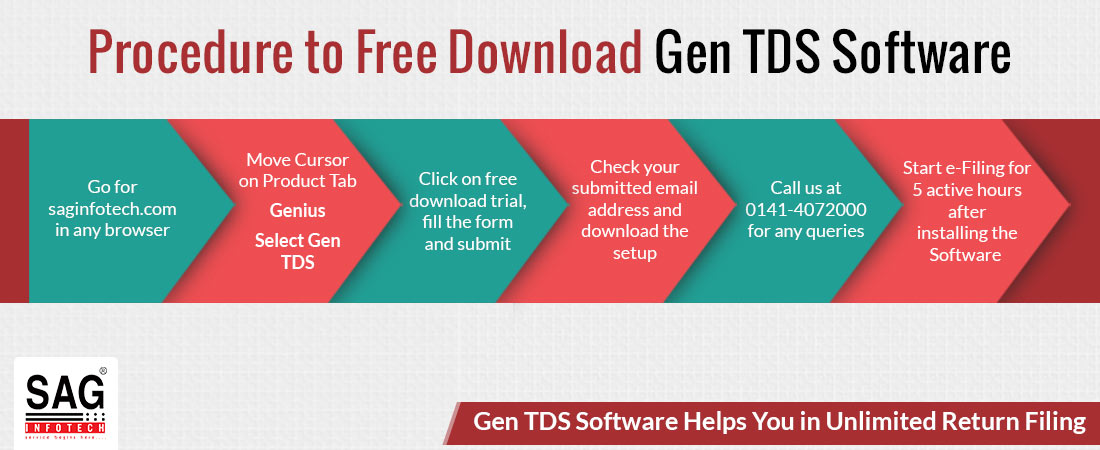
- Open a browser and type https://saginfotech.com/
- Move the cursor to the Our Products tab –> Genius –> Select Gen TDS software in the tab.
- The option of a free download trial comes up. Now, just click on the column and fill in the information in the form. Furnish all the details and submit the form
- Evaluate your given email address, and afterwards, download the setup
- For clarification of any doubts, contact 0141-4072000
- You can start e-filing after installing the software and after 5 active hours of installation
Features of TDS Return Filing Software for the Trial Version
- TDS Forms 141(26QB, 26QC, 26QD) Filing
- Forms 145(15CA) and 146(15CB) with E-Filing
- Quarterly E-filing of Form 121 (Earlier 15G or 15H)
- Available Forms 134/135(49B)
- Filing of Form 137(24G)
- User-friendly software
- Free download of TDS certificates 16, 16A, and 27D
- Free download of the TDS software from NSDL
- TDS traces the facility
- TDS on salary calculation
- TDS return utility
- 5 hours of usage of the free trial version, during which you can file the TDS Return
- Prepare the e-TDS return and calculation of tax
- e-TDS filing of Returns for forms 138(24Q), 140(26Q),144(27Q), 143(27EQ) with proper validations
- File the TDS/TCS return online from the assessment year 2003-04 onwards
- Import/export data from MS Excel files/text files/ FVU files
How Can Professionals Get Free TDS Return Filing Software?
The CA, CS and tax professionals often manage the compliance requirements of multiple clients. The free TDS return filing software can simplify the filing process, save time, and improve accuracy. A variety of TDS return filing solutions are available to help tax professionals efficiently.
There are two ways in which professionals can access free TDS return filing software-
- Government portals: For filing TDS returns for free, the Indian government proposes a user-friendly online platform. But it has more manual input compared to the specialised software, which illustrates a budget-friendly alternative for professionals who are adept at using the platform.
- Freemium versions with limited features: Certain companies pertinent to software deliver complimentary basic versions of their TDS filing software. Such versions do not charge any fee; they frequently come with restrictions like limitations on the number of returns you can file and a lack of advanced features like bulk upload or error checking. For professionals with a small number of clients, such basic versions could be an effective option.
It is crucial to conduct thorough research and compare features while proceeding with free TDS return filing software. It is important to consider distinct factors like ease of use, the restrictions of free versions, and available support options. Regarding data, specific free software options might have limitations or may require an upgrade to access features important for professionals, like bulk filing software.
What are the Benefits of Downloading Free TDS Return Filing Software?
It eliminates the requirement for manual spreadsheets, and switching to TDS return filing software offers significant benefits for both companies and tax experts. Discover how the Best TDS return filing software can simplify your tax compliance procedure:
- Enhanced Precision: Software automates calculations and ensures data consistency, decreasing the chance of errors that can lead to penalties.
- Improved Association: Software maintains all your TDS data in a central location, making it simpler to retrieve previous details and handle multiple clients.
- Effortless Time Saving: Pre-filled forms, import functionalities, and automated filing remarkably decrease the time consumed on data entry and processing.
- Compliance Assurance: Regular updates ensure that your software complies with the updated TDS norms, generating confidence in you.
- Simplified Workflow: So, for the sake of the reason that you do not miss any step, the software navigates you through the step-by-step filing procedure.
You are enabled to free your valuable time and resources, minimise errors, and ensure a smoother and more efficient tax filing experience by using the TDS return filing software.
Why Should We Choose the Best TDS Software for Return Filing?
31st October 2026 is the last date for filing TDS returns for the second quarter of the tax year 2026-27. You should file a timely return to prevent the penalty for late filing.
For easier TDS/TCS compliance, it is essential to utilise a powerful and stable software that provides efficiency while maintaining the correct tax credits for employees, vendors, and other stakeholders.
Some of the essential fields that need to be analysed within the effective TDS compliance software:
- It should be easier for non-experienced people.
- Should work efficiently with after-sales assistance to attain timely filing.
- Software must be regularly updated to ensure a better experience and faster response times for statutory notifications.
- Compatible with the Income Tax website.
- For error-free returns, smart detection of inconsistencies.
- Managing heavy data at a quicker pace just takes a few minutes.
- Easy generation and distribution of TDS Certificates
- Taking out TDS-related information for Tax Audit
- Easy Procedure for Correction Statements
- Should give the best user experience
- Follow recent guidelines for TDS
- Should be updated every time
- Money and time-saving
- Maintain all the records in a proper format
Companies with larger data volumes are facing issues with operational speed for importing data, generating returns, and other tasks. It is an essential concern that needs to be sorted out.
Gen TDS software is reliable software and is known for its speed, support, and value for money. The software has been providing its services for more than 20 years. The software is available in numerous variants with multiple user options.
General Queries on Gen TDS/TCS Return Filing Software
Q.1 – Can Gen TDS Software File Unlimited Returns?
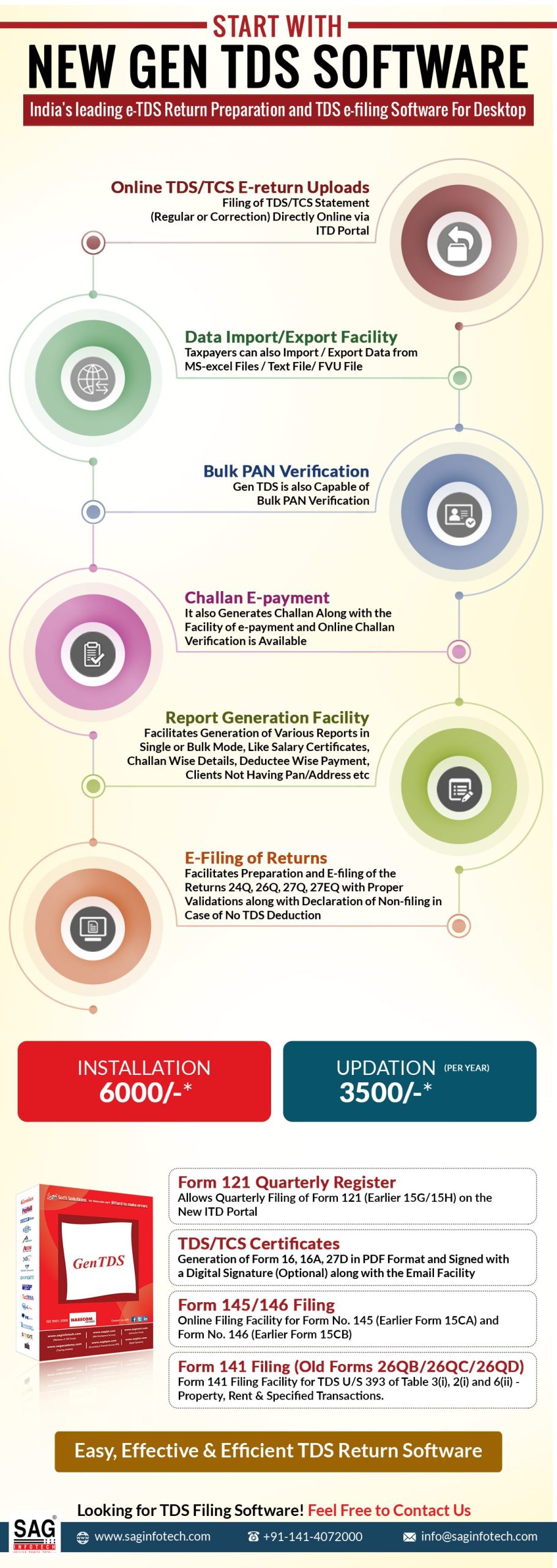
Yes, unlimited returns and be filed using Gen TDS filing software. It is a potential tool for all your TDS/TCS filing requirements. The tool is here to help you with preparing and e-filing of return such as Form 24Q, 26Q, 27Q, 27EQ with Proper Validations along with Declaration of Non-filing in Case of No TDS Deduction. Professionals now have the facility of directly logging into the TRACES CPC and NSDL with Gen TDS filing software, this calls off the requirement to, again and again, create a User ID. Gen TDS is one of the most secured government authorized TDS filing software.
Q.2 – Is it Possible to File Annual e-TDS/TCS via Gen TDS Software?
Yes, it is possible to file annual e-TDS and e-TCS via Gen TDS software. Under section 206 of the IT Act, annual TDS return is prepared using Form 24,26 and 27 and TCS under section 26C is prepared using form 27E. Such returns if presented through a CD/pen drive should be affixed with a verification form – Form 27A (in case of annual TDS) and Form 27B (in case of annual TCS)
Q.3 – Is it Possible to File Quarterly e-TDS/TCS via Gen TDS Software?
Yes quarter online compliance of TDS and TCS is possible via Gen E-TDS return Software. Online TDS is an electronic form valid under section 200(3)/206C and amended by the Finance Act 2005 which needs to be presented on a quarterly basis. Forms to file quarterly TDS are Form Nos. 24Q, 26Q and 27Q and quarterly TCS is Form No. 27EQ. Such returns if presented through a CD/pen drive should be affixed with a verification form – Form 27A (in case of annual TDS) and Form 27B (in case of annual TCS)
Q.4 – Does the software allow generating Form 16 B?
Yes. Gen TDS allows generating Form 16B. 15 days from uploading Form 26QB users can download Form 16B from the link visible on the software.
Q.5 – Why is Gen TDS Return e-filing Software Better than Others?
Gen TDS is among the most desired software for filing TDS. It is because the software has a user-friendly interface and each form on the software strictly adheres to the legal norms of TRACES and CPC. Apart from filing TDS and TCS, the software also facilitates pre-determining of the TDS amount, calculates interest and penalty all in a single click.
Q.6 – Is the E-payment of Challan Possible from Gen TDS software?
Generating Challan along with the facility of e-payment of challan is possible via Gen TDS e-filing software.
Q.7 – Is there any Specific Operating System Required for the Functioning of Gen TDS Software on a Computer?
Windows 98, XP(Service Pack 1 or Higher), Vista, Windows 7 or 8 families (32- or 64-bit) is the ideal system to run Gen TDS return filing software.
Q.8 Is there a need for any Technical Configuration in the System to Process Gen TDS/TCS Software?
Configuration required for processing Gen TDS/TCS software:
- Pentium or Later Processor, Minimum of 32 MB of RAM, Minimum Hard-Disk Space 200 MB.
Q.9 Gen TDS Software Trial Version Requires How Many Active Hours of Installation?
The trial version of the software requires 5 active hours of installation to get completely set for processing the returns.
Q.10 What is the Step-wise Procedure to Download Gen TDS Software for TDS/TCS Return Filing?
- Step 1. First of all, open the saginfotech official website
- Step 2. Click on the Move Cursor on Our Product Tab > Genius > Select Gen TDS software in the tab.
- Step 3. Click on the option of Free Trial Download visible on the screen and fill in the form. Complete the details asked in the form and click on submit.
- Step 4. Complete the basic details asked in the inquiry form i.e. Name, Email address and Mobile no. and press “Send”.
- Step 5. You will receive the download link at the email address you provided. Take the help of the link to download for free the Gen TDS software.
Q.11 Is there any Assistance for the Software Purchased?
Yes, there is a customer service support team available to solve issues related to the software. Just dial the helpline number 0141-4072000 and press 5 for TDS assistance. Lines are open from 10 AM to 8 PM.


TDS RETURN FILE
I need to file tds return of AY2021-22
What will be the charge?
if data between 100 charge 500+tds filling charges, if data over 1000+tds return filing charges.
Hi I want to know that I m not a salaried employee. I was working with coal India but now I m on leave due to maternity. I m on leave without pay. However, my company credited a certain amount in my account under some category and the TDS was around 48k for the quarter ending September 2020. Hence I want to know where can I file it and when will I get the refund.
Hi, I am looking for a new
Let me know within how many days do TDS amount gets credited in assessee’s saving account from the date of submission of ITR for the concerned year?
Generally, an ITR gets processed within 30 days of filing and refund is credited within 5-10 days of processing. However, the processing time period is not fixed and may take more time.