The Income Tax Department launched the new website of Income Tax on June 7th, 2021. The website has had various technical problems since its launch. One of these is the problem related to ITR. Let’s know it in detail here.
Various Errors Related to ITR
People were excited about the new Income Tax website, but after the launch, they are facing various problems with it. The long list of problems also includes problems related to ITR filing, due to which people are getting frustrated. It is obvious that ITR filing is one of the main functions of the Income Tax website, along with other functions. But right now, the website is not able to perform its main function properly.
Submit Query for Error Free Return Filing Software
Common ITR Issues Faced by Taxpayers in FY 2024-25
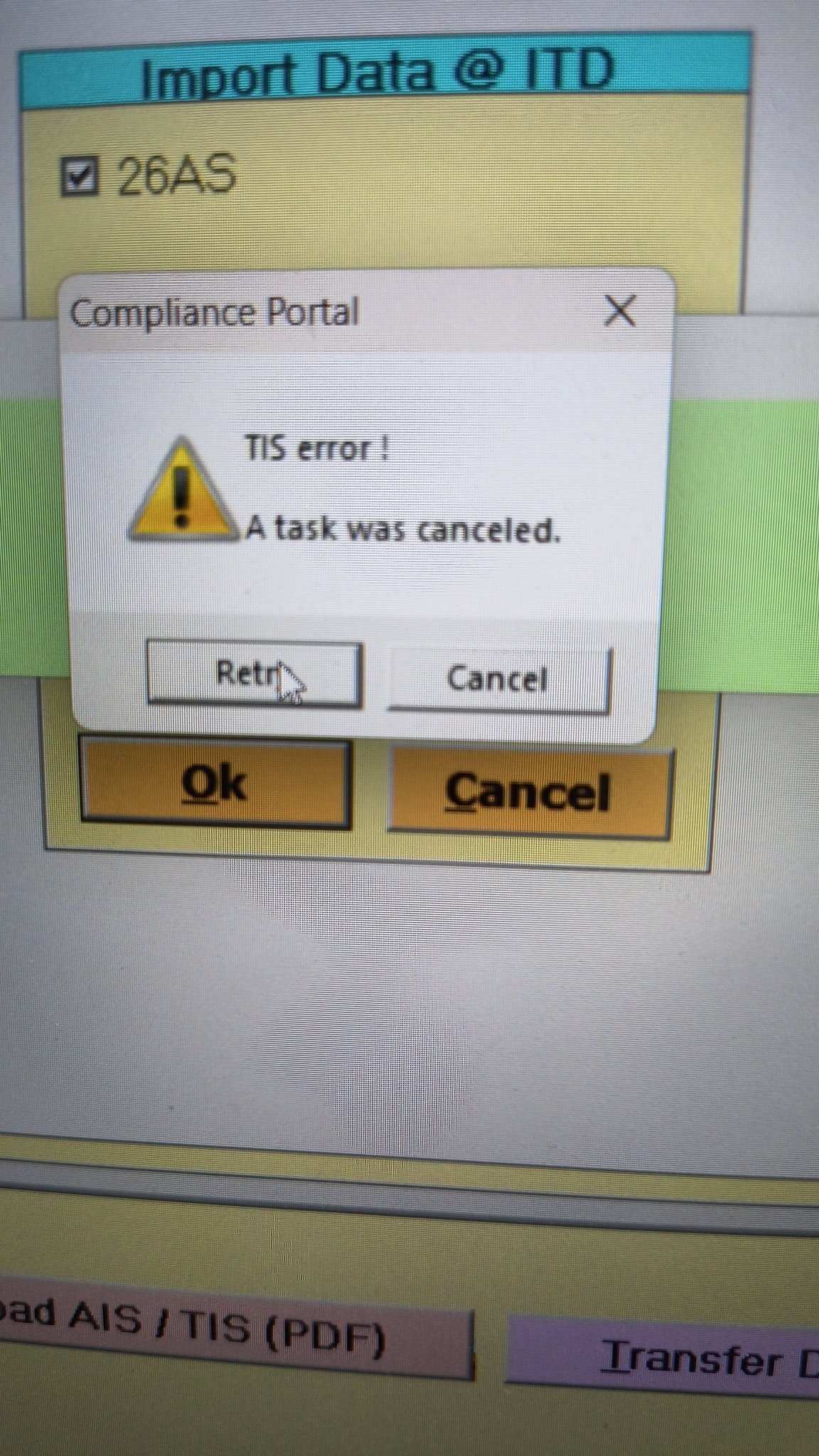
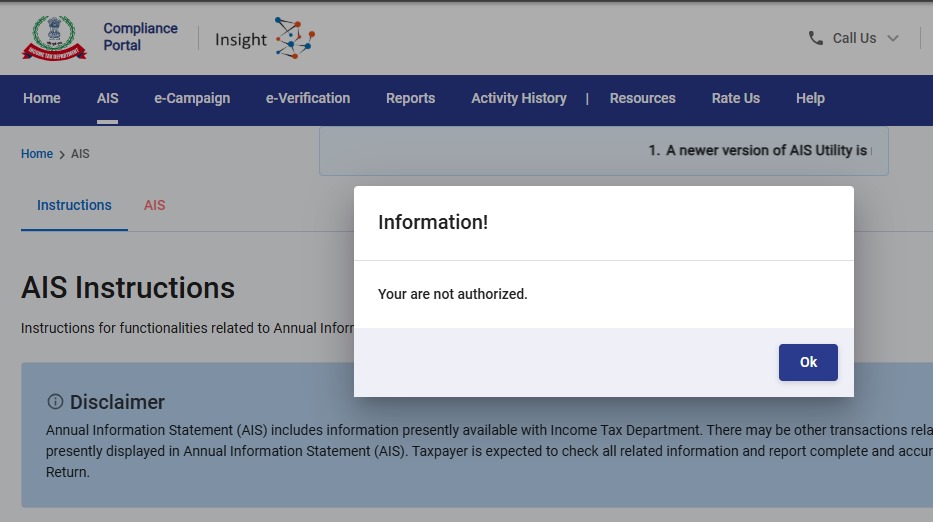
- Error 1: The income tax portal has been issuing an error for the past few days, making it impossible to download the AIS and TIS Data. According to the given challenges in the ITR filing, it would be mindful to think about extending the additional deadline by 2 to 3 weeks. The lack of these important records significantly complicates the tax filing process. Here is the error below –
- Error 2: While submitting the return in ITR-2, the Assessee is facing the following validation error. This error is not coming while filing ITR-3:
- In Schedule CG, the value of b1eii should be: (a) the difference of B1eiA and B1eiB, if eiA > eiB, else 0, if the date of acquisition is before 23 July 2024 and the transfer is on or after 23rd July 2024; (b) 0 in any other case.
- Error 3: While submitting the return in ITR-2, the Assessee is facing the following validation error. This error is not coming while filing ITR-3: In schedule CG, the dropdown at sl. no. B10a, &; Whether the date of limitation /withdrawal was before 23rd July 2024 & is not selected.
- Error 4: While submitting the return in ITR-2, the Assessee is facing the following validation error:
- In Schedule Part-BTI, Sl. No. 15 Aggregate Income of Schedule B-TI is not equal to Sl. No. 12 – 13 + 14
Genius Software Makes Income Tax Filing Easy and Secure
Since Assessment Year 2001-02, Genius tax software has been the number one tax return filing software among Indian tax professionals. Clients can file unlimited returns with this software, including income tax, TDS, AIR/SFT, and other tax forms. Gen BAL (Balance Sheet), Gen IT (Income Tax), Gen CMA, Gen FM, TDS (Tax Deducted at Source) and AIR/SFT make up the six modules of the Genius program. Among the best taxation software in India, Genius provides multiple features such as Backup, Restore, and Password Settings.



Can’t verify after successful validation. Upon successful validation when I click on ‘Proceed to verification’ it does not do anything. Tried multiple times. Stuck! 🙁
revised return not accepted at validation and varification stage
Original acknowledgement number is not getting validated in revised return.
When I file the revised return it says “Invalid receipt number. Please retry and enter correct acknowledgement number.” Tried multiple times with different utilities to generate the JSON file.
I am facing the same issue, it is recolved for you ?
I am facing the same issue, it is resolved for you?
Pls let us know…
I am getting the same error while I try submitting my defective returns.
Were you able to resolve?
Hi guys, Facing issue while filling ITR 5 excel utility received an error not saying “invalid hash value identified modification to itr details outside utility is not allowed”….if anybody has a solution for the same.
Hi, I am also getting the same error.
Is it resolved for you ?
Hi, I am also getting the same error.
Is it resolved for you ?
I am getting below error when trying to submit ITR:
[#/ITR/ITR1/TaxPayments/TaxPayment/0/DateDep: string [NaN-NaN-NaN] does not match pattern ([12]\d{3}-(0[1-9]|1[0-2])-(0[1-9]|[12]\d|3[01]))];#;Please contact the developer of your utility with the error key
It seems the date of deposit for advance tax payment is not being picked correctly. Has anyone else faced this and how to rectify this?
Were you able to resolve this? Facing the same problem.
It’s MacBook issue. Please use window laptop.
Try using Google Chrome, mine was fixed after changing the browser.
Yes, I have the similar issues. Any idea how to resolve that as ITR due date is after 2 days.
By any chance are you guys facing this issue in MacOS or safari browser?
I think it is happening because in “Tax Paid” section, for self Tax Payment – Date of deposit should be DD-MM-YYY, example 29-07-2022; But it seems to be taking in DD-MONTH-YYYY format, which is 29-Jul-2022 and the same is not able to verify at last step.
Try it in a different browser/OS and see if it fixes the problem.
same issue, please suggest someone..
Any Luck? with the error, Even I am unable to submit
[#/ITR/ITR1/TaxPayments/TaxPayment/0/DateDep: string [NaN-NaN-NaN] does not match pattern ([12]\d{3}-(0[1-9]|1[0-2])-(0[1-9]|[12]\d|3[01]))];#;Please contact the developer of your utility with the error key
It’s MacBook issue. Please use window laptop.
Facing same issue. Any solution ?
Facing same issue..were you able to resolve?
Hi, were you able to resolve this issue? I am facing the same, pl help!
Don’t worry! You only need to to update your profile in order to get rid of the error.
Yes, not able to proceed to validation. Could you resolve this issue?
Were you able to find any solution? Even I am facing same issue.
Were you able to resolve this? I am facing same issue and not able to figure out what is wrong.
Try using different browser, the issue mostly happening in Safari, Firefox & Opera.
Best browsers – Google Chrome, Microsoft Edge.
Yes, I am also facing similar error during e-verify and it seems this is only to the tax payers who have paid the selft assessment tax. This is rediculous that Infosys couldn’t do the test of system well. IT systems are never smooth like before but such software glitches are just not acceptable before being released to general public and critical stakeholders are more in nature.
Have you resolved this issue. I am also facing the same issue.please let me know if resolved. Urgent.
I am getting same error
after paying the additional demand using ” Pay Now”.
then the details of receipts are entered in “Tax Paid …. Advance tax and Self assessment ” option.
At the time of submit this error appear.I think the date field is having an issue here. I could not resolve yet.
I faced same problem but after multiple tries on Mac Safari, I logged in at google chrome and finally succeed to file. Try this, may work.
I was facing the same issue. Changed the browser from safari to chrome to login into my account and it got resolved.
I faced the same issue in Macbook, but when I tried from other laptop it worked.
Just switch to chrome and try again, it’s safari issue.
After payment of tax the amount is not reflected.
It’s SAFARI. Pls use CHROME / FIREFOX or some other browser.
If you cross checked your info for any copy paste errors then browser is the culprit!
Hi Rajat, I was also facing the same issue yesterday, however when I tried today it worked but its too late for me now. I have to pay the delay fee now. is it sorted for you now?
Not confirming personal details in spite of multiple attempts
Even I too getting same message, when we check IT Call center they asked to send a detail mail to helpdesk, so far no reply….
Did you get any solution from IT call center?
It’s MacBook issue. Please use window laptop.
Facing same issue here since yesterday. No errors, but still not confirming personal details!
same issue
am also facing same issue, did many attempts still unable to provide the conformation
After getting the ITR 2 validated with no errors, at the time of proceeding to verification, the following message appears.
POST foitrvalidations2223medservice.iec.svc.cluster.local:8381/itrintval2223/api/1.0.0 HTTP/1.
What is the meaning of this message and how to sort it out.
I am also getting the same error.
Tried many ways, but still stuck in this error.
Which all fields did you find had bad characters? I checked but am not able to find. Would be helpful to know please.
Thanks it solve my issue. I had address in FA in German Language.
I am getting the same error. Any resolution found??
Anyone managed to get this issues resolved?
Guys, finally solved the issue. In some of the data that is prefilled there is an illegal character. So search each and every field that has been prefilled.
Struggled with same problem for 3 days. There was a special spanish character “ó” in one of the addresses in Schedule FSI which was causing the error. Replaced it with normal alphabet “o”. So check if there is any é or ó etc anywhere and replace it.
Hi,
I had faced the same error but was able to resolve it. You have to walk through each field and check if there are any foreign characters ( In my case, I had copied the address which had a german letter in between). I removed it and this worked. So make sure all the fields, especially copied and auto-filled ones are right, character by character
Also, you can reach out to “orm@cpc.incometax.gov.in” for any help, they actually called us back for help and if required they would do web conferencing as well.
Issue:
After successful validation of ITR 2, there was an error for Process for Validation as “POST foitrvalidations2223medservice.iec.svc.cluster.local:8381/itrintval2223/api/1.0.0 HTTP/1.”
Solution: In my ITR 2 form, in one of the schedules I had a foreign address as “… République” which is a French word and has special char as ” é ” due to which the error was generated. So, I just replaced ” é ” with English ” e ” or République with “Republique” and then followed the same steps for verification and there was no error. I hope this will help you. Good luck!
how did you Resolved it?
Those who have designed the new website must be very incompetent fellows. Worse is that Directorate General (Systems) and CBDT gave work to incompetent fellows and launched the website without ascertaining that it does not cause any problem. Despite filling quarterly break up of ST and LT capital Gains, I am getting message of errors.
did anyone solve this problem?
what is error code EF20052 while ITR VERIFICATION STAGE
Data in ITR is wrong EF20052 IFSC under “Bank Details” is not matching
with the RBI database
problem fixed after removing failed bank accounts from list and relogin
thanks for the suggestion
I did the same- deleted one account which was not validated but error is still pesisting. All bank accounts are now validated
Thanks for lot for this suggesting. Removing failed back account details solved this strange error “EF20052”. This error kept me anxious for 1.5 hours. Thanks Ajaidka!!
what is error code EF20052 while ITR VERIFICATION STAGE
Hi, Balasubramanian, how are you? I am facing the same error. Did you find solution for it?
Hi Abhishek, Click on your Profile (top right)> My bank accounts>remove the failed account and retry. it works!
As suggested by one user, I removed the ‘not validated ‘ bank accounts from schedule Gen. I was able to file it. One other user has also benefited from this suggestion. You may also try.
what is error code EF20052 while ITR VERIFICATION STAGE
Last name mandatory error is shown in itr validation while pan card or aadhar is matching. Last name also printed in pancard. How can i resolve this problem
I am facing the same error, did you get the solution to it?
iam facing same issue
Start new filing, check if the last name now appears in personal details & enter all other details again. The issue of the last name being mandatory will be resolved.
Starting new filing works!
this really helped us, thank you
Getting the following error during “verification” while uploading the validated ITR 2 return using the Tax utility: [#/ITR/ITR2/ScheduleSI/SplCodeRateTax/31/SecCode: 5BBF_BP is not a valid enum value, #/ITR/ITR2/ScheduleSI/SplCodeRateTax/33/SecCode: 5BBG_BP is not a valid enum value];#;Please contact the developer of your utility with the error key
I also faced the same issue. So, I unchecked the Schedule Special Income as it was not applicable for me. But then, I faced another issue “[#/ITR/ITR2/Form_ITR2/FormName: string [Ver1.0] does not match pattern ITR-2]”.
Same issue [#/ITR/ITR2/ScheduleSI/SplCodeRateTax/31/SecCode: 5BBF_BP is not a valid enum value while verification] i’m also facing, raised grievance with Income tax team. pls help us if anyone is able resolve this issue.
Did you find any solution to this error?
#/ITR/ITR2/ScheduleSI/SplCodeRateTax/31/SecCode: 5BBF_BP is not a valid enum value,
#/ITR/ITR2/ScheduleSI/SplCodeRateTax/33/SecCode: 5BBG_BP is not a valid enum value];
#;Please contact the developer of your utility with the error key
Hi,
I too face the same error. I raised a grievance which stands unresolved as of now. I guess by debugging the issue is at
As per Schedule SI form it appears at line # 32 whereas the generated file is processed at line 31 , per the error msg ,
31 115BBE – Tax on income referred to in sections 68 or 69 or 69A or 69B or 69C or 69D 60.00% 0 {“SecCode”:”5BBE”,”SplRatePercent”:60,”SplRateInc”:0,”SplRateIncTax”:0},
32 (a) Income under head business or profession 10.00% 0 {“SecCode”:”5BBF_BP”,”SplRatePercent”:10,”SplRateInc”:0,”SplRateIncTax”:0},
Finally resolved this issue. I tried with a fresh form first but produced the same error again.
So I downloaded the json file using “Download json” option after the validation step.
In the json file, I looked for :{“SecCode”:”5BBG_BP”,”SplRatePercent”:10,”SplRateInc”:0,”SplRateIncTax”:0}
and deleted this entry because this was not applicable to me anyway.
Uploaded the modified json and it worked for me.
Error:-
#/ITR/ITR2/ScheduleSI/SplCodeRateTax/31/SecCode: 5BBF_BP is not a valid enum value,
#/ITR/ITR2/ScheduleSI/SplCodeRateTax/33/SecCode: 5BBG_BP is not a valid enum value];
#;Please contact the developer of your utility with the error key
Status:- RESOLVED
Solution:- The error happens because of the form or file corruption.
I ran through the ITR filing process from the beginning and re-submitted the ITR2 form with the same details. Basically for the system, scrapped the corrupted ITR2 form and submmited a fresh form.
I am also getting the same error
I am also facing the same issue
Hi Mukul,
I have also received the same error. If you are solved, Please share the details.
Hi Nikhilesh,
Tried various options:
1. Downloaded the latest utility (published 23 July 22) – gives same error
2. Started from beginning (i.e. restart the process by importing the JSON exported) – gives same error
3. Tried to manually change the JSON (by removing the 2 codes giving error) – the manually modified JSON gets rejected when uploading, since the HASH will not match
Not sure what else can be done to resolve this error
Hi Nikhilesh,
Tried all the alternatives which were suggested above as well with the latest Tax Utility, but still getting the same error.
Grievance related to error has been registered on the Tax portal
SOLUTION :- Re-entered all the required directly in the online utility, since the offline utility still has the same error.
ITR1 verification error shown as EF20052. Hence I could not proceed for verification state. please guide.
While submitting the return, this is the comment I am receiving and not able to submit the final return. Request solution :
#/itr/itr 1/creationinfo/intermediary city: expected maxLength: 25, actual: 29];Please contact the developer of yourUtility with the error key
Hello everyone,
I too had the same issue ITR/ITR1/CreationInfo/IntermediaryCity: expected maxLength: 25, actual: 27];#;
Please contact the developer of your utility with the error key.
But it is not solved.
I downloaded the desktop version of the ITR app, installed it on my laptop and did the same process that we do on the website for filling the ITR. It worked like a charm and my filling is done.
Below is the link from the income tax webite.
https://www.incometax.gov.in/iec/foportal/downloads
Donload the Common Offline Utility (ITR 1 to ITR 4) first app which is 104 MB veresion 1.111
Hope it helps everyone with any type of error.
Thanks
Santosh Lenka
Many Thanks for this suggestion. This works very well.
There were errors in the prefilled data when I was trying to complete the tax return through the website. But, those errors were not there when I downloaded this desktop utility.
Thanks Santosh.
I faced the same issue. The process you mentioned helped alot to file my returns.
i am facing same issue, your problem got solved or not ?
Hi Ravi Shankar,
I am also facing the same issue. Is the issue resolved for you
My 80C and 80D deductions are not properly reflected, it is showing a much lesser eligible amount (Rs.11,833/- in both cases), while my 80C contribution is 1,50,000/- and 80D is 25,000/-.
What was the need of replacing the older ITR portal which was working so perfectly. This new one is as useless and pathetic as the government that launched it.
I am getting the following error code during ITR validation
[#/ITR/ITR1/CreationInfo/IntermediaryCity: expected maxLength: 25, actual: 29];#;Please contact the developer of your utility with the error key
What is the meaning of this error. subsequently final submission is not enabled.
how I resolve this issue?
I am having the same
Mr Dennis Antony,
Were you able to resolve this issue! Even I have the same issue.
Hey bro ? Did your problem get solved.
I am not able to confirm personal information & proceed with gross total income. Next option is not enabled. Is this a technical glitch?
Yes. Even I am facing the same issue since yesterday.
Very Frustrating , same issue with me , other options are not enabled, stuck at personal information. Any one any idea , how we can get rid of this ?
I too facing same issue. Suggest if anyone has any idea how to proceed.
Last name mandatory
Is this solved? I am also facing the same issue.
Last name is mentioned. Still not able to continue to step 2. Struck at confirming personal information. All star mark fields are filled.
Same problem – name autofilled in the first section with no provision to correct it within the ITR, leading to error at the time of verification. One is already registered at the portal with a login. Will one have to register afresh and fill in all the saved data again?
Hi,
Did u get any resolution for this?
I am also not able to confirm personal information & proceed to next, even after confirmation next section is not enabled
Did it work for you ? I am facing the same issue.
I checked with customer care. there is some bug in continuing the draft. So go for new filing. dont resume from past.
Thanks for the hint. It worked !!!!
It seems that it is still not solved. I am also facing this issue.
Income from other sources is being listed wrongly. how do we correct it?
If a person having proprietorship business and FORM-16A, which ITR he/she should be filed. Please guide. Thank you.
I did not claimed under 80DD .I am claiming in only 80D .
It is showing error “Fixed amount of INR 75000 can be claimed for category ” Dependent with disability” u/s 80DD subject to GTI.” at the time of verification .
There is no validation error.
Which is irrelevant with my ITR2 .
Hi Sagar, I am also facing the same error. Any resolution ?
same error is appearing while filing itr2, i am claiming 80d but why it is showing to claim 80dd.
Hi,
I am facing the same error, any resolution
Try now . Error rectified
I am too getting the same error . please let me know if have any fix for this
iam also facing the same issue. any resolution found
I am getting this error.
“In schedule part BTI value mentioned under chapter VI-A, Part B, C , Ca and D is not equal to sum of Part B deduction”
Here the difference is RS 1. It is due to rounding up of values. Also sum is calculated by system only there is no scope for manual editing of value. How to resolve the issue
Your problem is solve or pending? If solved then advise me how to solve this error.
Hi sagar is your problem solved.
“In schedule part BTI value mentioned under chapter VI-A, Part B, C , Ca and D is not equal to sum of Part B deduction”
I am also getting same issue