


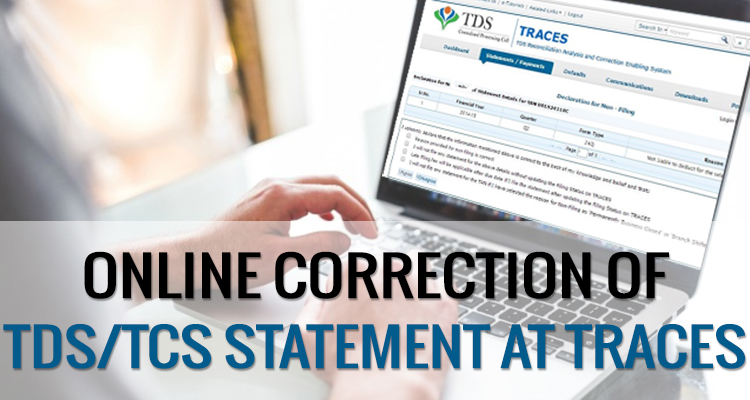
If Assessee has uploaded TDS return but there occur some mistakes while furnishing the TDS statement PAN is wrongly mentioned, short deduction of TDS amount, excess utilization of any challan etc. In that case, the assessee has to do online corrections in the TDS statement on “TRACES” (TDS Reconciliation Analysis and Correction Enabling System).
Steps for Online Corrections in TDS/TCS Statement
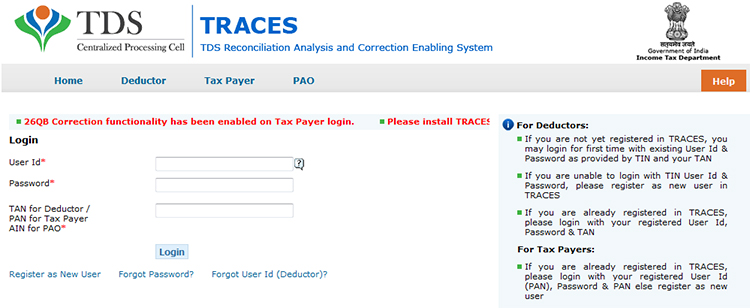
Step 1: Log in to TRACES website
Step 2: Go to “Request for correction” under “Defaults” by entering the relevant Quarter, Financial Year, Form Type, and Latest Accepted Token number. The correction category should be “Online”, and the request number will be generated
Step 3: The request will be available under “Track Correction Request” when the request status becomes “Available” Click on Available / In progress status to proceed with the correction and provide information of valid KYC
Step 4: Select the type of correction category from the drop-down as “Challan Correction”
Step 5: Make the required corrections in the selected file
Step 6: Click on “Submit for Processing” to submit your correction (Only available to admin user), and the request can be submitted via Digital signature of an Authorised person.
Step 7: A 15-digit token number will be generated and mailed to the registered e-mail ID
Online Corrections’ List of TDS/TCS
All types of corrections, like “Personal information, Deductee details and Challan correction” can be made using online correction functionality available from FY 2007-08 onwards, depending upon the type of correction.
| Type of Error or Defaults | Correction Type | Available from FY | DSC Required |
|---|---|---|---|
| If the challan is unmatched | Challan correction | FY 2007-08 Onwards | No |
| Add a new challan | Add a challan to the statement | FY 2007-08 Onwards | No |
| To clear the interest and late fee demand payment | Pay 220, interest, levy, late filing | FY 2007-08 Onwards | No |
| To move the deductee row | Request for overbooked challan (move the deductee row from the challan) | FY 2007-08 Onwards | No |
| To update PAN | PAN correction | FY 2007-08 Onwards | Yes |
| To add/modify the deductee row | Add/Modify deductee details | FY 2013-14 Onwards | Yes |
| To update personal details | Personal information | FY 2007-08 Onwards | Yes |
| To modify salary details | Add or delete salary details | FY 2013-14 Onwards | Yes |
Note: For the paper return, online correction cannot be done
Status of Online Correction Requests
- Requested: When the user submits a request for correction.
- Initiated: The request is being processed by TDS CPC
- Available: Request for correction is accepted, and the statement is made available for correction. The user can start correcting the statement. Clicking on the hyperlink will take the user to the validation screen. Once the user clicks on the request with ‘Available’ status, the status of the request/statement will change to ‘In Progress
- Failed: Request cannot be made available due to a technical error. The user can resubmit the request for the same details
- In Progress: The user is working on a statement. Clicking on the hyperlink will take the user to the validation screen
- Submitted to Admin User: Sub-user / Admin User has submitted a correction statement to Admin User
- Submitted to ITD: Admin User has submitted a correction statement to ITD for processing
- Processed: Statement has been processed by TDS CPC (either for Form 26AS or for defaults)
- Rejected: Statement has been rejected by TDS CPC after processing. Rejection reasons will be displayed in the ‘Remarks’ column.





I have filed revised TDS return for FY 2017-18-Quarter 3 on 30.01.18 through TDS traces as there was PAN error.But still the statement not processed.I want to download TDS Certificates.What to do?
Contact to department.
hi….i had filled my TDS return online through computax for third quarter of AY 2018-19 successfully on 13th Jan 2018….now it is been two weeks my data has still not been processed,,,, how do I download my TDS certificate….or how to get to know what error have I made…..
Regards
Contact to the department for assistance.
DEAR SIR, I HAD FILLED ALL DETAILS ON TRACES TDS WEBSITE TDS SALE ON PROPERTY BUT UNFORTUNATELY I FILED WRONG E-MAIL ID, RIGHT NOW I AM NOT ABLE TO CHANGE EMAIL, BECAUSE WITHOUT VERIFY EMAIL AND MOBILE NO. I CANT ENTER IN TRACES WEBSITE LOGIN
Please wait for 24 hours for your account to be deactivated and try again.Your registration process is valid only for 24 hours and you must activate your account within this time using the activation codes sent through Email and SMS.During registration, please ensure to verify your details on the Confirmation Screen (Step–5). In case of any incorrect details, click on ‘Edit’ to change your details.
I have filed four quarters of 26Q returns F.Y 2016-17 Sucessfully. Now we identified that one Vendor PAN Number is wrongly mentined in all the quarterly returns. Question: Is there any charges for Online PAN correction. (PAN Correction is morethan 3 Digits).
I have purchased a property in New Delhi, the registration for which was done on 8-Dec, 2017. The major part of the payment was done on the date of registration after sale deed was made. Since I have availed Bank Loan, the bank cheque along with the remaining payment from my end was handed over together to the seller (75 Lac – 85K (TDS amount)). Before issuing the bank cheque, the bank had asked me to deposit TDS and provide Form 26QB on the entire amount, I believe the same is required by the Sub-registrar for Sale of a property before Sale deed is registered. Since TDS filing system doesn’t allow TDS deduction for a future payment date, I had to enter a date in the past. I was suggested to use the date of “Agreement to Sell” (payment of 10 Lac) as the date of payment by the Bank official, which was 30-Oct. Now I have got a demand notification since the payment was made after the due date. I want to correct the Date of payment now to avoid this penalty but TRACES is not letting me do this. Please guide and help.
You cannot enter a past date for a payment which has to be made in future since the liability arises on payment only and interest thereon will be levied accordingly. Form 26qb can only be generated for the amount of payment made. You can make correction online only since the facility for correction is available online only
In the traces website, the Submit for processing button is not clickable, can you please guide the process to solve it.
Note – I have made all the requirements for the function to be used but no response has been still received.
Thanks in advance.
I want to add a challan at traces, but after going through the process the process is stopped at “SUBMITTED TO ADMIN”. On enquiring with Traces they replied that for this you have to do this from ADMIN level. In this connection, I am already change authorized person detail in Profile tab of traces, which is same as conso file. But I cannot get a solution to the said issue.
Please help me.
You have to submit it for processing. After that, it will be reflected in your conso file.
I don’t have any track of my token numbers for TDS returns I filled. I need to make some correction on the TDS return.. so can I do so without token numbers… with the help of DSC?
Correction statement cannot be filed without original token numbers.
Sir, whether we can delete a deductee details online/offline and how we can solve the below problem
T-FV-4297 Invalid tax deducted amount. Enter valid tax deducted amount
T-FV-4257 No value should be provided if the tax is not deducted.
you can make a request for the conso file and after importing the latest conso file you can make the required corrections.
e-tds return T-FV-4297 Invalid tax deducted amount. Enter valid tax deducted amount.
please expain this error
Sir, I got demand for late penalty u/s 234E Which I paid online. But when I am going to add Challan under Correction request/track correction request I can not see the challan. It is giving an error message that “no challan found”. I can see the challan on OLTAS website. Am I missing any further step? Please respond.
If your challan is not showing then you have to contact the department.
Respect you all.
I have an employee whose employment tenure was six months during the f.y 2016-17 ending on 30.09.2017 and he was transferred. TDS was deducted for those six months however while revising return which was duly filed on the due date, TDS actually so deducted was higher than that of what was supposed to be deducted and after incorporating deduction under chapter VIA and other income included.
I can’t revise return for this employee because TDS was actually deducted from the higher amount and there is no shortfall of TDS rather excess TDS.
How can I revise return for these employees?
Please help asap.
if TDS deducted was higher than that required to be deducted then the employee can claim the refund of the excess tax deducted while filing income tax return for that particular assessment year.
When I am doing TDS online correction and entering the token number, challan details and PAN details, it is saying that challan details entered is invalid.
Please contact on traces.
Hi, if i have late payment TDS challan with interest, how to show deductee wise interest amount against late payment tds challan in export excel sheet through your software in DEDP_DET Sheet.
Deductee wise interest is not required to be shown in TDS. Only interest payable and interest paid has to be filled while entering the challan details.
How to modify TDS challan for correction or revised TDS return for interest correction. There are showing error {Consolidated Statement ( Correction Not Allowed)}. You have to prepare New correction Statement for any correction.
I am doing online correction in Add/Modify Deductee details under All Deductees. After editing the field it is not getting saved i.e; save option is not working. Pls tell me the solution.
Thanks in advance
Please contact to department for assistance.
I am doing online correction in Add/Modify Deductee details under All Deductees. After editing the field it is not getting saved i.e; save option is not working. Pls tell me the solution.
I am doing online correction in Add/Modify Deductee details under All Deductees. After editing the field it is not getting saved i.e; save option is not working. Pls tell me the solution.
Thanks in advance
In the FY 2016-17, AY 2017-18 three FDRs with the SBI the 1st beneficiary is my wife and I am the 2nd beneficiary. The Bank has shown the accrued interest of the FDRs in respect of my wife to my Form 16A instead of the Form 16A of my wife. Consequently my income from other Sources-Bank Interest under 194A has been inflated by Rs.12800/-. The SBI advised me to consult their nominated CA who has uploaded the Quarterly Return. The CA told me that it would take time. If the CA of the Bank does not rectifies the mistakes by 31.07.2017 on behalf of the Bank , will it be possible for me to submit my IT Return online ignoring the excess interest shown in my FORM 16A. There will be mismatch between the interest figure between my figure
and that shown in the TRACES FORM 26AS . I am a Central Government pensioner and my pension is taxable. The pension and the interest are the only sources of my income. Kindly guide me.
how to modify PAN NO through online. I am giving all the details pertains to that Qtr, it is going to file correction after that I am unable to modify the same. Kindly help me out.
Dear Sir
I have tried to do online TDS correction for 26Q after DSC regd. for my a/c. All went well but Edit Deductee details is faded and available to correct the TDS amount for the party to match with challan paid, It is actually 1 rupee diff. Not sure how to correct it.
Dear Sir,
I have paid excess TDS in Q-3 of FY15-16 and adjusted the same amount in Q-4 of FY15-16. But the amount utilised against Q-3 challan is still showing as short payment in default status. In Q-4 return amount showing as Available Balance but not utilising the deductee of Q-4.
Kindly help me out.
Hi,
While filing correction statement, after giving PIN for DSC, I’m getting message “Please insert a smart card”. Pls get me a solution.
I have filed TDS Return for Q 3 FY 2016-17 online. Now, I noticed that One Challan details were not added in said TDS Return. Now, while uploading online request for correction whether I have to mention token number viz., 311690548 or RRR Number viz., 770000005795145. Pl. guide
You can use any of the two, either Token Number or RRR Number.
I HAVE MADE A CORRECTION IN ONLINE AND ADD 2 NEW CHALLANS , AND THE STATUS DENOTES “PROCESSED”. BUT I CAN NOT ADD DEDUCTEE DETAILS. WHAT I HAVE TO DO FOR ADD DEDUCTEE DETAILS PERTAINS TO NEWLY ADDED CHALLANS
THANKS
After adding challan on traces site, you have to request conso file and add the deductee details. After updating details upload the same on ITD portal with Digital Signature.
Is it not possible to do PAN correction online?
Is DSC registration necessary for PAN Correction or can it be done without DSC. If it can be done without DSC, how to proceed after submitting correction request?
DSC is not compulsory for PAN correction. You have an option either you can verify it with DSC and upload documents or you can send the form along with documents to TIN NSDL by post.
By what date one can take the details published in the TRACES as final.
After processing of return by TRACES one can take the details published in the TRACES as final
By what date tax deductors have to remit the TDS deducted from tax payer to Incomentax dept.?
Sir,
I am trying to rectify my challan thru oltas challan online rectification. I am able to put all details but when i submit , I am prompted by a message to change the minor head & major head though i only want to change the financial year . How can i only rectify the challans financial year?
Minor head and Major head is compulsory to select. Minor head means TDS paid by the taxpayer or major head mean TDS liability is raised by the ITD Department and that’s why TDS is paid by the taxpayer., (in Regular assessment)
This is Manoj Gidwani from Raipur, Yesterday I have filled form 281 related to TDS,[online] while submitting I was supposed to do 94A [for interest] , instead 96A had been submitted [96A – Income in respect of Units of non-residents]
How can I go further for necessary rectification, Kindly convey
Sir, from where you generated your challan? or had you paid this challan or still pending?
how to modify PAN NO through online. I am giving all the details pertains to that Qtr, it is going to file correction after that I am unable to modify the same. Kindly help me out.
how to modify PAN NO through online. I am giving all the details pertains to that Qtr, it is going to file correction after that I am unable to modify the same. Kindly help me out.
We are do correction FY 2014-15, through TRACES. When trying to submit through DSC it showing “PAN of Authorized / Responsible Person as per Personal Information of the correction and as per TRACES Profile should be same. Please update the PAN of Authorized / Responsible Person in the correction file.” Could you please help us in this regards.
The signing authority at the time of original return filling and at the time of correction should be same. And DSC will be related to the same person.
Respected all
Please help me with tds correction file upload which am not able to upload its shown this way
as “file is in invalid format”
Pls help me
File is not as per department XML schema, that’s it why error is showing. Kindly generate the file as per schema.
When i filed online correction on traces Status is shown submitted to ITD now what to do?
Sir, your case is transferred to Income Tax Department. Now you have to contact to department personally to resolve the case.
Just wait & see Sir
””””PAN of Authorised / Responsible Person as per Personal Information of the correction and as per TRACES Profile should be same. Please update the PAN of Authorised / Responsible Person in the correction file.”””’
What is the solution for that reason
Error showing may be due to wrong PAN is updated on TRACES or PAN is updated of previous Authorized person. So you have to update the PAN on TRACES site of Authorized/Responsible Person.
Dear Sag Infotech,
Please help me out regarding this problem bcoz its very urgent for me. I have took help from traces help desk but they told me that log a complaint against the error and I have done it but they will take the action within 15 Days.
Hi This is rakesh, I have add challan in correction but when i click on “Submit for Processing” then it shows that “PAN of authorized person and profile details to be match” and that challan went to “Submit to Admin User”. I am using DSC for it and no sub users for it. Can you please help me out about this.
sir, please check where the registered DSC and the DSC you are submitting for the same person as well as at the time of verification there is the same person who has sign authority.
Dear SAG INFOTECH,
I have checked that the registered DSC with current DSC and found it same, which will expired on 24/10/2018. I have done this same procedure for FY 2015-16 and it easily processed but for FY 2014-15 & 2013-14 I get this error while submitting challan to statement. the error is this “PAN of Authorised / Responsible Person as per Personal Information of the correction and as per TRACES Profile should be same. Please update the PAN of Authorised / Responsible Person in the correction file.” I have cancelled that challan and try to add it again but still it shows the same error.
In the correction screen you can change the Personal Details.
Pls update the PAN of authorised person there & Do Further Correction.
Getting error as “unable to submit the correction statement” for all quarters where online revision is required.
did any body found solution to “UNABLE TO SUBMIT CORRECTION STATEMENT”
when i contacted TRACES
they suggested me to follow some specifications like browser versions..
i totally fed up in trying all possible ways…
pls any body here help me..
how can i attach my screen shot here??
no paste / attachment options here:(
“unable to submit the correction statement in traces”
after getting of this in your traces, then don’t go through Google chrome and Mozilla fire fox
choose only “Internet explorer “
after completion of rectification process through online in traces for pan not available customers and submitted to ito then next day it shows the status as rejected as “The correction statement submitted is inconsistent. Kindly file the correction again”.
one day before it can do the rectification process in online and the same updated and next day i tried the remaining work but it shows the above error message.
kindly help us urgently.
Sir, You might have submitted the wrong file or any compulsory field could be missing that’s why the error is generated.
Hi Neetha
Sachin Varshney
I am also having same issue today since morning as DEIVARAJ have.
i.e.“UNABLE TO SUBMIT CORRECTION STATEMENT”. i am using web browser “Google Chrome”
Is this issue because of web browser??
Please help urgently
Might be web browser’s issue or department server was not working properly.
Hi Neetha
Deivaraj R
Am trying to do online correction in traces.
when I went for submit for processing, after
clicking on submit it is giving error
“UNABLE TO SUBMIT CORRECTION STATEMENT”
Pls help
Hi Neetha
A Madhavi.
Am trying to do online correction in traces.
when I went for submit for processing, after
clicking on submit it is giving error
“UNABLE TO SUBMIT CORRECTION STATEMENT”
Pls help
Hi,
Madhavi,
Please take a print screen & share with us, then we will provide solutions:-
I am also having the same problem since sep’16, Please let me know if you get any solution.
cajalajjain@outlook.in
mam might be there some issue in your correction statement or in internet connectivity. Consult with Traces.
Which type error show on screen please write here……….