


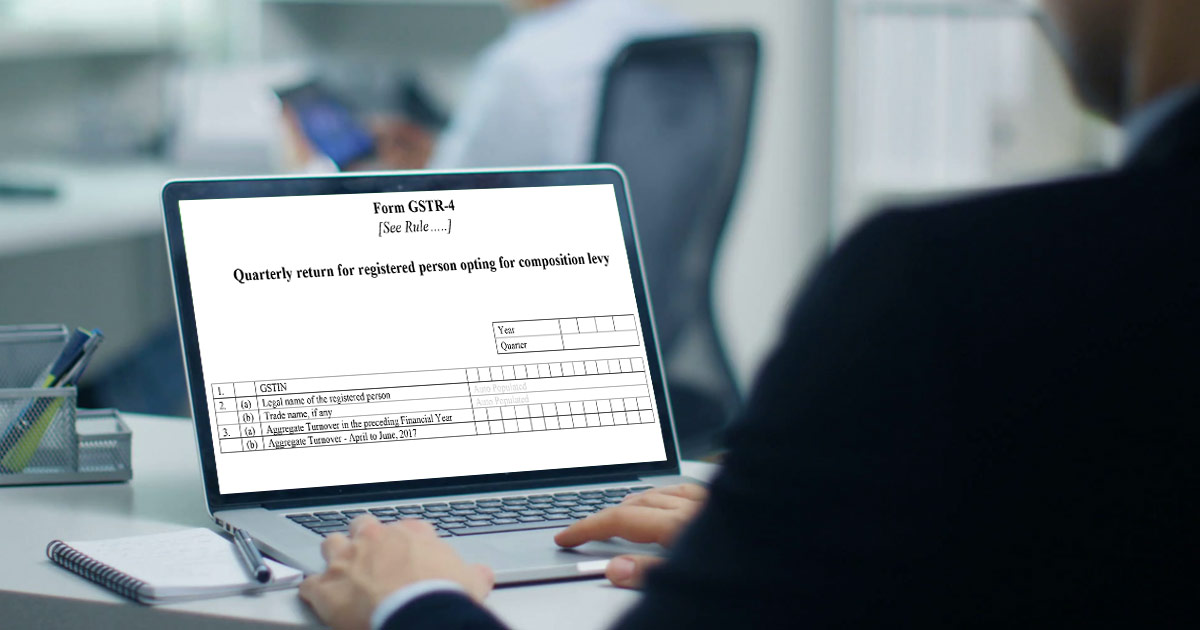
What is GSTR 4?
The GSTR-4 form is an annual return form for those taxpayers who have opted GST Composition scheme in the new indirect tax regime. Under the GST composition scheme, taxpayers will be required to file only one return in every financial year.
Also, the taxpayers will have to file CMP-08 for the payment in every quarter of the year. The due date for each CMP-08 filing is the 18th of every succeeding quarter. Read the CBIC notification.
- Who Should File GSTR 4
- GSTR 4 Form Due Date
- Interest on Late Payment
- GSTR 4 Important Terms
- GSTR 4 Updates on Council Meeting
- Simple Process to File GSTR 4
- GSTR 4 General Queries
- GSTR 4 Filing By Gen GST Software
Latest Update
- The 53rd GST Council updated the GSTR-4 due date from 30th April to 30th June for the FY 2024-25 onwards. View more
Free Demo of GSTR 4 Annual Return Filing Software
Major Points to File GSTR-4 (Annual Return)
- File button is enabled only if:
- No additional cash is required to be paid for liabilities
- You have clicked on the declaration checkbox
- You have selected authorised signatory details from the drop-down list
- The excess amount deposited through GST CMP-08, available in the negative liability statement will also get adjusted towards liabilities if any
- If the available balance in the electronic cash ledger is less than the amount required to offset the liabilities, you can directly create a challan by clicking on the ‘Create Challan‘ button.
- Tax and late fees are auto-drafted in Table-8 but interest is user input. Liabilities can be discharged only through an electronic cash ledger.
- The details of inward supplies (from Table 4B, 4C, and 4D for each tax rate) will be auto-drafted in Table 6 only after the Taxpayer has clicked on the ‘Proceed to file’ button. Before that, the balance will be displayed as ‘0’ (zero)
- Once you enter outward supply details in Table 6 and click the “Proceed to file” button, liability on the RCM basis is auto-populated from details entered in Tables 4B,4C, and 4D. Thereafter, Table 6 shows your total tax liability
- The details of outward supplies in Table 6 (Row 12-16) of GSTR-4 have to be entered manually by the taxpayer.
- The summary of self-assessed liability is auto-populated in Table-5 of the GSTR-4 Annual Return on the basis of filed Form CMP-08 & is non-editable.
- The tax amounts in Table-4 of GSTR-4 are auto-calculated on the basis of the values entered in the Taxable Value and Tax Rate fields. However, the tax amount is editable. The CESS is to be entered by the taxpayer.
- The aggregate turnover is required to be entered for the last year and if in case the business did nil transactions or turnover in the last FY or not registered it can put ‘0’ zero
- The annual GSTR 4 return filing will get activated once the taxpayer has finished filing of all the quarters of CMP-08 of the given financial year
Annual Return Form GSTR-4 Available on the GST Portal
The government has decided to let the taxpayers, assessees, and businesses file GSTR 4 on an annual basis. This has been done due to the demand of the community. The form is also available on the portal which has further relaxed the assess and taxpayers in finding and filing the form as per their convenience.
Salient Features of GSTR 4 Return Form
- GSTR 4 Returns will be filed on an annual basis for compounding Taxable persons. The last date for filing the GSTR-4 (CMP-08) payment form is the 18th of the month following the quarter. GSTR 4 (CMP-08) returns can be filed on 18th April, 18th July, 18th October, and 18th January and so forth
- GSTR-4 Form is filed by all the taxpayers who registered under the composition scheme
- Business entities registered under the composition scheme will be required to pay taxes at fixed rates quarterly without availing of the input tax credit facility
- The taxpayer will be required to show the total value of supplies made in a specific period and tax paid at the composition rate
- The taxpayer will be required to insert invoice-level purchase details for the purchases from normal taxpayers, which will be automatically updated GSTR 4A Form from the supply invoice uploaded by the opposite party in GSTR 1
Who Should File GSTR 4 Form
All the composite registered taxpayers are required to file the tax return.
GSTR 4 Annual Filing Due Dates
| Period | Due Date |
|---|---|
| Annual Return FY 2026-27 | 30th June 2027 |
| Annual Return FY 2025-26 | 30th June 2026 |
GSTR 4 Interest on Late Payment
GST Council clearly stated in the acts that if a person has not paid the taxes before the due dates, then the GST Council has strict rules and regulations to accommodate it with an 18 % interest rate per year. The interest rate is applied to the number of days the taxpayer missed out.
If we take the illustration of it, a person missed out on the due date of yesterday, then the taxpayer has to pay 1000*18/100*1/365 = Rs. 0.49 for one day and the calculation varies on payable tax and the total missed out days.
In case if a taxpayer does not file his/her return within the due dates mentioned above, he shall have to pay a late fee of Rs. 50/day i.e. Rs. 25 per day in each CGST and SGST (in case of any tax liability) and Rs. 20/day i.e. Rs. 10/- day in each CGST and SGST (in case of Nil tax liability) subject to a maximum of Rs. 5000/-, from the due date to the date when the returns are actually filed.
GST CMP 08 is a quarterly return form that must be filed by the composition taxpayers after the end of each quarter. The due date for filing the GST CMP 08 return online is the 18th of the month after a particular quarter. GSTR 4 is an annual return form, for which the due date is 30th April after a particular financial year.
Important Terms Frequently Used in GSTR 4
- GSTIN – Goods and Services Taxpayer Identification Number
- UIN – Unique Identification Number
- UQC – Unit Quantity Code
- HSN – Harmonised System of Nomenclature
- SAC – Services Accounting Code
- POS – Place of Supply of Goods and Services
- B2B – From one registered person to another registered person
- B2C – From registered person to unregistered person
HSN: Harmonised System of Nomenclature (HSN code is filled in case of the supply of goods)
- A taxpayer will be required to provide the aggregate turnover of the immediately preceding financial year and the first quarter of the current financial year.
- The taxpayer will be required to furnish all the information only in the first year and it will be automatically updated in the succeeding years.
Let us Understand the Step-by-Step Guide Filing Procedure of GSTR 4
GSTR 4 return form is divided into 13 sections but it is not necessary to fill all these sections. Some of the details of sections in GSTR 4 form are given below:-
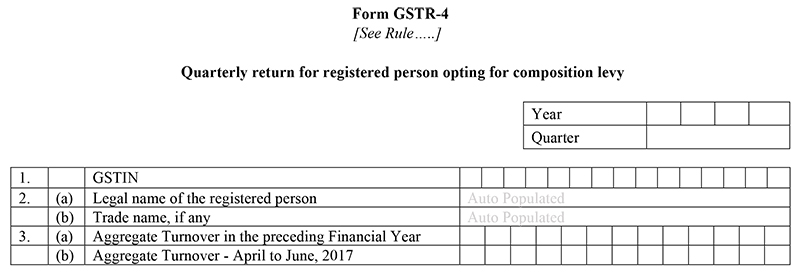
Part 1 to Part 3 – General Information
- GSTIN:- Every Taxpayer gets a state-wise PAN-based 15-digit Goods and Services Taxpayer Identification Number (GSTIN) from the Government. It must be noted that the identification of the taxpayer will be automatically filled in at the time of filing the return in the coming future
- Legal Name of the Registered Person and Trade name (if any):- The taxpayer’s name will automatically fill the time of filing the returns at the GSTN portal
- Annual Turnover in the preceding Financial Year:- A taxpayer will be required to fill in all the information only for the first time of filing and after then it will be automatically updated in the succeeding years
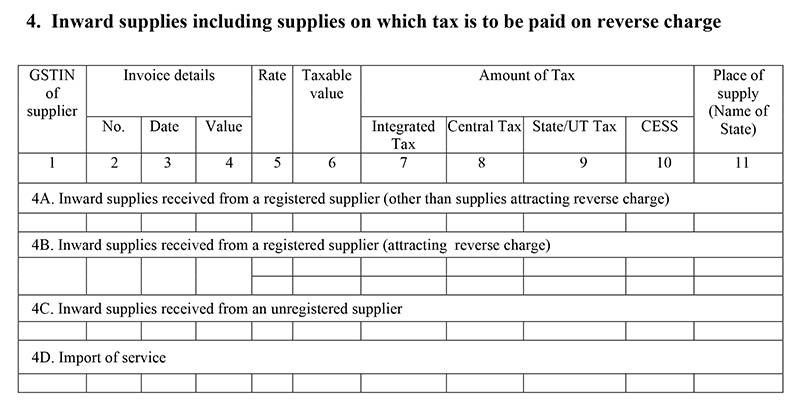
Part 4 – Inward supplies, including supplies on which tax is to be paid on a reverse charge
- Inward supplies received from a registered supplier (other than supplies attracting reverse charge), the information will be auto-populated from the provided by the supplier in GSTR-1 and GSTR-5. Inward supplies received from a registered supplier (attracting reverse charge- this information will be automatically filled from the information provided by the supplier in GSTR-1, inward supplies received from an unregistered supplier and Import of service. It must be noted that all inward supplies to the composition will be auto-filled here
Note: FinMin tweeted that the composition taxpayers can leave the purchase invoice details in table number 4, part 4A.
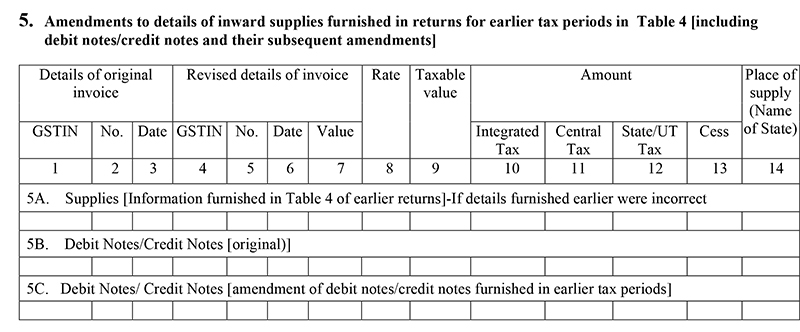
Part 5 – Amendments to details of inward supplies furnished in returns for earlier tax periods in Table 4 [including debit notes/credit notes and their subsequent amendments]
- It will include amendment information mentioned in earlier tax periods and also original amended debit or credit notes received, rate-wise. The place of supply is to be mentioned in case the same is different from the location of the recipient. While providing the information of the original debit /credit note, the details of the invoice must be provided in starting three columns, whereas, providing the revision of the details of the original debit /credit note shall be provided in the first three columns of this Table
Part 6 – Tax on outward supplies made (Net of advance and goods returned)
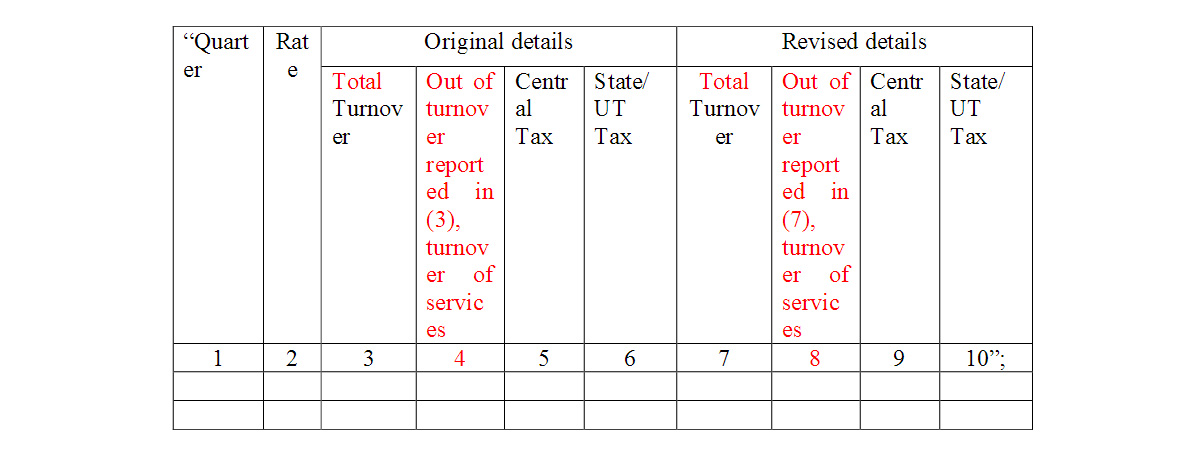
- Under this section, you will provide the details of a tax rate, total turnover, out-of-turnover reported and the composition tax amount including both central tax & State/UT tax.

Part 7 – Amendments to Outward Supply details furnished in returns for earlier tax periods in Table No. 6
- Under this section, you will be able to rectify the incorrect details you provided in Table 6 in previous returns, without turnover reported details additionally added.
Note:
- In the GST council meeting, the authorities decided to revise the GSTR 4 filing form with some inclusion of terms in clauses 6 & 7. The revised columns have been added to the final form and are mentioned in red text.
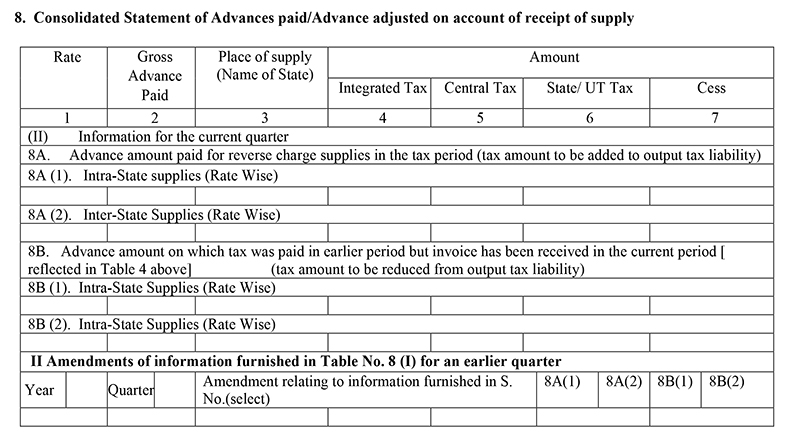
Part 8 – Consolidated Statement of Advances paid/Advance adjusted on account of receipt of supply.
- Under this, details of the advance paid relating to reverse charge supplies and if you paid taxes on them, adjustments against invoices issued to be mentioned in Table 8
Part 9 – TDS Credit received
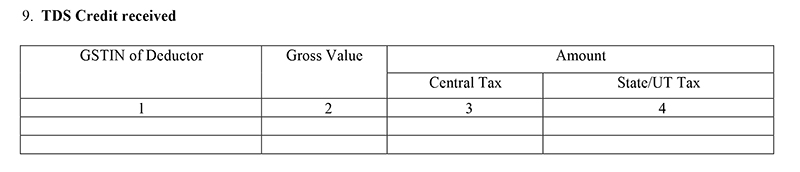
- TDS (Tax Deduct at Source will be auto-filled in Table 9
Part 10 – Tax payable and paid
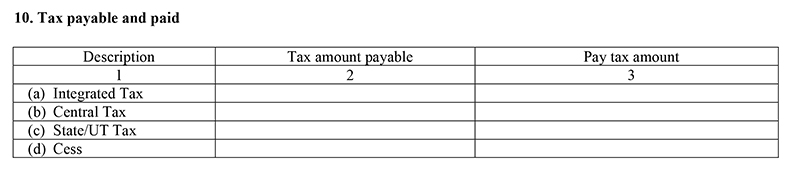
- Under this section, you will be to provide the details of Integrated Tax, Central Tax, State/UT Tax, and cess tax amount payable as well tax amount paid
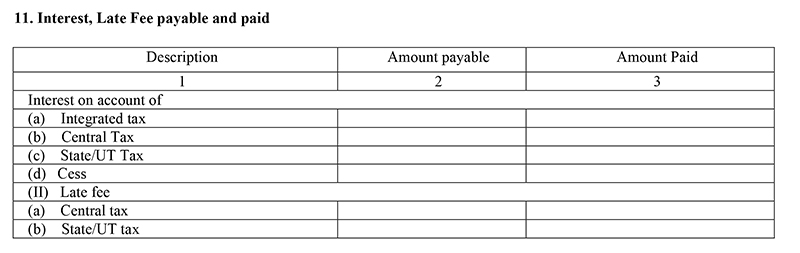
Part 11 – Interest, Late Fee payable and paid
- This section is for those taxpayers who have not paid their taxes timely
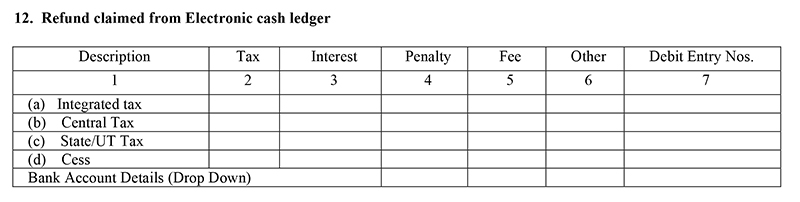
Part 12 – Refund claimed from Electronic cash ledger
- If in case the tax liability of the composition dealer is below the TDS deducted, he can get a refund of the balancing amount. The amount which is available for the refund will be auto-filled under this section
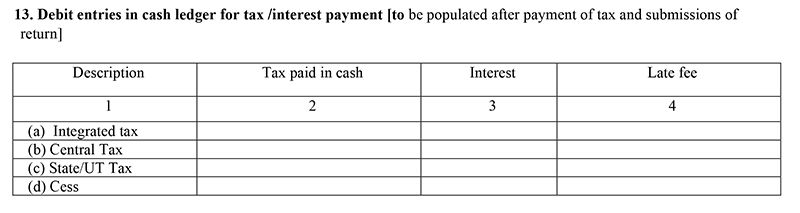
Part 13 – Debit entries in cash ledger for tax /interest payment [to be populated after payment of tax and submissions of return]
GSTR 4 Return Filing General Queries
Q.1 – Who needs to file GSTR 4?
All the assessees who have opted for the composition scheme under the GST Act 2017, are required to file their annual returns in form GSTR 4:
- Who has opted for composition scheme during registration but not opted since registration
- Who have opted for the scheme e before the start of the financial year
- Who have opted for the scheme during the year
Q.2 – What is the last date of filing form GSTR 4?
All the assessees must file the returns under form GSTR 4 till the 30th of the succeeding month after the end of the financial year. The government may extend the date.
Q.3 – Is filing required if my registration cancelled or I opted out of the scheme during a financial year?
Yes, you are required to file the annual returns under form GSTR 4 for the financial year even if your registration is cancelled or you opted out of the scheme.
Q.4 – What are the conditions to file form GSTR 4?
The assessee should be registered under the GST Act 2017 and should have opted for composition scheme. The assessee should also file quarterly returns under form CMP 08. If you do not file quarterly returns under form CMP 08, then you can not file GSTR 4.
Q.5 – Who can file NIL returns in form GSTR 4?
Any assessee can file NIUL return in GSTR 4 if:
- NOT made any outward supply
- NOT received any goods/services
- Have NO other liability to report
- Have filed all Form CMP-08 as Nil
- There is no late fee to be paid for Form GSTR-4
Q.6 – Where can I file GSTR 4?
Visit the GST portal then:
- Login
- Services
- Return
- Annual Returns
- File the return
Q.7 – What are the tables in form GSTR 4?
Form GSTR 4has the following tables:
- 4A. Inward supplies from the registered supplier (other than reverse charge): To add details of inward supplies received from a registered supplier (other than reverse charge)
- 4B. Inward supplies from the registered supplier (reverse charge): To add details of inward supplies received from a registered supplier (reverse charge)
- 4C. Inward supplies from unregistered supplier: To add details of inward supplies received from an unregistered supplier
- 4D. Import of Service: To add details of import of service
- 5. Summary of CMP-08: To view auto-drafted details provided in filed Form CMP-08 for the financial year
- 6. Tax rate wise inward and outward supplies: To enter tax rate wise details of outward supplies/ inward supplies attracting reverse charge during the financial year
- 7. TDS/TCS credit received: To view details related to TDS/TCS credit received
Q.8 – Does the amount in tax fields auto-populate based on values entered in taxable value field?
Yes, the amount in tax fields gets auto-populated based on values entered in taxable value field but the CESS field is not.
Q.9 – How can I add values in Outward supplies details in table 6?
Any assessee can add values in outward supplies manually, as they are not auto-filled like the inward supplies.
Q.10 – How to download the summary of Form GSTR 4?
You can download the summary of GSTR 4 by visiting the GST portal and:
- Services
- Returns
- Annual Return
- Form GSTR-4 (PREPARE ONLINE)
- DOWNLOAD GSTR-4 SUMMARY (PDF)/ DOWNLOAD GSTR-4 (EXCEL)
Q.11 – Can I file the returns after the due date without paying late fees?
No, you can not file the returns post the last date without paying the late fees. Although, the government may forgive the late fees.
Q.12 – Where can I find tax, late fee and interest for my return?
Tax, interest and late fees can be found in table 8, as tax and late fee are auto-drafted, while the Interest is user input.
Q.13 – How to offset the liabilities?
Any assessee can offset the liabilities after deducting the amount already paid on form CMP 08 by paying through electronic cash ledger. If the amount in the ledger is less then that required to offset, then you can make a part payment and create a challan for the rest or you can offset through the excess amount paid in CMP 08 if any.
Q.14 – What should I do if I receive a warning message of processing or processed with error?
If the warning is of under processing then wait for the processing to complete and if the waring is of processed with an error then go back to GSTR 4 and rectify the error.
Q.15 – When does file GSTR 4 button enables?
File button gets enabled only if you have-
- No ‘Additional cash (which) is required’ to pay for late fees, if any
- Clicked on declaration checkbox and have selected authorized signatory details from the drop-down list
Q.16 – Can I file GSTR 4 through an offline tool?
There is an offline tool present for GSTR 4 form but filing return for GSTR 4 can only be done online through the GST portal.
Q.17 – How many modes are there to sign form GSTR 4?
You can file form GSTR 4 through a DSC or EVC.
- Digital Signature Certificate (DSC)- DSC is an electronic certificate that proves an individual’s identity. You can generate a DSC from the certifying authorities. http://www.cca.gov.in/cca/?q=licensed_ca.html.
- Electronic Verification Code (EVC)- EVC can authenticate the identity of the assessee through an OTP sent to the mobile number registered under GST.
Q.18 – Can I preview form GSTR 4 before filing?
Yes you can preview form GSTR 4 before filing in PDF and Excel format by clicking on ‘DOWNLOAD GSTR-4 (PDF)’ and ‘DOWNLOAD GSTR-4 (EXCEL)’ button on the portal.
Q.19 – Can I revise form GSTR 4 after filing?
No, you can not revise form GSTR 4 post-filing.
Q.20 – What happen after the successful filing of Form GSTR 4?
After the successful filing of form GSTR 4:
- ARN is generated
- The assessee is intimidated through SMS and email
- Electronic Cash Ledger gets updated
Start GSTR 4 Return Filing by Gen GST Software
Disclaimer:- "All the information given is from credible and authentic resources and has been published after moderation. Any change in detail or information other than fact must be considered a human error. The blog we write is to provide updated information. You can raise any query on matters related to blog content. Also, note that we don’t provide any type of consultancy so we are sorry for being unable to reply to consultancy queries. Also, we do mention that our replies are solely on a practical basis and we advise you to cross verify with professional authorities for a fact check."








I am a composition dealer. I do billing manually. For filing of the GSTR 4 form, should I make excel sheet of purchase bills quarterly? Should I have to check for purchase bills those are not automatically entered.? What should I do for bills not filed or missing against my purchases? Should I have to calculate purchases based on various tax rates. I sell all 6 tax slabs 0,3,5,,12,18,28?
I am asking since the dates are extended to nov 15 but still the GST. The utility hasn’t opened. Why should the concerned authority make us do in haste at the deadline and also a heavy fine of 100 or 200 per day?
Tks
yes, you need to maintain bill wise purchase details of purchases for GSTR-4.
This is call Gabbar Singh Tax.
When will the offline utility be available for GSTR 4 as the due date of return filing is nearby?
Contact to the department.
awesome portal, sufficient info is being shared, thanks for your efforts, all my Q. are answered.
Is there any offline tool for GSTR 4 provided by government?
Offline utility for GSTR 4 is still to be provided by the department.
Yes Govt. has provided the excel offline tool
Hi,
I am GST Composition scheme tax payer, my application is approved but till now I am not received any revised certificate from the department.
What can I do for next step? Please suggest me
You can download your application in user services option under services option under view my submission.