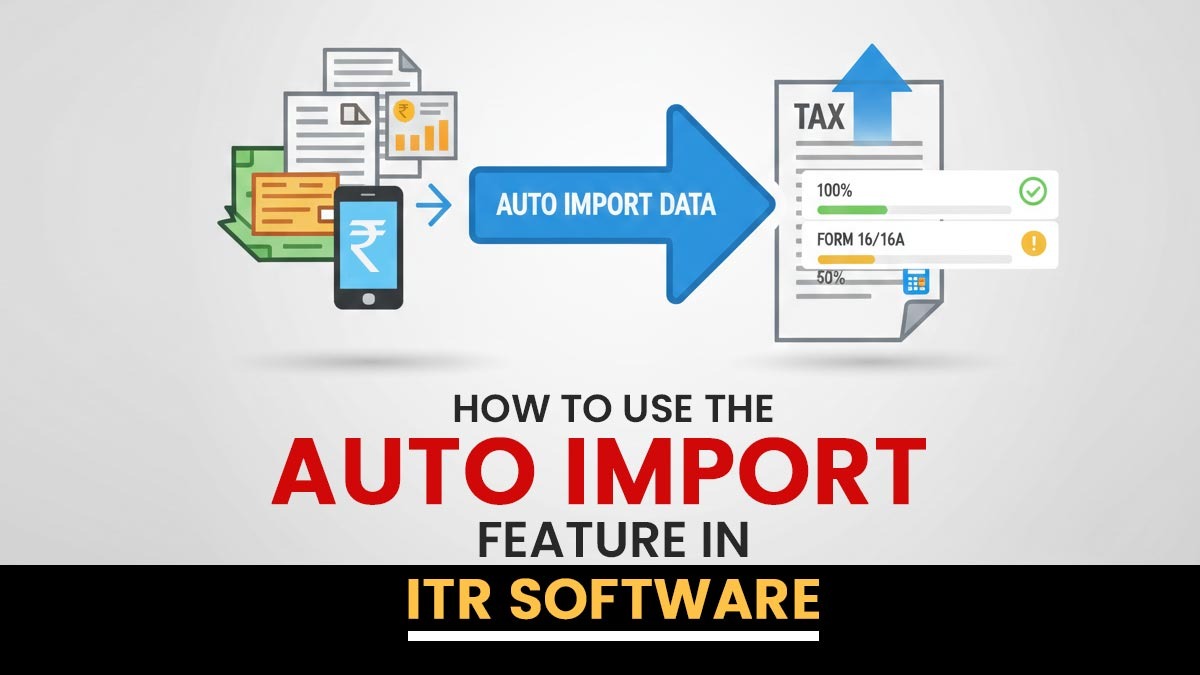
The tax filing in today’s taxation environment is very different from the earlier days of using spreadsheets and manually entering data. It is difficult to keep track of everything when information comes from multiple sources, such as banks, employers, investment accounts, and government websites.
Here, income tax return filing software makes the process easier for taxpayers. The software automatically organises your financial data from various sources. It is directed that you can submit your taxes appropriately, streamlining everything and making tax season less stressful.
Automated Software-Generated ITR XML Import
Apart from JSON, XML files are used normally to file the tax returns and share data. Various advanced tax software permits users to import XML files. The same can-
- Get the income tax return data produced by other systems
- Make modifications to returns that have already been filed
- Edit and submit updated info
The Software can read the XML file format and transform it into a format that you can edit. The feature is supportive in making rectifications, reevaluating past tax returns, and transferring data between different software platforms.
Import Pre-Filled JSON and Filled ITR Data
The Income Tax Department delivers pre-filled JSON files that consist of information about the taxpayer, such as income, TDS credits, personal information, and bank details. Instead of entering this data manually, the IT software authorises users to import pre-filled JSON files directly.
After it gets uploaded, the system automatically-
- Removes individual and income details
- Maps tax credits into appropriate schedules
- Updates tax deduction sections
- Specifies insufficient or irregular entries
Likewise, the ITR data submitted earlier can be imported for revision or modification. The same prevents duplication of effort and confirms consistency with official records.
Master File Import from Other XML Files
Tax professionals working with multiple clients must keep client data appropriately. Software makes it simpler by enabling the import of client data from other files. The same signifies that you can-
- Finally, add details like tax identification numbers and addresses
- Carry over past compliance documents
- Move your clients’ details from one system to another
- Transition smoothly from various tax software
The above-mentioned feature shall ensure that everything works seamlessly and saves much time by removing the need to enter data manually, particularly when upgrading the software or revising systems.
AIS, TIS & Form 26AS Data Import
Government-issued statements like-
- AIS (Annual Information Statement)
- TIS (Tax Information Statement)
- Form 26AS
The same delivers crucial financial details, such as Tax Deducted at Source (TDS), Tax Collected at Source (TCS), interest earnings, securities transactions, and other significant financial activities.
ITR filing software streamlines it to import financial data from multiple sources, such as AIS (Annual Information Statement), TIS (Tax Information Summary), and Form 26AS. All such can be imported in different formats, such as text documents, Excel spreadsheets, or compressed ZIP files.
Also Read: How to Use ITR Filing Software to Resolve AIS/TIS Issues
After the information is imported, the software performs supportive things:
- Automatically extracts data on any tax credits
- It contains the income in the right categories
- It confirms the data against the records in Form 26AS
- It catches differences
The same feature of checking and matching data reduces the possibility of mistakes or reporting errors, ensuring that everything is precise.
Capital Gain Data Import and Automated Computation
Capital gains calculation is intricated, which consists of purchase dates, sale values, cost of acquisition, and indexation. ITR software facilitates the same procedure via structured Excel import utilities.
Users can import capital gain transaction information, after which the system:
- Categorises short-term and long-term gains
- Applies indexation where applicable
- Calculates tax liability automatically
- Maps results directly to ITR schedules
It eradicates the manual calculation errors and confirms precise compliance with tax norms.
Bulk Upload and E-Filing of ITRs
The efficiency of the professionals in managing various taxpayers during the filing season is important. Advanced ITR software helps-
- Bulk upload of multiple returns
- Batch validation before submission
- Simultaneous e-filing of ITRs
- Automated acknowledgement tracking
Rather than filing each return individually, bulk upload operations save time and decrease the administrative workload.
Reporting System for Efficient Management
The same furnishes a complete reporting dashboard. Users, after importing data and return preparation, can generate-
- Taxpayer list and detailed summaries
- Reports of pending returns
- Filed return tracking reports
- Tax liability overviews
- Compliance status dashboards
Such reports assist professionals in tracking due dates, handling workflow, and furnishing effective client support.
Facilitate ITR E-Filing Integration
The auto-import operationality integrates with electronic filing features. The software, on successful import and validation of data, can generate government-compliant JSON or XML files that are ready for upload.
Incorporated validation tools check for the following:
- Missing schedules
- Wrong PAN or Aadhaar details
- Discrepancies in bank account information
- Incomplete tax payments
The same validation procedure streamlines the submission experience and reduces the risk of getting wrong return notices.
Intelligent Validation and Error Reduction
Built-in validation is one of the main benefits of auto import functionality. Since data flows into the system, the software-
- Verifies income with tax credits
- Identifies mismatches between AIS and Form 26AS
- Shows missing or inconsistent entries
- Performs automatic tax computation checks
The same eliminates human error and improves filing accuracy.
Advanced Document Management Systems
Efficient tax filing relies on organised documentation. Integrated document management systems permit users to:
- Store AIS, TIS, 26AS Form and supporting documents digitally
- Attach capital gain statements to specific taxpayers
- Recover files immediately during scrutiny or audits
- Supports structured records for future reference
Documentation with digital storage and quick retrieval becomes facilitated and secure.
Closure: The auto-imported feature has transformed income tax compliance by superseding the manual procedures with intelligent automation. ITR software, from importing pre-filled JSON and XML files to handling AIS, TIS, and Form 26AS data, ensures easier integration of financial data.
The multiple specifications, such as master file import, capital gain automation, bulk upload and e-filing, comprehensive reporting, and advanced document management systems, form an integrated compliance ecosystem.
Adopting advanced ITR software for taxpayers and professionals alike signifies quicker preparation, enhanced precision, better data management, and stress-free tax filing. Auto import functionality makes tax filing efficient and reliable where compliance deadlines are strict and data volumes are much higher.